
VB.NET 2005 Tutorials: Simple Data Binding
In Section 1 of Data Binding you will learn about definition of Data Binding Bindable Entities, The Architecture of Data Binding, Bind Data to the User Interface and Simple Data Binding
Data Binding
The process of binding a control to a data source is called data binding. Visual Studio 2005 includes several new features to assist in developing applications that access data. The Data Source Configuration Wizard simplifies connecting the application to data in databases, Web services, and user-created objects. The new Data Sources window provides a centralized view of the data available to the project, and it reduces the complexity of data binding by allowing the user drag items from the window onto forms to create data-bound controls. Filling datasets, running queries, and executing stored procedures can be accomplished using the new Visual Studio-generated TableAdapter object. The new local data feature allows the user include Microsoft SQL Express and Microsoft Access database files, directly in to the application.
Windows Forms can take advantage of two types of data binding: simple binding and complex binding. Each offers different advantages. We will look at them a little later in this lesson.
Bindable Entities:
Binding data to form controls allows the user access data from databases as well as data in other structures, such as arrays and collections which support IList interface. The data providers for other objects in .NET Frameworkare listed below:
-
Array or collection that implement IList interface.
. -
ADO .NET objects
-
DataColumn object. The users can simple-bind a control (such as a TextBox control’s Text property) to a column within a data table.
. -
DataTable object. The user can complex-bind a control to the information contained in a data table (such as binding the DataGrid control to a data table) using the default view of the DataTable.
. -
DataView object. The users can simple- or complex-bind to the data within a data view. However this provides a fixed snapshot of the data.
. -
DataSet object. The users can simple- or complex-bind to the data within a dataset using the default view.
. -
DataView Manager Object. It functions like DataView, with a difference that this snapshot comes with relationships that exists between the tables as seen in a DataSet.
-
The Architecture of Data Binding
-
Create Connection Object. The connection that the users create, forms the basis for all other activities. In doing so the user creates a connect string and also a connection object that provides connection to the database.
. -
Create DataSet and DataAdapter. Then the user proceeds to set the Data Binding property of the text box. At this stage the Visual Studio creates a DataSet and a DataAdaptor. The “Select … “ statement for creating the DataSet is also autogenerated based on the selections the user has made in the Data Source configuration wizard.
. -
Call the fill method of the DataAdapter to fill the dataset. This also adds a line of code that fills the dataset using the data adapter and the connection object . At the end of it all the data from the selected data source is available for the control when the form loads.
Having said all that, let us now see how simple binding and complex binding of data to controls is accomplished.
Bind Data to the User Interface
Simple Data Binding
Simple data binding is the ability of a control to bind to a single data element–such as a value in a column in a dataset table. This is the type of binding typical for controls typically display a single value such as a System.Windows.Forms.TextBox control or System.Windows.Forms.Label control. In fact, any property on a control can be bound to a field in a database. Let us create a sample to understand the concept better.
1. Create a new Windows Application project in Visual Basic 2005 IDE .
2. Press Ctrl + Alt + S to open the Data Explorer if it is not seen docked to the top left hand side corner of the window. The screenshot below shows the Database Explorer.
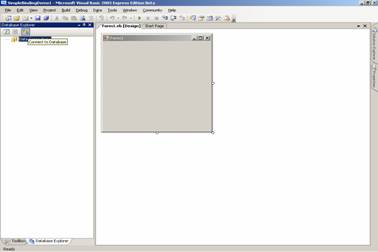
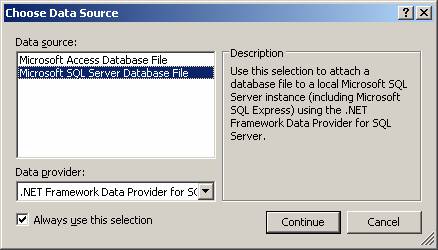
3. Click on the “Connect to Database” icon on the left window pane, to open the dialog box. Choose option Database. In the dialog box “Choose Data Source”, select Microsoft SQL Server Database File and click continue as shown below:
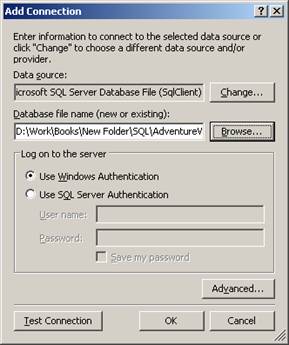
4. The “Add Connection” dialog box opens. Click on the Browse button to choose the Database file. Now click on “Test Connection”. The user will get a message box saying “Connection Successful”. Click on OK to add the database.
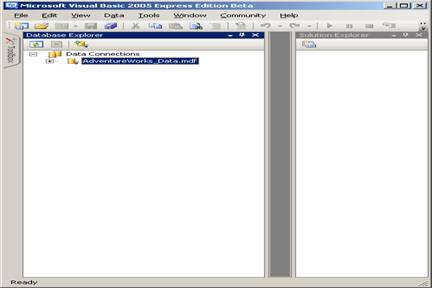
5. The user will see a new connection added in the database explorer:
6. Add a TextBox to the form and also a button which we will use for closing the application. The window will look like the screenshot shown below:
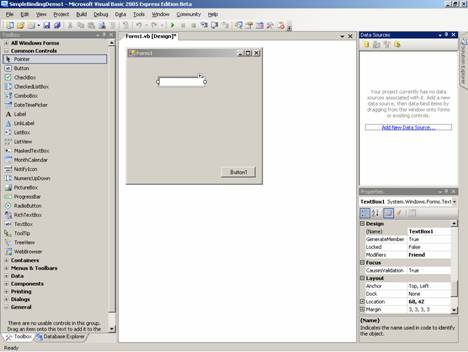
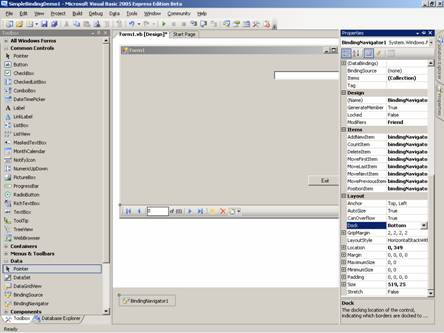
7. Add a BindingNavigator from the toolbox to the
form. In the property window set the value for property ‘Dock as Bottom’. Set
the Text property of the Button1 to Exit. Add the following code to the click
event of the button.
Me.Close()
The window will look like the screenshot shown below:
{mospagebreak}
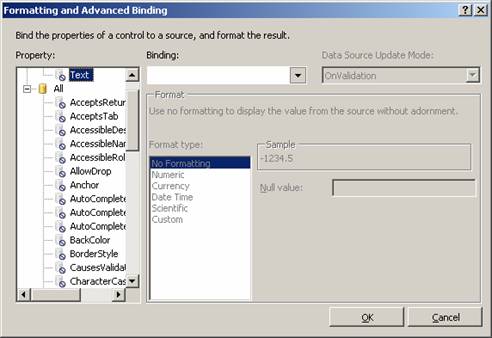
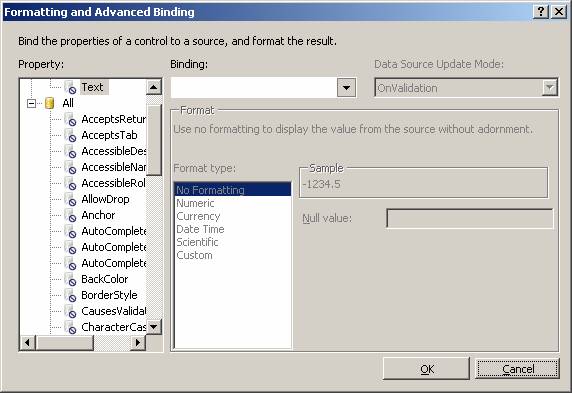
8. Now click on the TextBox and in the property sheet for the TextBox, Click on the more button on the (Advanced) DataBinding property, it will open a DialogBox “Formatting and Advance Binding”. The first screen will look some thing like the following screenshot:
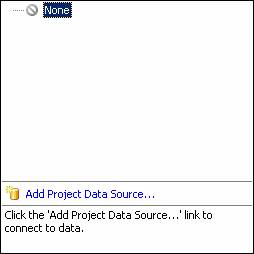
9. Click on the ComboBox of the Binding. It will pop open a smart tag. Click on the Add Project Data Source.
10. The previous activity will open up the Data Source Configuration Wizard. The user will be prompted to Choose a Data Source type as shown below. Choose the option database and click next.
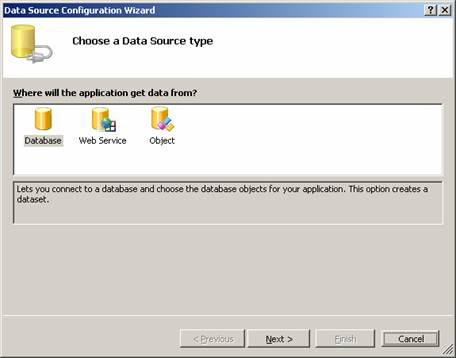
11. This will open the next screen which will prompt for the database connection. Obviously no connection will be available. Click the button new which will pop up the screen as shown below:
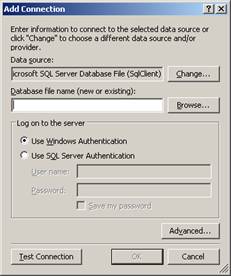
12. In the above screen click on the button Browse and choose the SQLServer Datafile. The wizard will look like the screenshot seen below:
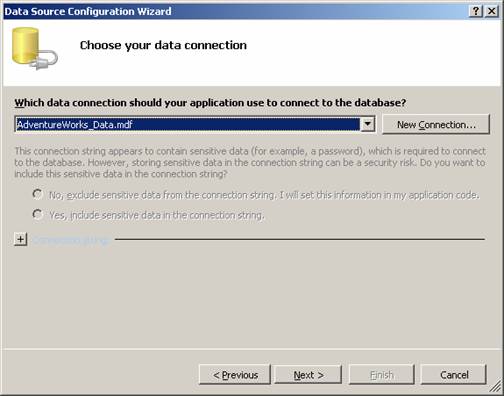
13. When next is clicked the user will be prompted with a message box which will look like the following screenshot. Choose Yes to proceed.

14. The next screen of the Wizard appears. Choose the default options and click next to continue. Depending on the speed of the computer and the size of the database file this step will take substantial time.
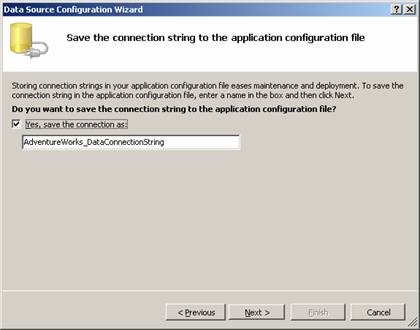
{mospagebreak}
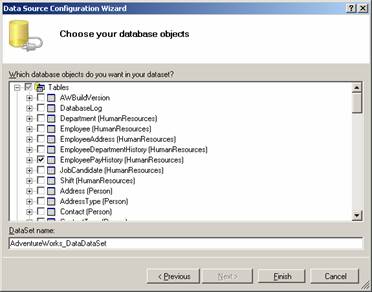
15. When the user clicks the next button in the above screen, he will be immediately shown with the next screen of the wizard which shows all the Tables, Stored procedures, functions, Views, and Functions in a tree control. The user will have to choose a table or multiple tables from which he may want to extract data. He will then have to click on Next to continue.
16. Next the user will have to click on the Advanced Binding property of the TextBox to open up the Formatting and Advanced Binding. The screen below will appear.
17. The user will have to click on the ComboBox Binding in the displayed form to see a smart tag. Clicking on any column will close the smart tag automatically.
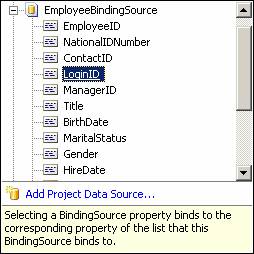
18. Click on the appropriate column of the table shown in the smart tag. The next screen will appear as under:
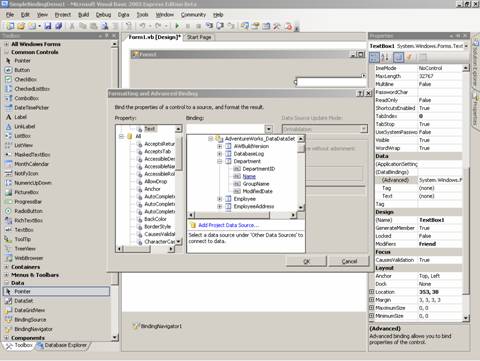
19. Note that the Text property of the TextBox is bound to column Name of Department table. The user will see the floating window titled “Data sources”. He must click on any of the DataSet and drag the DataSet and drop it on the form. This process will create a DataGrid like structure on the screen. However, multiple values of the TextBox will be bound just to a single display control. As a next step, the user needs to add some kind of control for the navigation.
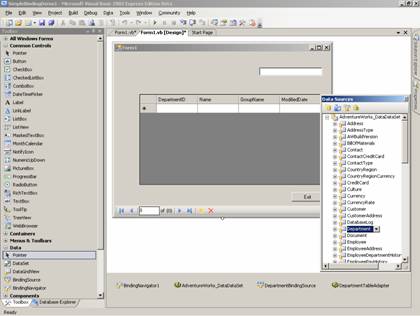
20. Add Binding Navigator to set the Data source of the control to the same data Source as that of the text box. Now press F5 to execute the program. The user will see that the data is bound and displayed in the text box. The BindingNavigator will also help the user to navigate through the data.
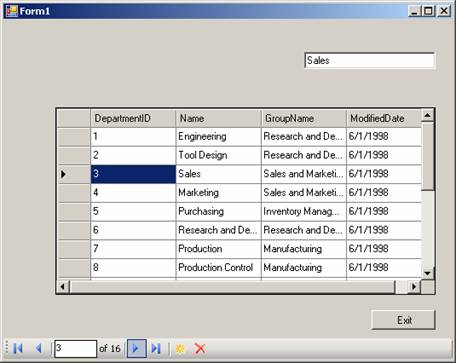
21. Simple-bound controls show only a single data element, therefore, it is very better to include navigation logic in a Windows Form with simple-bound controls
[catlist id=175].