
In this tutorial you will learn about Using Web Reference – Adding a Web reference:, To create an ASP.NET Web application, Adding a Web Reference, Testing a Web Service, Accessing the XML Web Service and To access the XML Web service
VB.NET 2005 Tutorials : Web Reference, ASP.NET Web Application and XML Web Service
Using Web Reference
A Web reference is a generated proxy class that locally represents the exposed functionality of an XML web service. The proxy class defines methods that represent the actual methods exposed by an XML web service. When the client application creates an instance of the proxy class, it is capable of calling the XML Web service methods as if the XML Web service were a locally available component. The programming language the proxy class is generated, is dependent upon the programming language of the active project to which the Web reference is added. However if you created a proxy using the tool wsdl.exe, you have the option to provide the program language.
At design time, the added reference enables the developer use the statement completion in the code editor using the IntelliSense. The actual implementation of the methods in the proxy class is comprised of code to package and send SOAP request message and to receive and un package any returned SOAP response message.
At run time, a call to a method of the proxy object is processed and encoded as a SOAP request message if the SOAP protocol is supported. If the XML Web service does not support SOAP, the proxy uses HTTP POST or HTTP GET. This message is then sent to the actual Web Service for processing.
Adding a Web reference:
a. In solution Explorer, choose the project that will consume the web service
b. Right click on the project to bring the context menu.
c. Choose Add Web Reference in the menu, to open the dialog box.
d. Select the link in the Web browser pane on the left to search for web services installedon your local machine, or available on servers within the intranet or available from the providers of commercial Web services listed in the UDDI Business Directory.
e. Select a Web service from the services listed in the web browser pane on the left. The path to the selected Web services appears in the URL field. You may have to make additional setting if you are behind a fire wall.
f. Check for the security.
g. Enter a name of choice, which will be used in your code to access the selected Web service, in the Web Reference name field.
h. Now click on the Add reference button to add reference name.
i. Check the Webreference folder in the solution explorer for the namespace for the Web reference classes that are available to the items in your project.
j. Now your web reference is ready to use.
Testing a Web Service
If the name of the temperature conversion XML Web service was changed after creation substitute the appropriate names where the TempConvert1 name appears throughout this walkthrough.
To create an ASP.NET Web application
1. On the File menu, choose New Web Site.
2. In the New Web Site dialog box, select the ASP.NET Web Site icon.
3. Enter the address of the Web server on which you will develop the Web application in this case I have chosen http://vbdotnet/client .By default, the project uses your local machine, http://localhost.
4. Click OK to create the project.
5. In Solution Explorer, right-click Default.aspx and choose View Designer to open the designer.
6. From the Web Forms tab of the Toolbox, drag a Text Box, five Labels, and a Button to the design surface of Default.aspx and arrange them to your liking.
7. Right-click the button you added, Button1, and click Properties on the shortcut menu. In the Properties window, set the Text property to Convert.
8. Right-click the label you added, Label1, and click Properties on the shortcut menu. In the Properties window, clear the Text property to make this a blank label.
Adding a Web Reference
1. On the Website menu, choose Add Web Reference. Visual Studio downloads the service description and generates a proxy class to interface between your application and the XML Web service.
2. In the URL box of the Add Web Reference dialog box, type the URL to obtain the service description of the XML Web service you want to access, such as http://vbdotnet/Service.asmx. Then click the Go button to retrieve information about the XML Web service.
Accessing the XML Web Service
Once a reference for the XML Web service is added to the project, the next step is to create an instance of the XML Web service’s proxy class. The user can then access the methods of the XML Web service in the same manner that he accesses any object’s methods by calling methods in the proxy class. When the application calls these methods, the proxy class code generated by Visual Studio handles the communications between the application and the XML Web service. a. First, we will create an instance of the XML Web service’s proxy class.
b. Next, we will take a value, provided in TextBox1, and make a call to the XML Web service’s ConvertTemperature method using the proxy class.
c. Then we will display the value returned from the XML Web service.
To access the XML Web service
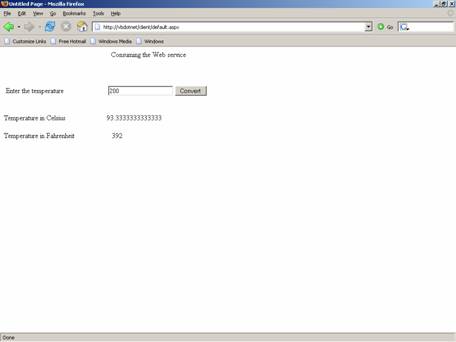
1. Double-click the Convert button on WebForm1.aspx to create an event-handling method for this button and to display the code-behind file. Partial Class Default_aspx Inherits System.Web.UI.Page Protected Sub Button1_Click(ByVal sender As Object, ByVal e As System.EventArgs) Handles Button1.Click Dim wsConvert As New vbdotnet.Service() Dim temperature As Double Try temperature = Convert.ToDouble(TextBox1.Text) Label2.Text = _ wsConvert.FahrenheitToCelsius(temperature).ToString() Label5.Text = _ wsConvert.CelsiusToFahrenheit(temperature).ToString() Catch End Try End Sub End Class The name of the XML Web service class generated when adding a Web reference may differ from the one shown above as Service. Now open the site http://vbdotnet/client/default.aspx in a browser. The site in the browser looks like the graphic shown below: A value can be entered in the text box. This value is passed to the two methods defined in the web service. The value is considered as Fahrenheit and changed to Celsius by one method and vice versa in the other method. Now enter a value 200 in the text box and find the result: In this lesson we have covered all aspects of using Web services in the .NET framework. We have learnt how to create and deploy a web service. In the next lesson we shall look at some of the aspects of testing and debugging a Web application.
2. Enter the following code:
3. Select Default.aspx in Solution Explorer.
4. On the Website menu, click Set as Start Page.
5. Save the solution.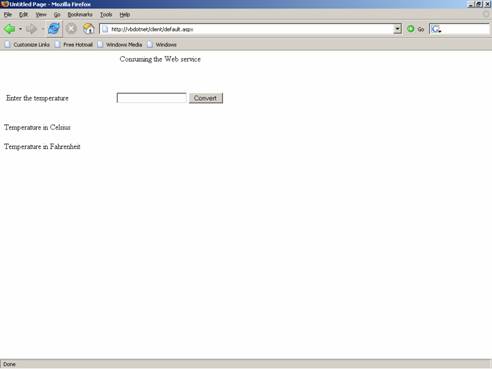
[catlist id=175].