
This article discusses about the differences between Bluetooth and 802.11b Wireless LANs, Co-existence of Bluetooth & Wi-Fi and Advantages & Disadvantages.
1) Bluetooth has lower distance range (less than 30 feet) than 802.11b (up to 200 feet). Therefore, you would need many more access points to cover the same area of an office. Simple mathematics will show that you may need as many as 20-50 times the number of access points
2) Bluetooth has generally lower speed than that of 802.11b wireless LANs.
3) Bluetooth components (chips and radios) and device adapters are cheaper than wireless LAN components and adapters.
4) Bluetooth chips have lower power consumption – less drain on battery.
5) Bluetooth is more appropriate and affordable technology for communication between smart phones and other accessories or between PDAs and information kiosks.
6) Bluetooth is younger technology, and therefore is less mature. However, it has a huge following. Purely because of the potential and future expectation built by the Bluetooth vendors, there were over 2000 vendors signed up as members of Bluetooth forum. There is a good developers following as well. Wireless LAN industry is smaller but more mature.
7) It is not fair to run comparisons between Bluetooth and WLAN regarding the number of chips being shipped or expected to be shipped for either technology. Because of its price and the type of products where it is going into, Bluetooth will soon surpass 802.11 chip shipments but dollar volume might still be smaller for some time. Ultimately, Bluetooth dollar volume is expected to catch up.
8) Bluetooth will go beyond cable replacement in short distances between handheld devices and handheld devices and a kiosk or local server. It will meet the needs of connecting devices at the edge node of a network.
9) Bluetooth and wireless LANs address different wireless connectivity requirements. Therefore, the two technologies need not and should not compete with each other. If Bluetooth community would not get offended, 802.11b is the big brother and Bluetooth is the younger brother.
|
IEEE 802.11b & 802.11a
|
Bluetooth
|
|
| Time Table | Standard in 1998, Products in 2000 | Standard in 2000, products in 2001 and 2002 |
| Frequency Band and bandwidth |
IEEE 802.11b – 2.4 GHz IEEE 802.11a – 5GHHz IEEE 802.11g – 2.4 |
2.4 GHz |
| Speed | 11 Mbps- 54 Mbps (Effective speed – half of rated speed) | 1-2 Mbps (Effective speed – less than 50% rated speed) |
| Modulation Technique |
Spread Spectrum OFDM |
|
| Distance Coverage |
Up to 300 feet – 802.11b Up to 60 ft – 802.11a |
Up to 30 feet now – efforts to increase coverage and speed |
| Number of access points required |
every 200 feet – 802.11b Every 50 feet – 802.11a |
Every 30 feet – 25 to 30 times number of Bluetooth access points; |
| Maturity | More matured products | Less matured but progressing fast |
| Market Penetration | Quite widespread | Just starting in 2002 |
| Interference with other devices | 2.4 GHz band is polluted – significant interference here | 2.4 GHz band is polluted – significant interference here |
| Interoperability | Current problems expected to be resolved in future | Problems now but expect resolution soon |
| Cost | Much more expensive than Bluetooth | Cost incremental in PDAs and phones – $50; However Bluetooth chips @ <$5 now |
| Vendors | Proxim, 3COM, Symbol, Cisco | Mostly chip vendors supplying to device manufacturers. |
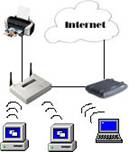
An 802.11b wireless network adapter can operate on two modes, Ad-Hoc or Infrastructure. In infrastructure mode all your traffic passes through a wireless access point and can be thought of as a wired network without cables. This is commonly setup to allow resources such as printers and files to be shared. The image below demonstrates such a setup.
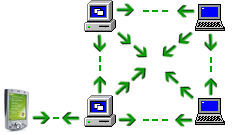
In Ad-Hoc mode, the computers or mobile devices talk to each other directly and do not needs an access point. This type of structure can support up to 8 devices connected to each other and is useful when we want to setup a wireless connection quickly or when we have a few computers in our network. The image below demonstrates a typical ad-hoc network.
{mospagebreak}
Co-existence of Bluetooth & Wi-Fi
Wi-Fi (Wireless Fidelity) is really for when cabling is not a feasible option and Bluetooth is for intercommunication between devices without the need for a PC. Several vendors (Intersil, Silicon Wave and Mobilian) are building chips that will support both technologies in the same card. This will enable each of the two technologies to be used for what they are best suited to do. Chip set provider Intersil and Bluetooth radio maker Silicon Wave announced reference design that allows simultaneous operation of two protocols. Both operate in the same band. The vendors seem to be addressing interference issues between the two technologies. Blue802 technology uses a time-slicing technique in which two protocols switch back and forth fast enough to give the appearance of simultaneous operation.
Advantages & Disadvantages
Merits:
- Interoperability
- Scalability
- Inexpensive
- Voice/data compatible
- Allows for the formation of an Ad-hoc network
- Low power consumption
- Universal link
- Secure data and safe transmission
Demerits:
- Short Range
- Low data rate
- RF Band is shared
Bluetooth’s advantage over Infrared (IrDA – Infrared Data Association) is its ability to connect 1-to-many devices rather than 1-to-1. Infrared requires a direct line of sight in order to operate and has a range of approximately one meter. Bluetooth developers have said they did not intend to create an alternative to IrDA but so many companies are now replacing the devices IrDA slot with Bluetooth.
I hope you liked my series of articles on Bluetooth technolgy. In the next article we will learn about "How the Bluetooth technology works" .
About the Author: Nupur Mittal is doing 3rd Year, B.E., Computer Science & Engg. Ghurdhauri, India. This is the first article on the BlueTooth Technology and the others will be published shortly. Please use the comments section to thank Nupur for the wonderful article series.
[catlist id=180].