
ASP.NET Managing Membership and Roles
In this tutorial you will learn about Anonymous Users, Managing Membership and Roles, The Programming Interface – Properties and Methods, Setting up the Membership, The Membership Provider, The ProviderBase Class, The MembershipProviderBase Class, Managing Roles, The Role Class and The Role Provider.
Anonymous Users
Before actually moving into the topic of creating roles and managing users, we need to talk on how to deal with Anonymous users ASP.NET 2.0. The Beta version provides a new feature that assigns an identity to the anonymous users. The authentication and authorization process of the application is not impacted. It merely gives a handle to track this user and assign personalization properties to him.
The Anonymous User’s ID is stored in a Cookie, but the membership system does not treat him as logged in. If the user’s browser does not accept cookies, the identification cannot be embedded in the URL requested class. This ID is generated by the HTTP module and the properties of the cookie are determined by the configuration settings.
< anonymous identification enabled= “true|False” / >
The Module fires two events—Create and Remove which are used for creating and removing the anonymous user. The name of the user can be retrieved using the User object from the HTTP context. The user name is returned by the context.
String name=HttpContext.Current.User.Identity.Name;
The Logoff button would be a plain submit button or the developer could use the Login view control and other controls to enhance user experience.
If the anonymous user later registers and logs in, he is treated as a regular authenticated user and his personalization properties are migrated to his identity in the application.
Managing Membership and Roles
This is an aspect of a web based application that demanded a lot of coding skills and thinking through by the developer. He had also to do a lot of repetitive hard coding to ensure that memberships and roles are properly defined and the administrator has the right tools to administer these roles. This has been made extremely simple by ASP.NET 2.0. The new Membership class of ASP.NET 2.0 reduces the amount of code to be written considerably and provides the infrastructure for managing roles. The user authentication can be completed by calling the ValidateUser function to do the task. All the developer needs to do is to ensure that he has obtained the right data provider and has rightly configured the users’ data store.
The membership class is a neat and elegant API that masks the backend functionalities and processes from the developer. It contains a few static methods that can be used to obtain unique identity for each connected user. This information can be used with other services such as role based function enabling and personalization.
The membership class also provides methods for update, create and delete users but no methods for programmatically setting roles and giving rights to users. It works on top of the data provider –even custom defined ones. Multiple providers can also be used and the application must be set to select the right one at runtime.
{mospagebreak}
The Programming Interface
The Properties: A number of classes and interfaces have been defined in the membership class to encapsulate the logic for creating and managing users and for authenticating users on the basis of credentials input. The ApplicationName property gets and sets an optional string to identify the application. Defaults to the application’s metabase path. The EnablePasswordReset property returns true if the provider supports password reset. EnablePasswordRetrieval returns true if the provider supports password retrieval. Provider returns the instance of the currently configured provider. Providers returns the collection of all registered providers. RequiresQuestionAndAnswer returns true if the provider requires a password question/answer when retrieving or resetting the password. UserIsOnlineTimeWindow specifies the time window in minutes, during which the user is considered to be online.
The Methods:
A number of methods have also been made available in the Membership class which can be manipulated and customized by the developer. The CreateUser method creates a new user and fails if the user already exists. It returns a MembershipUser object that represents any information about the user. DeleteUser, deletes the user corresponding to the specified name. FindUsersByEmail returns a collection of membership users whose email address corresponds to the specified email. FindUsersByName as the name suggests finds the users corresponding to the name specified. GeneratePassword generates the random password of the specified path.
GetAllUsers returns a collection of all users. GetNumberOfUsersOnline returns the number of users currently online. GetUser retrieves the membership data of the user specified. GetUserNameByEmail obtains the user name that corresponds to the specified email if email is a unique identifier in the database. UpdateUser takes a MembershipUser object and updates information stored for the user. ValidateUser authenticates a user using supplied credentials. The UsersOnlineTimeWindow has a default value of 15 minutes. If the user has performed any activity in that 15 minutes he is considered online, else he is treated as offline by the applicaton.
Setting up the Membership
The membership API relies on a data store. The membership model supports a variety of storage media as long as the membership data provider exists. ASP.NET has two built in membership providers—one for the Access database and the other for the SQL server database. The membership database can be set up using the Web Application Administration Tool in Visual Studio 2005.
In the Login application we created navigate to the Website menu option and click on ASP.NET Configuration. Click on the security tab.
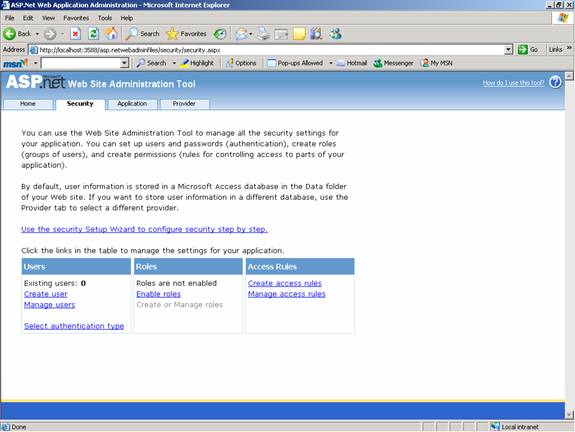
The wizard allows the developer create the membership database. This is Microsoft Access by default and users and roles can be added to it.
The Membership Provider
The membership provider model is extensible and extremely compact. Any database can be integrated with the Membership API by creating a custom provider for it. For instance if an Oracle database is to be linked with the Membership API the developer has to create a class that inherits from the MembershipProvider class, which in turn inherits from the Provider class. The code would read something like this:
public class OracleMembershipProvider:MembershipProvider
{
//implements all abstract members of the class and if needed defines //the custom functionality.
……
}
The Web.config file will also have to be tweaked to recognize this provider by specifying in the
< providers > section the name of the provider. Now the API is ready to instantiate the class and use it through the implemented interfaces.
{mospagebreak}
The ProviderBase Class
The ProviderBase class has only one method—Initialize method and one Property Name. This method takes the name of the provider and a name/value collection object is packed with the content of the provider’s configuration section. It initializes the internal state with the values read out of the Web.config file.
The MembershipProviderBase Class
Many of the properties of the MembershipProvider class are implemented by calling a corresponding method or property in the MembershipProviderBase class. All these methods are abstract virtual methods and must be overridden or must be inherited by the MembershipProvider class.
ChangePassword, ChangePasswordQuestionAndAnswer, CreateUser, DeleteUser, FindUsersByEmail, FindUsersByName, GetAllUsers, GetNumberOfUsersOnline, GetPassword, GetUser, GetUserNameByEmail, ResetPassword, UpdateUser and ValidateUser are some of the methods available in the MembershipProviderBase Class. The functionalities exposed by these methods are indicated in the names of the methods themselves. Additonally certain properties are exposed by the MembershipProviderBase class. ApplicationName, EnablePasswordReset, EnablePasswordretrieval, RequiresQuestionAndAnswer are the properties that can be set by the developer. Additional information is also stored with the user by the Provider.
A custom class can be developed from MembershipUser to add users and return an instance of the class using the GetUser method of the membership API. Custom membership providers also can add new users and new custom members.
The Providers collection is the key property for authentication of users with dynamically selected providers. Multiple providers can be supported and different providers can be used for different users.
As mentioned earlier in this tutorial ASP.NET 2.0 comes with its own built in providers—AccessMembershipProvider and SqlMembershipProvider.
The SqlMembershipProvider provides access to all the SQL Server syntax including stored procedures. Multiple applications can use the same database or each application can be set to manage its own database.
All configuration information about the Membership provider is stored in the
Managing Roles
Applications need to restrict different users to different sections and prevent all users from performing all activities. Authorization is nothing but the process of assigning rights to users. ASP.NET regards roles as a plain string that refers a logical role to the user. Each user can be assigned multiple roles. This information is attached to the identity object and the application code checks authorization the moment the user is successfully authenticated.
The Role manager feature of ASP.NET maintains the relationship between users and their roles or the roles can be defined programmatically by the developer. The easiest method of configuring roles is the Web Application Administration tool. Let us assign roles using the tool.
1. Navigate to Website menu option
2. Click on ASP.NET configuration
3. Click on Security tab and then on Create Roles and enter the names of the roles to be created.
4. In this instance the User Role and the Admin Role has been created.
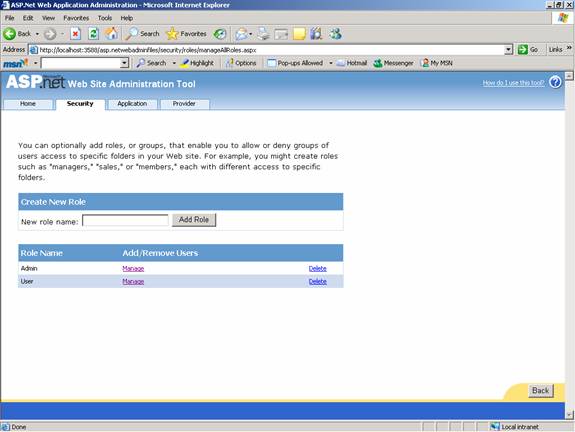
5. Now the rights of the roles can be configured. At runtime the logged in information about the user becomes available by user object.
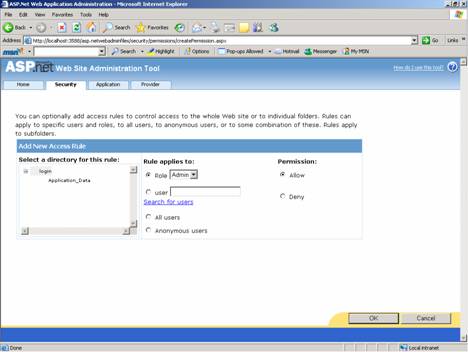
6. The Admin is assigned all roles while the user role is denied some roles.
The Role Class
An instance of the Role class is created when the Role management is enabled.. An instance of the Role class is added to the current Httpcontext object. The roles class has an number of methods. AddUserToRole adds an arrary of users to a role.
AddUsersToRoles adds an array of users to multiple rows.
AddUserToRole adds one user to the role.
AddUserToRoles adds an user to multiple roles.
CreateRole create a new role.
DeleteCookie deletes the cookie that the role manager used to cache all the role data.
DeleteRole deletes the role.
FindUsersInRole returns a string array with the names of users in a role. The username matches a specified name.
GetAllRoles returns all the available roles.
GetRolesForUser gets the role assigned for a specified user.
GetUsersInRole returns a string array listing the users that belong to a particular role. RemoveUsersFromRole removes user from role.
RemoveUserFromRole removes a user from the role assigned.
RemoveUsersFromRole removes multiple users from a role.
RemoveUsersFromRole removes multiple users from a role.
RoleExists returns true if the specified role exists.
{mospagebreak}
Most of the methods of the Role class are directed towards querying for user roles. The role information is stored in an encrypted format in a cookie sometimes. When this happens ASP.NET checks for the cookie and decrypts the role ticket and attaches the role information to the User object. The cookie is valid only for the duration of the request for the current user. Other user information, if requested is read from the data store using configured role provider.
Cookie support can be enabled if the cacheRolesInCookie attribute is set to true in the Web.config file. It must be remembered that the Role class is really a string that represents and enables administration by its name. There is no direct relationship between the role class and membership management. The users are also administered as a string.
The Role Provider
Another feature of the Role assignment tools in ASP.NET is the Role Provider. The RoleProvider inherits from the RoleProvider class and the schema is not very different from the membership provider. Many of the methods used are similar the membership provider class in name and functionality.
ASP.NET comes with two built in providers AccessRoleProvider and SqlRoleProvider.
The Membership API and the Role Management API have really made the life of the web application developer easy. The API built around the concept of a provider, exposes a suite of methods that are not tied to physical data store. This is particularly useful in personalization. The interfaces also make the type of data store irrelevant because any kind of data store can be accessed through the provider.
[catlist id=179].