
In this C++ tutorial, you will learn about standard input stream and standard output stream explained along with syntax and examples.
It is C++ programming language uses the concept of streams to perform input and output operations using the keyboard and to display information on the monitor of the computer.
What is a Stream?
A stream is the source or destination of a series of data, either characters, or in the case of binary files, a sequence of bytes that represent memory content. The standard input and output stream objects of C++ are declared in the header file iostream.
Standard Input Stream
Generally, the device used for input is the keyboard. For inputting, the keyword cin is used, which is an object. The operator of extraction, >>, is used on the standard input stream, in this case: cin stream. Syntax for using the standard input stream is cin followed by the operator >> followed by the variable that stores the data extracted from the stream.
For example:
int prog;
cin >> prog;
In the example above, the variable prog is declared as an integer type variable. The next statement is the cin statement. The cin statement waits for input from the user"s keyboard that is then stored in the integer variable prog.
The input stream cin is waiting for the user to input a value,before proceeding for processing or storing the value. This duration is dependent on the user pressing the RETURN key on the keyboard. It is also possible to request input for more than one variable in a single input stream statement. A single cin statement is as follows:
cin >> x >> y;
is the same as:
cin >> x;
cin >> y;
In both of the above cases, two values are input by the user, one value for the variable x and another value for the variable y.
// This is a sample program//This is a comment Statement//For using MS VS2005 and later, iostream requires the addition of a namespace//instead of <iostream.h>, just like in the following example#include <iostream> //Header File Inclusion Statementusing namespace std;
void main()
{int sample, example;
cin >> sample;
cin >> example;
}
This produces the following output:
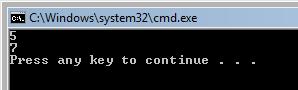
If a programmer wants to write comments in C++ program, the comments should follow after a pair of slashes denoted by //. All the characters after the // are ignored by C++ compiler and the programmer can choose to comment after the //.
In the above example, two integer variables are input with values. The programmer can produce input of any data type. It is also possible to input strings in C++ program using cin. This is performed using the same procedures. The vital point to note is cin stops when it encounters a blank space. When using a cin, it is possible to produce only one word. If a user wants to input a sentence, then the above approach would be tiresome. For this purpose, there is a function in C++ called getline.
{mospagebreak}Standard Output Stream
A By default, the device used for output is the screen of the computer. For outputting values the keyword cout is used, which is an object. The insertion operator << is used on the standard output cout stream. The syntax for using the standard output stream is cout followed by the operator << followed by the value to be inserted or output by the insertion operator.
For example:
int prog;
cin >> prog;
cout << prog;
In the above example, the variable prog is declared as an integer type variable. The next statement is the cin statement that waits for input from the user"s keyboard. This information is then stored in the integer variable prog. The value of prog is displayed on the screen by the standard output stream cout. It is also possible to display a sentence as follows:
cout << "Training given by Exforsys ";
The above gives output as:
Training given by Exforsys
If a programmer chooses to use constant strings of characters, they must be enclosed between double quotes " " .
In this situation, it is important to note the difference between the two statements below:
cout << "exforsys";
cout << exforsys;
In the above, the first statement displays on the screen as exforsys. The second statement outputs the value of the variable exforsys. As previously explained, the extraction operator >> can be used more than once in a single cin statement. Similarly, it is possible to use the insertion operator << more than once in a cout statement.
In this situation, it is important to note the difference between the two statements below:
For example:
cout << "Exforsys " << "gives" << " excellent training";
This produces output on the screen as:
Exforsys gives excellent training
The above concept is mainly used if the programmer chooses to print string constants followed by variables.
In this next example, the programmer chooses to display a combination of string constants and variables.
For example:
int a=50;
cout << "Exforsys has given " << a << " numbers of trainings";
This produces the output as:
Exforsys has given 50 numbers of trainings
Below is one more example:
cout << "Exforsys";
cout << "Training";
The above produces output as:
Exforsys Training
An important point to note from the above example is cout does not give a line break unless specified. If the programmer chooses to display output in a new line, it must be explicitly specified in cout by using the n which denotes newline character.
For example:
cout << "Exforsysn";
cout << "Training";
gives output as
Exforsys
Training
There is also another way for specifying newline that is by using endl manipulator (end line).
For example:
cout << "Exforsys" << endl;
cout << "Training";
gives output as
Exforsys
Training
Example to demonstrate the use of input and output streams
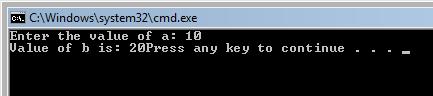
// Example to demonstrate the use of Input and Output streams#include <iostream>using namespace std;
void main()
{int a,b;
cout << "Enter the value of a: ";
cin >> a;
b=a+10;
cout << "Value of b is: " << b;
}
This produces the following output:
[catlist id=165].