
The DrillThrough operations are extremely useful when the user wants to look at the underlying causes for some abnormally high or low outputs in specific fields. For example, let us say a store is doing extremely well and the sales in that store is showing increase in a particular month. The Administrator would like to examine the reasons for this high sales figure and find out if there is any specific reason why this store is doing extremely well when compared to other stores in the region. He will then look at details of the sales in the particular store. Let us say that the sales in this store became abnormally high during the month of July—specifically–the sale of umbrellas. On deeper examination it was found that the sale was at a peak during the last fortnight of July. Then the Administrator could discover that during this period there was an unusual spell of rains and hence the increase in the sale of umbrellas. He would then conclude that the sale was a seasonal one and not to be examined further. However, if the increase in sales happened due to the extraordinary efforts or campaigns undertaken by the store, he would definitely like to study it and take action to replicate the campaign in the other stores and for other months if possible.
Nevertheless, it must be noted that he data in the Data warehouse goes through a process of Extraction, Transformation and loading. Pre-aggregations of data and summarization of data takes place before the data is ready for use in fact tables. The cubes are constructed using the fact tables and dimensions in the database. Therefore, the data that is actually available for Drill through in the Data warehouse is the data that has been pre aggregated, transformed or summarized in different ways. The data that is displayed at drillthrough is actually the data in the fact table. Though this makes for speed and accuracy of presentation, it loses out on the depth of detail that is available in the Online Transaction Processing (OLTP) database. Analysis of the kind illustrated above may not always be possible with the data available in the fact tables.
Drillthrough operations also require that the Client supports the Drillthrough operations. Clients such as the Cube Browser or applications that use COM interface of SQL Server 2000 Analysis Services libraries will be able to Drillthrough to the raw data from the OLAP cube to which they are connected.
The table rows have to be evaluated to the calculated value of the selected cube cell if the drillthrough result set is to be derived. For instance if a selected cube is a three dimensional cube and the intersection of the dimensions puts the values 1998 and Mexico into the cell and is sliced by All Customers and the measure used is Sales, the resulting data set from a drillthrough would be generated only if the fact table rows relate to both 1998 and Mexico–the time dimension table rows store 1998; the Location dimension table rows must store Mexico and all rows of the Customer dimension table. The result set will be summarized by the joins in the Cube’s schema.
Drillthrough is not supported for cells that have values based on expressions such as calculated member cells or ones that are associated with Custom Member formulas. Cells having values for the level members of a mining model dimension also cannot be drilled through.
Permissions to Drillthrough are granted by the Administrator in the Cube Role Manager. To enable or disable Drillthrough of a cube, users will have to Click the Drillthrough options in the Tools menu of the Cube Editor or the Virtual Cube Editor and check or uncheck the Enable Drillthrough check box. The Columns tab will permit the user specify the columns on which the drillthrough will have to be displayed. Drillthrough can be tested by right clicking on a cell in the cube and Clicking on Drill Through.
To specify drillthrough options for a regular cube
In the Analysis Manager tree pane, under the database that contains the cube, expand the Cubes folder.
Right-click the cube, and then click Edit.
On the Tools menu, click Drillthrough Options. (If this option is not available, the cube structure is not valid. The existence of the problem can be ascertained by clicking Validate Cube Structure on the Tools menu.)
|
|
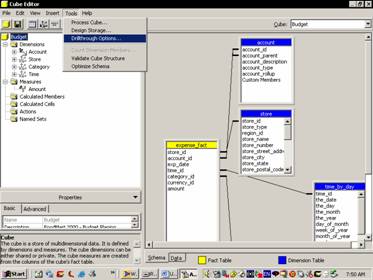
In the Drillthrough Options dialog box, perform one of the following actions:
To enable drillthrough, select the Enable drillthrough check box.
To disable drillthrough, clear the Enable drillthrough check box. Go to Step 7.
|
|
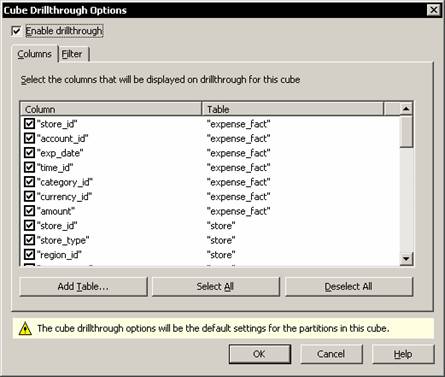
In the Columns tab, select the columns to be displayed when drillthrough is executed.
Please note that selecting a column to which a cube role is denied access and then granting the cube role the ability to drill through, security exposure becomes an issue. (Access to a column can be denied by using dimension security or cell security). When the end users of the cube role drill through, they can access the denied column.
(Optional.) In the Filter tab, specify a filter (WHERE clause expression) to limit the result set returned by drillthrough. Do not include the keyword WHERE. For example, to limit the result set to fourth-quarter data, specify:
"shipment_facts"."quarter"=4
Click OK.
In Cube Editor, on the File menu, click Save.
{mospagebreak}
Specifying Drillthrough Options for Individual Partition
In the Analysis Manager tree pane, under the cube that contains the partition, expand the Partitions folder.
Right-click the partition, and then click Edit.
Advance to the Finish step of the Partition Wizard, and then click Advanced.
|
|
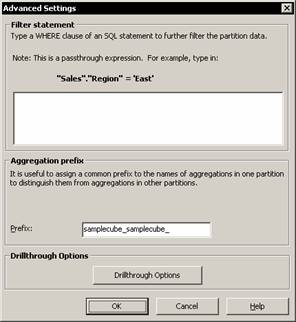
In the Advanced Settings dialog box, click Drillthrough. Note that drillthrough options for the parent cube has to be enabled for the option to be available for the partition.
|
|
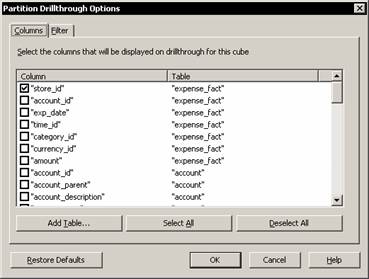
In the Columns tab, select the columns to be displayed when drillthrough is executed.
Please note that if the users select a column to which a cube role is denied access and then grant the cube role the ability to drill through, security exposure will be created. (Access to a column can be denied by using dimension security or cell security.). When the end users in the cube role drill through, they can access the denied column.
Optional.) In the Filter tab, specify a filter (WHERE clause expression) to limit the result set returned by drillthrough. Do not include the keyword WHERE. For example, to limit the result set to fourth quarter data, specify:
"shipment_facts"."quarter"=4
|
|
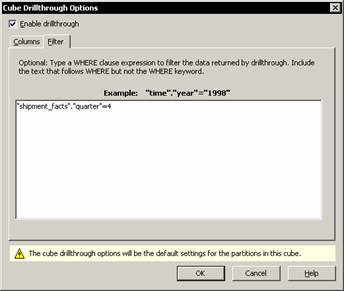
Click OK.
In the Advanced Settings dialog box, click OK.
In the Partition Wizard, click Finish.
{mospagebreak}
To specify drillthrough options for a virtual cube
In the Analysis Manager tree pane, under the database that contains the virtual cube, expand the Cubes folder.
Right-click one of the source cubes of the virtual cube, and then click Edit. The Cube Editor opens.
On the Tools menu, click Drillthrough Options. (If this command is not available, the cube structure is not valid. The problem can be determined by clicking Validate Cube Structure on the Tools menu.)
In the Drillthrough Options dialog box, ensure that the Enable drillthrough check box is selected. Drillthrough must be enabled on the source cube before enabling drillthrough for the virtual cube.
In the Columns tab, select the columns to be displayed when drillthrough is executed. Please note that selecting a column to which a cube role is denied access and then granting the cube role the ability to drill through, security exposure is created. (Access to a column can be denied by using dimension security or cell security.) When the end users in the cube role drill through, they access the denied column.
Optional.) In the Filter tab, specify a filter (WHERE clause expression) to limit the result set returned by drillthrough. Do not include the keyword WHERE. For example, to limit the result set to fourth-quarter data, specify: "shipment_facts"."quarter"=4
(Optional.) If the user does not want drillthrough to be enabled for the source cube after selecting the display columns, he will have to clear the Enable drillthrough check box. This option provides users the ability to drill through to the selected columns through the virtual cube but not through the current source cube.
Click OK.
In Cube Editor, on the File menu, click Save.
(Optional.) If there is more than one source cube, select the name of the next source cube from the Cube box within Cube Editor. Repeat Steps 3 through 9 as necessary for each source cube.
Exit Cube Editor.
In the Analysis Manager tree pane, right-click the virtual cube for which you want to enable drillthrough and click Edit. If the properties pane is not expanded in Virtual Cube Editor, expand it by clicking Properties beneath the tree pane.
Click the Advanced tab of the properties pane, and then click the value next to the Enable Drillthrough property.
Click True to enable drillthrough for the virtual cube.
In Virtual Cube Editor, on the File menu, click Save.
[catlist id=181].