
Exforsys

Analysis Services Training

  1. MSAS - Browsing the Dependency Network
  2. MSAS - Building a Relational Decision Tree Model
  3. MSAS - Introduction to Data Mining
  4. MSAS - Applying security to a Dimension
  5. Tutorial 65: MSAS - Managing Cube Roles
  6. MSAS - Understanding Database Roles
  7. MSAS - Securing User Authentication
  8. MSAS - Introducing Analysis Services Security
  9. MSAS - Writebacks
  10. MSAS - Defining and Creating Drillthrough
  11. MSAS - Defining and Creating Auctions
  12. MSAS - Creating and Maintaining Calculated Members in Virtual Cubes
  13. MSAS - Building a Virtual Cube
  14. MSAS - Understanding Virtual Cubes
  15. MSAS - Introducing Solve Order
  16. MSAS - Implementing Calculations Using MDX Part 2
  17. MSAS - Implementing Calculations Using MDX Part 1
  18. MSAS - Merging Partitions
  19. MSAS - Introduction and Managing Partitions
  20. MSAS - Troubleshooting Cube Processing
  21. MSAS - Optimizing Cube Processing
  22. MSAS - Processing Dimensions and Cubes
  23. MSAS - Introducing Dimension and Cube Processing
  24. MSAS: Optimization Tuning Part 2
  25. MSAS: Optimization Tuning Part 1
  26. MSAS: Usage-Based Optimization
  27. MSAS: Analysis Services Aggregations
  28. MSAS: The Storage Design Wizard
  29. MSAS: Analysis Server Cube Storage
  30. MSAS: Defining Cube Properties
  31. MSAS: Introduction and Working with Measures
  32. MSAS: Introduction and Working with Cubes
  33. MSAS: Virtual Dimensions
  34. MSAS: Introducing Member Properties
  35. MSAS: Creating Custom Rollups
  36. MSAS: Creating a Time Dimension
  37. MSAS: Understanding Hierarchies
  38. MSAS: Dimension Storage Modes and Levels
  39. MSAS: Working with Levels and Hierarchies
  40. MSAS: Working with Parent-Child Dimensions
  41. MSAS : Basics of Levels
  42. MSAS : Working with Standard Dimensions
  43. MSAS : Shared vs Private Dimensions
  44. Understanding Dimension Basics
  45. MSAS : Office 2000 OLAP Components
  46. MSAS : Client Architecture
  47. MSAS : Cube Storage options
  48. MSAS : Meta data Repository
  49. MSAS : Analysis services Tools for Extended Functionality
  50. MSAS : The Wizards
  51. MSAS : The Analysis Manager and Analysis Server
  52. MSAS : The Data warehousing framework of SQL Server 2000 - Part 2
  53. MSAS : The Data warehousing framework of SQL Server 2000 - Part 1
  54. MSAS : Microsoft Data Warehousing Overview
  55. MSAS : Browsing the Cube
  56. MSAS : Designing Storage and Processing the Cube
  57. MSAS : Building the Cube Part #3
  58. MSAS : Building the Cube Part #2
  59. MSAS : Building the Cube Part #1
  60. MSAS : Setting up the Database in Analysis Server
  61. MSAS : Preparing to Create the Cube
  62. MSAS : Introducing Analysis Manager Wizards
  63. Microsoft Analysis Services Installation
  64. MSAS - Applying OLAP Cubes
  65. Understanding OLAP Models
  66. Designing the Dimensional Model and Preparing the data for OLAP
  67. Design of the data warehouse: Kimball Vs Inmon
  68. Defining OLAP Solutions and Data Warehouse design
  69. Microsoft Analysis Services Training
  70. Data Warehouse database and OLTP database
  71. Introduction to Data Warehousing

Ads


Home arrow Technical Training arrow Analysis Services Training

MSAS : Introducing Analysis Manager Wizards

Author : Exforsys Inc.     Published on: 7th Mar 2005
This tutorial covers brief introduction to Analysis Manager Wizards, how to start, Previewing and Defining terms which helps to understand the navigation along with the screen shots.

Ads

Introducing Analysis Manager Wizards

The Analysis Manager is a console application in Microsoft SQL Server 2000. It provides an interface for accessing Analysis servers and their metadata repositories. The Analysis manager console can be used to administer servers, create databases, cubes, data mining objects, or for specifying storage options and optimizing query performance. The console also allows the user browse data sources, shared dimensions and security roles. It snaps into the Microsoft Management console, which is a common framework for server and network management applications and hence can be accessed from it.

Starting Analysis Manager

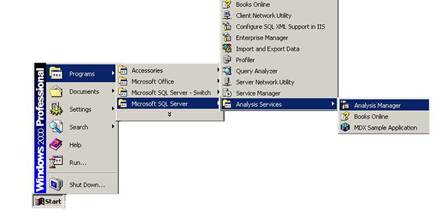
Analysis Manager gets installed when Microsoft SQL server is installed. To start Analysis services go to Start > Programs > Microsoft SQL Server > Analysis Services > Analysis Manager.

The Analysis Manager Interface: Previewing and Defining terms

The Analysis manager window that opens is composed of two panes. The left pane contains a ‘console tree’. The right pane consists of the step by step tutorials provided by Mircrosoft on the use of the SQL server 2000.

The console tree shows the items that are available in a console. The first of the items under the console root is the Analysis Servers. The Analysis server component gets created when the Analysis services is installed. The default server that is created while installing the Analysis services has the same name as the computer in which the service is installed (in this case SSS-SAIRAM). All other services are subordinated to the Analysis server.

Each Analysis server has associated data folders that store multidimensional data structures for the objects defined in the server and these structures are referenced to resolve queries. Security files that control the user’s access to objects in the Analysis server are located in the data files. An Analysis server is registered so that it can be administered. The servers registered under the Analysis servers are visible if the + sign next to the Server folder is clicked. To register a new server the user has to right click on the Analysis server node and enter the name of the new server in the dialog box that opens

The first object that is created in the Analysis server is the database. The database is defined as a structure that stores a set of related cubes. In the picture above, the database that is created is named “FoodMart 2000”. This is the default database that ships with SQL Server 2000. Other user defined databases can be created by right clicking on the server and selecting new database option. We will learn how to do that a little later in this tutorial.

Ads

There are of three kinds of objects in the database:-

Cubes, virtual cubes and the library.

Cubes are the fundamental units for data storage and retrieval in the Analysis server system. The dimensions of the cubes are perspectives from which data can be queried and analyzed. A cube can have up to 128 dimensions and 1024 measures. The first five dimensions of the cube contain Columns, Rows, Pages, sections and Chapters. The points of interaction of dimensions are called Cells. Multiple values can be stored and retrieved from cells. Each value that is stored in a cell is called a measure. A cell can contain multiple measures. The location of the cell in the cube is stored within the key values of the fact table.

Virtual Cubes are cubes that are derived from one or more cubes stored in the same database. A virtual cube has the same characteristics as a view in the SQL server.
The Library is a section of the Analysis server database that holds all the common elements that are accessed by all the cubes in the database.

The data in the cube is derived from a data source. The data source specifies the source of data for the cube in the database. In the picture above the data source defined in foodmart.mdb.

Dimensions have levels organized into a hierarchy. The values at each level are referred to as members of that level. A shared dimension is a dimension stored in the library and can be accessed by multiple cubes in the database. A private dimension is a dimension that can be used only in cubes in which they are defined. A virtual dimension is created from a member property. It can be browsed like a regular dimension but has no aggregations calculated for it. A member property associates additional information with the members in one of the levels of the dimension. A time dimension is a specialized dimension used to represent standard time. All other dimensions are called standard dimensions.

Roles are access rights that are assigned to various users of the database. All roles that are defined for a cube in a database are recorded and stored in the library. The roles defined can be shared across cubes in the database.

A data mining model is a virtual structure that can be used for grouping and predictive analysis of multidimensional or relational data. It represents an interpretation of records as rules and patterns, composed of statistical information, referred to as cases.


This tutorial is part of a Analysis Services Training tutorial series. Read it from the beginning and learn yourself.

Analysis Services Training

  1. MSAS - Browsing the Dependency Network
  2. MSAS - Building a Relational Decision Tree Model
  3. MSAS - Introduction to Data Mining
  4. MSAS - Applying security to a Dimension
  5. Tutorial 65: MSAS - Managing Cube Roles
  6. MSAS - Understanding Database Roles
  7. MSAS - Securing User Authentication
  8. MSAS - Introducing Analysis Services Security
  9. MSAS - Writebacks
  10. MSAS - Defining and Creating Drillthrough
  11. MSAS - Defining and Creating Auctions
  12. MSAS - Creating and Maintaining Calculated Members in Virtual Cubes
  13. MSAS - Building a Virtual Cube
  14. MSAS - Understanding Virtual Cubes
  15. MSAS - Introducing Solve Order
  16. MSAS - Implementing Calculations Using MDX Part 2
  17. MSAS - Implementing Calculations Using MDX Part 1
  18. MSAS - Merging Partitions
  19. MSAS - Introduction and Managing Partitions
  20. MSAS - Troubleshooting Cube Processing
  21. MSAS - Optimizing Cube Processing
  22. MSAS - Processing Dimensions and Cubes
  23. MSAS - Introducing Dimension and Cube Processing
  24. MSAS: Optimization Tuning Part 2
  25. MSAS: Optimization Tuning Part 1
  26. MSAS: Usage-Based Optimization
  27. MSAS: Analysis Services Aggregations
  28. MSAS: The Storage Design Wizard
  29. MSAS: Analysis Server Cube Storage
  30. MSAS: Defining Cube Properties
  31. MSAS: Introduction and Working with Measures
  32. MSAS: Introduction and Working with Cubes
  33. MSAS: Virtual Dimensions
  34. MSAS: Introducing Member Properties
  35. MSAS: Creating Custom Rollups
  36. MSAS: Creating a Time Dimension
  37. MSAS: Understanding Hierarchies
  38. MSAS: Dimension Storage Modes and Levels
  39. MSAS: Working with Levels and Hierarchies
  40. MSAS: Working with Parent-Child Dimensions
  41. MSAS : Basics of Levels
  42. MSAS : Working with Standard Dimensions
  43. MSAS : Shared vs Private Dimensions
  44. Understanding Dimension Basics
  45. MSAS : Office 2000 OLAP Components
  46. MSAS : Client Architecture
  47. MSAS : Cube Storage options
  48. MSAS : Meta data Repository
  49. MSAS : Analysis services Tools for Extended Functionality
  50. MSAS : The Wizards
  51. MSAS : The Analysis Manager and Analysis Server
  52. MSAS : The Data warehousing framework of SQL Server 2000 - Part 2
  53. MSAS : The Data warehousing framework of SQL Server 2000 - Part 1
  54. MSAS : Microsoft Data Warehousing Overview
  55. MSAS : Browsing the Cube
  56. MSAS : Designing Storage and Processing the Cube
  57. MSAS : Building the Cube Part #3
  58. MSAS : Building the Cube Part #2
  59. MSAS : Building the Cube Part #1
  60. MSAS : Setting up the Database in Analysis Server
  61. MSAS : Preparing to Create the Cube
  62. MSAS : Introducing Analysis Manager Wizards
  63. Microsoft Analysis Services Installation
  64. MSAS - Applying OLAP Cubes
  65. Understanding OLAP Models
  66. Designing the Dimensional Model and Preparing the data for OLAP
  67. Design of the data warehouse: Kimball Vs Inmon
  68. Defining OLAP Solutions and Data Warehouse design
  69. Microsoft Analysis Services Training
  70. Data Warehouse database and OLTP database
  71. Introduction to Data Warehousing
 

Comments