
MSAS : The Data warehousing framework of SQL Server 2000 – Part 2
The Online Analytical Processing (OLAP) tools offered by Microsoft are impressive, considering the fact that Microsoft entered the OLAP market only in 1998. A review of the growth of Microsoft tools in this area, clearly indicates that they have grown from being a mere entrant to being a market leader in the field. What started as OLAP services in SQL Server 7.0 has been enhanced and renamed as Analysis Services in SQL Server 2000. We will be learning more about Analysis services a little later in this tutorial. For the present we will examine the broad features of the OLAP services offered by Microsoft.
The OLAP functionality provided by Microsoft with SQL Server 2000, helps build and manage powerful, multidimensional models of data and applications for use in large enterprise systems. It provides processing capabilities against heterogeneous OLE DB data sources. The efficient algorithms for defining and building multidimensional cubes can be referenced by OLE DB OLAP extensions. These multidimensional structures and cubes can be configured and implemented through the use of a variety of storage options called Multidimensional OLAP, Relational OLAP and Hybrid OLAP. It includes predefined data access functionalities and application interfaces for these functionalities. Quantitative analysis functions provide strength to the Analysis services. These functions make statistical processing capabilities and data mining capabilities a reality. It supports user defined functions and amply provides documentation to assist the user in building such capabilities. Custom rollups and actions are two features that distinguish the Microsoft OLAP tools. Actions like triggers extend analyses to incorporate custom functions and they are also useful in closing the loop between analytic applications and operational systems. Custom rollups enable the calculation of values from individual child dimensions for populating the values in the parent dimension. These custom rollups also enable the implementation of domain specific analysis for businesses.
Analysis services provide four OLAP and data mining application interfaces. The MDX ( Multidimensional Expressions) is an interface to Analysis services multi dimensional data. This is similar to the SQL interface with relational data. MDX provides data definition syntax and data manipulation syntax and over hundred MDX functions with which to work. MDX data manipulation functions can be used within the Decision support objects(DSO), PivotTable Service and XML/A programming models. Decision Support Objects (DSO) defines the COM based object model and provides an interface to the internal structure Analysis services OLAP and data mining functionality and the data structures, models etc. PivotTable Service is a client based OLE DB provider that applications can access, manipulate and retrieve relational and multidimensional data, create local multidimensional cubes on the client, perform OLAP functions on those cubes and display the results of the processing. XML/A is a Simple Object Access Protocol(SOAP) based XML API designed for accessing SQL Server Analysis services data and Web Client applications. Key, standard web service protocols are used to create OLAP interfaces that are language independent and require no pre-installed components on the client machine.
A data mining model is a virtual structure that represents the grouping and predictive analysis of relational or multidimensional data. Though the structure of the model resembles the structure of a database table, the record set in the data mining model represents the interpretation of records as rules and patterns, composed in statistical patterns called cases. The case set defines the data mining model and the data stored therein represents the rules and patterns learned from processing the case set. A case set is a way of viewing the physical data and different case sets can be constructed from the same physical data. Since the information is innately hierarchical, the case set is stored as a collection of data mining columns. Each column will then contain a group of data mining columns instead of a single data item and are stored in the Decision Support objects Library.
The most important task of data mining is to determine the impact of the attributes of the items on classification and prediction of trends and patterns. The relative importance of each of these attributes is determined by a process of mining known as model training. Data is supplied to the model for analysis and the algorithms used examine the ‘data set’ in a multitude of ways and draws conclusions about classification and prediction of data. The algorithms used in the mining model are stored in the Mining model object in the Decision support Objects Library
{mospagebreak}
Data Mining
Data mining is inbuilt into SQL Server 2000 and helps the user define models containing grouping and predictive rules that can be applied to relational databases or multidimensional OLAP cubes. These models can then be used to automatically perform sophisticated analysis of data and identify trends in data for decision making. Data mining models can be built using the Analysis Services wizard based interface or programmatically using the DSO object model. Visual tools in the data mining Wizard simplify the complex modeling process and pivot table support is an advantage. The PiovtTable Service also provides capabilities for building and training data mining models. Integration with third party data mining tools is also possible
Enterprises seek to maintain copies of data in different systems to improve the overall performance of the systems. SQL Server 2000 replication feature allows enterprises multiple copies of data to be maintained in different systems and also enables the enterprise to keep these copies in synchronization. Disconnected and mobile users find this a great advantage as they would have synchronized data the moment they connect to the server hosting the departmental database. The SQL server replication also supports replication of data in data warehouses. It can also replicate the data from any data source or to any data source that uses OLE DB access.
The replication model used by SQL Server is the publish-subscribe model for distributing data. The server which is the publisher which contains the data source to be replicated. An article is defined for each table or database object to be used as a data source and one or more articles are organized to form a publication. The subscriber is the server that receives the replicated data. The subscriber server defines the subscription to a particular publication and specifies when the subscription will receive the publication. It also maps the articles to the tables and other database objects in the subscriber. A distributor is a server that performs the task of distributing the data from the publisher to the subscriber. SQL Server 2000 allows three kinds of replication:
Snapshot replication copies data or database objects as they exist in the moment of time. These are generally scheduled and time based and is used when the data is relatively static.
Transactional Replication is a process of replicating data by first applying a snapshot and then capturing transactional data and transmitting them to the subscriber. Transactional integrity is maintained in the process and modifications are synchronized between the publisher and the subscriber. This replication is used when dynamic replication is required to capture modifications to data.
Merge replication is a process of replication that is adopted when multiple sets of subscribers work together. The multiple subscriber data generated is then combined and merged back into the publisher. The subscribers and the publisher are then synchronized with a snapshot and all changes are tracked both on the subscriber and the publisher. Later the changes are also merged to define a single version of the data. Conflict ‘resolvers’ are a defined set of rules for resolving conflicts in the merge replication data. This technology is used when the Publisher and the subscribers need to work autonomously or when multiple subscribers must update the same data.
The Administration of replication services is simplified in SQL Server 2000. The Enterprise manager supports configuring and monitoring replication. The SQL DMO interfaces can be used for programmatically configuring and monitoring the process. Microsoft ActiveX controls help in embedding replication technology in custom applications and replication can be scripted using T-SQL systems stored procedures.
English Query
The English Query feature of the SQL Server 2000 allows users to build applications that customize themselves to user queries in plain English. Users can query, using ad hoc queries. The English query Administrator defines all logical relationships between tables and columns of a database or cubes in the data warehouse or data mart and the user can enter a character string to query the data. The engine analyzes the string against the relationships defined and returns to the application an SQL statement or a MDX expression, which in turn will return the reply to the user’s question. 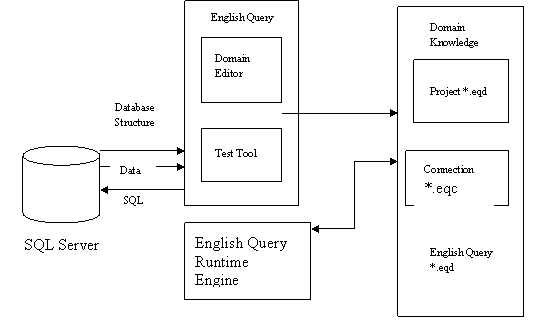
Microsoft has introduced the following features in English Query to make it user friendly:
- Greater integration with Microsoft Visual Studio, Analysis services and Full text search.
- A graphical user interface for English Query authoring
- An XML based language for persisting English Query model information.
Meta Data
Meta Data services, inbuilt in SQL Server 2000, is a facility for storing, viewing and retrieving descriptions of objects in the applications and systems. Meta data defines the structure and meaning of data, applications and processes. It consists of ActiveX interfaces and information models that define database schema and data transformations as defined by Microsoft data warehousing framework. The goal of the framework is to provide meaningful integration of multiple products through shared meta data. Business and technical meta data are combined to provide an industry wide standard for storing the schema of production data sources and destinations.
Meta data services is a popular means of storing DTS packages in data warehousing scenario, because it provides lineage for packages. DTS also uses the meta data services storage to enable transformations, queries and ActiveX scripts to reused by heterogeneous applications.
Tool developers add meta data management support to their products with ease as the service provides a platform for building such management capabilities into dedicated tools. Shared meta data is used to deploy data and application structures across heterogeneous platforms and development environments. Common definitions are so constructed that tools and applications can interpret the same meta data and transform them into application specific structures. It is the point of integration as it is abstract, contains essential details that remain constant whatever the implementation strategy. This flexibility allows the user to separate design from implementation.
Meta data services help the user store meta data constructs, version meta data objects and relationships, track meta data created, allocate workspaces to isolate modifications to a specific set of objects, import and export meta data structures in XML format.
The service supports the MDC Open information Model (OIM) specifications and defines a common format for storing descriptions of entities such as tables, views, cubes or transformations. It specifies the relationships between these entities. The OIM support enables application developers use these facilities for rapid development and interchange with other tools and applications. The other components of the SQL Server 2000 can also be stored in the Meta data services repository.
We will learn how meta data repositories are used in Microsoft SQL Server 2000, in greater detail, a little later in the tutorial.
[catlist id=181].