Exforsys

Analysis Services Training

  1. MSAS - Browsing the Dependency Network
  2. MSAS - Building a Relational Decision Tree Model
  3. MSAS - Introduction to Data Mining
  4. MSAS - Applying security to a Dimension
  5. Tutorial 65: MSAS - Managing Cube Roles
  6. MSAS - Understanding Database Roles
  7. MSAS - Securing User Authentication
  8. MSAS - Introducing Analysis Services Security
  9. MSAS - Writebacks
  10. MSAS - Defining and Creating Drillthrough
  11. MSAS - Defining and Creating Auctions
  12. MSAS - Creating and Maintaining Calculated Members in Virtual Cubes
  13. MSAS - Building a Virtual Cube
  14. MSAS - Understanding Virtual Cubes
  15. MSAS - Introducing Solve Order
  16. MSAS - Implementing Calculations Using MDX Part 2
  17. MSAS - Implementing Calculations Using MDX Part 1
  18. MSAS - Merging Partitions
  19. MSAS - Introduction and Managing Partitions
  20. MSAS - Troubleshooting Cube Processing
  21. MSAS - Optimizing Cube Processing
  22. MSAS - Processing Dimensions and Cubes
  23. MSAS - Introducing Dimension and Cube Processing
  24. MSAS: Optimization Tuning Part 2
  25. MSAS: Optimization Tuning Part 1
  26. MSAS: Usage-Based Optimization
  27. MSAS: Analysis Services Aggregations
  28. MSAS: The Storage Design Wizard
  29. MSAS: Analysis Server Cube Storage
  30. MSAS: Defining Cube Properties
  31. MSAS: Introduction and Working with Measures
  32. MSAS: Introduction and Working with Cubes
  33. MSAS: Virtual Dimensions
  34. MSAS: Introducing Member Properties
  35. MSAS: Creating Custom Rollups
  36. MSAS: Creating a Time Dimension
  37. MSAS: Understanding Hierarchies
  38. MSAS: Dimension Storage Modes and Levels
  39. MSAS: Working with Levels and Hierarchies
  40. MSAS: Working with Parent-Child Dimensions
  41. MSAS : Basics of Levels
  42. MSAS : Working with Standard Dimensions
  43. MSAS : Shared vs Private Dimensions
  44. Understanding Dimension Basics
  45. MSAS : Office 2000 OLAP Components
  46. MSAS : Client Architecture
  47. MSAS : Cube Storage options
  48. MSAS : Meta data Repository
  49. MSAS : Analysis services Tools for Extended Functionality
  50. MSAS : The Wizards
  51. MSAS : The Analysis Manager and Analysis Server
  52. MSAS : The Data warehousing framework of SQL Server 2000 - Part 2
  53. MSAS : The Data warehousing framework of SQL Server 2000 - Part 1
  54. MSAS : Microsoft Data Warehousing Overview
  55. MSAS : Browsing the Cube
  56. MSAS : Designing Storage and Processing the Cube
  57. MSAS : Building the Cube Part #3
  58. MSAS : Building the Cube Part #2
  59. MSAS : Building the Cube Part #1
  60. MSAS : Setting up the Database in Analysis Server
  61. MSAS : Preparing to Create the Cube
  62. MSAS : Introducing Analysis Manager Wizards
  63. Microsoft Analysis Services Installation
  64. MSAS - Applying OLAP Cubes
  65. Understanding OLAP Models
  66. Designing the Dimensional Model and Preparing the data for OLAP
  67. Design of the data warehouse: Kimball Vs Inmon
  68. Defining OLAP Solutions and Data Warehouse design
  69. Microsoft Analysis Services Training
  70. Data Warehouse database and OLTP database
  71. Introduction to Data Warehousing

Ads


Home arrow Technical Training arrow Analysis Services Training

MSAS: The Storage Design Wizard

Page 1 of 2
Author : Exforsys Inc.     Published on: 12th Apr 2005
The Storage Design Wizard helps the user set the storage options and design the aggregations for a cube. While choosing from the three available storage modes the user has to keep certain factors in mind.

Ads

ROLAP stores aggregations in a relational database and hence it does not make sense to select ROLAP as a storage mode for cubes if the aim is to have speed of performance in analysis. Aggregations in Relational databases are slow and bulky and it defeats the very purpose of creating the aggregations. However, if the user wants to look at the aggregations and understand how they work, then ROLAP is the best storage mode.

MOLAP and HOLAP aggregations are similar. The only difference lies in where the detail level values are stored. MOLAP consumes more space than HOLAP, because the former duplicates the data in the fact table. Queries that use the data will however be efficient. HOLAP on the other hand does not duplicate the data but the queries on the detail data will tend to be slower in comparison. However, processing of a HOLAP cube is faster than the processing of a MOLAP cube.

Storage Design Wizard

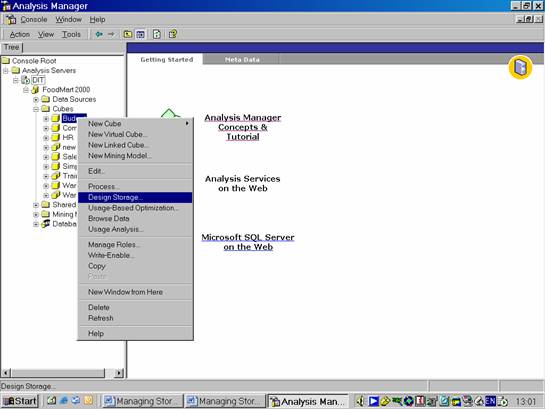
In the Analysis Manager tree pane, under the database that contains the cube for which the storage options is to be set and design aggregations, expand the Cubes folder.

Right-click the cube for which storage options is to be set and design aggregations, and then click Design Storage.
If the cube storage design has already been selected the user will be show the screen as under:
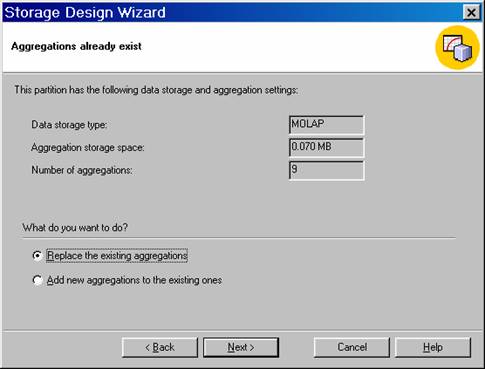
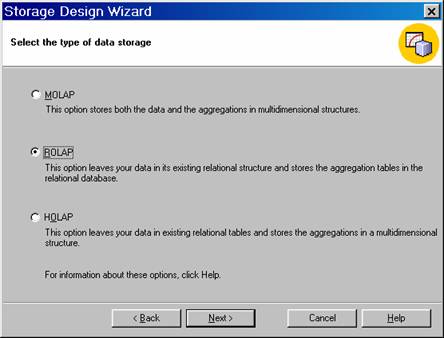
The user can replace the existing aggregations or add new aggregations to the existing ones. But he cannot change the storage mode in this screen. The next screen permits him to change the storage mode.
Ads

Significantly, a change in the storage mode will make no difference to the client application which only sees the cubes and not the storage types. The user should keep in mind that ROLAP is recommended when resources are not available for MOLAP or the users depend on some functionality of the underlying relational system. If query time is the deciding factor, MOLAP should be used. HOLAP should be used when both processing speed and disk space constraints are in operation.

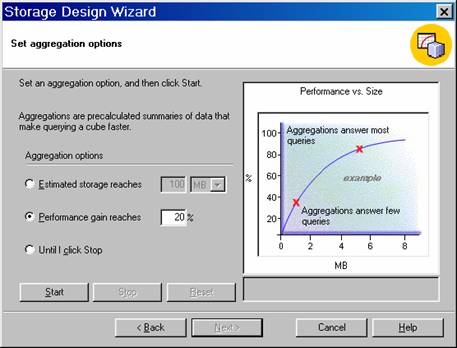
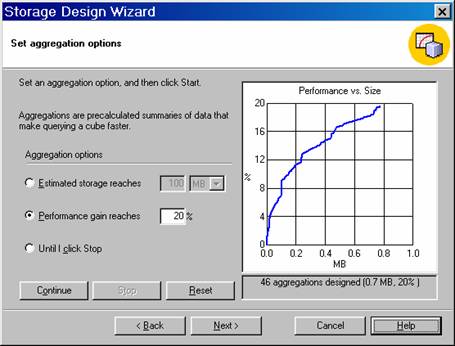
On clicking Next the user is taken to the Set Aggregations screen. Aggregation design is perhaps the single most important factor that impacts on the times required for processing and querying the cube. Creating the right set of aggregations is a very complex problem and Analysis Services estimates usages statistically. The Storage Design Wizard tries various combinations of aggregations and selects a few specific aggregations as the best choices for the cube. The user has no control over which of the few will be selected. In the screen shot below 46 aggregations have been selected.

The options available in this screen are:

Estimated storage reaches is used to enter the amount of hard disk storage to allocate for storing the aggregation tables. The user can enter a maximum storage size in either megabytes (MB) or gigabytes (GB).

Until I click Stop is used to manually control the balance. Watch the Performance vs. Size graph to determine when the increase in performance levels off, even though storage continues to build.

The Wizard asks the user to specify the percentage amount of performance gain for your queries. This amount represents the percentage improvement between the maximum and minimum query times, as represented by the following formula. PercentGain = 100 * (QTimeMAX - QTimeTARGET) / (QTimeMAX - QTimeMIN). For example, if a query that is not optimized takes twenty-two seconds (QTimeMAX) to execute, and the best possible query performance with maximum aggregations is two seconds (QTimeMIN), specify a 75% desired performance gain to achieve a query time of seven seconds (QTimeTARGET).

Click the Performance Gain Reaches and type 20% as the target performance percentage. Then click Start. When the Next button becomes enabled, Click Next.

 
This tutorial is part of a Analysis Services Training tutorial series. Read it from the beginning and learn yourself.

Analysis Services Training

  1. MSAS - Browsing the Dependency Network
  2. MSAS - Building a Relational Decision Tree Model
  3. MSAS - Introduction to Data Mining
  4. MSAS - Applying security to a Dimension
  5. Tutorial 65: MSAS - Managing Cube Roles
  6. MSAS - Understanding Database Roles
  7. MSAS - Securing User Authentication
  8. MSAS - Introducing Analysis Services Security
  9. MSAS - Writebacks
  10. MSAS - Defining and Creating Drillthrough
  11. MSAS - Defining and Creating Auctions
  12. MSAS - Creating and Maintaining Calculated Members in Virtual Cubes
  13. MSAS - Building a Virtual Cube
  14. MSAS - Understanding Virtual Cubes
  15. MSAS - Introducing Solve Order
  16. MSAS - Implementing Calculations Using MDX Part 2
  17. MSAS - Implementing Calculations Using MDX Part 1
  18. MSAS - Merging Partitions
  19. MSAS - Introduction and Managing Partitions
  20. MSAS - Troubleshooting Cube Processing
  21. MSAS - Optimizing Cube Processing
  22. MSAS - Processing Dimensions and Cubes
  23. MSAS - Introducing Dimension and Cube Processing
  24. MSAS: Optimization Tuning Part 2
  25. MSAS: Optimization Tuning Part 1
  26. MSAS: Usage-Based Optimization
  27. MSAS: Analysis Services Aggregations
  28. MSAS: The Storage Design Wizard
  29. MSAS: Analysis Server Cube Storage
  30. MSAS: Defining Cube Properties
  31. MSAS: Introduction and Working with Measures
  32. MSAS: Introduction and Working with Cubes
  33. MSAS: Virtual Dimensions
  34. MSAS: Introducing Member Properties
  35. MSAS: Creating Custom Rollups
  36. MSAS: Creating a Time Dimension
  37. MSAS: Understanding Hierarchies
  38. MSAS: Dimension Storage Modes and Levels
  39. MSAS: Working with Levels and Hierarchies
  40. MSAS: Working with Parent-Child Dimensions
  41. MSAS : Basics of Levels
  42. MSAS : Working with Standard Dimensions
  43. MSAS : Shared vs Private Dimensions
  44. Understanding Dimension Basics
  45. MSAS : Office 2000 OLAP Components
  46. MSAS : Client Architecture
  47. MSAS : Cube Storage options
  48. MSAS : Meta data Repository
  49. MSAS : Analysis services Tools for Extended Functionality
  50. MSAS : The Wizards
  51. MSAS : The Analysis Manager and Analysis Server
  52. MSAS : The Data warehousing framework of SQL Server 2000 - Part 2
  53. MSAS : The Data warehousing framework of SQL Server 2000 - Part 1
  54. MSAS : Microsoft Data Warehousing Overview
  55. MSAS : Browsing the Cube
  56. MSAS : Designing Storage and Processing the Cube
  57. MSAS : Building the Cube Part #3
  58. MSAS : Building the Cube Part #2
  59. MSAS : Building the Cube Part #1
  60. MSAS : Setting up the Database in Analysis Server
  61. MSAS : Preparing to Create the Cube
  62. MSAS : Introducing Analysis Manager Wizards
  63. Microsoft Analysis Services Installation
  64. MSAS - Applying OLAP Cubes
  65. Understanding OLAP Models
  66. Designing the Dimensional Model and Preparing the data for OLAP
  67. Design of the data warehouse: Kimball Vs Inmon
  68. Defining OLAP Solutions and Data Warehouse design
  69. Microsoft Analysis Services Training
  70. Data Warehouse database and OLTP database
  71. Introduction to Data Warehousing
 

Comments