
PL/SQL is a procedural extension for Oracle’s Structured Query Language. PL/SQL is not a separate language rather a technology. Mean to say that you will not have a separate place or prompt for executing your PL/SQL programs. PL/SQL technology is like an engine that executes PL/SQL blocks and subprograms. This engine can be started in Oracle server or in application development tools such as Oracle Forms, Oracle Reports etc.
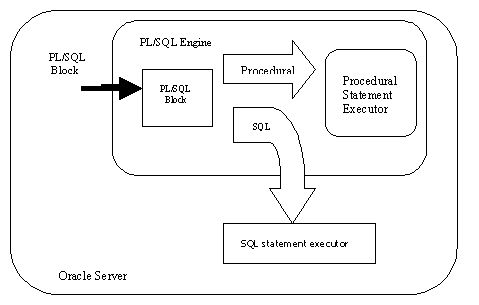
As shown in the above figure PL/SQL engine executes procedural statements and sends SQL part of statements to SQL statement processor in the Oracle server. PL/SQL combines the data manipulating power of SQL with the data processing power of procedural languages.
Block Structure of PL/SQL: PL/SQL is a block-structured language. i.e. Programs of PL/SQL contain logical blocks.
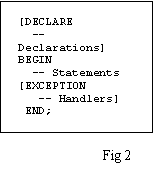
As shown in the Fig.2 a PL/SQL block has three parts.
1) Declaration: Necessary variables are declared in this section. (Optional)
2) Begin: This section contain executable statements of SQL and PL/SQL
3) Exception: Any error occurred while executing the statements in begin part can be handled in this part.
Variables and Constants: Variables are used to store query results. Forward references are not allowed. Hence you must first declare the variable and then use it.
Variables can have any SQL datatype, such as CHAR, DATE, NUMBER etc or any PL/SQL datatype like BOOLEAN, BINARY_INTEGER etc.
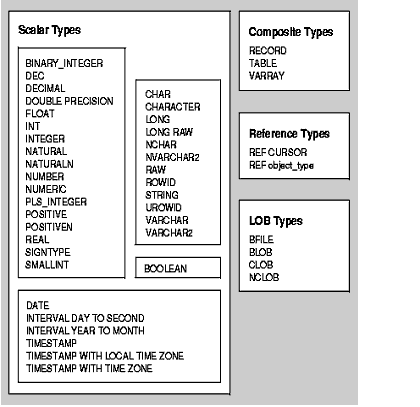
Declaring Variables: Variables are declared in DECLARE section of PL/SQL.
DECLARE
SNO NUMBER (3);
SNAME VARCHAR2 (15);
_ _ _
BEGIN
Assigning values to variables:
SNO NUMBER : = 1001; or SNAME := ‘JOHN’; etc
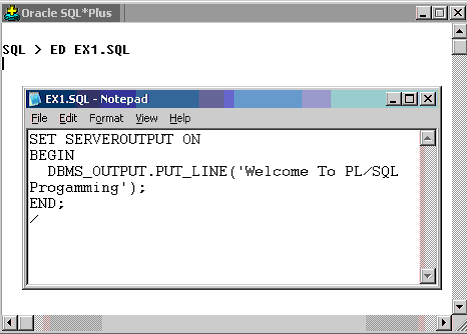
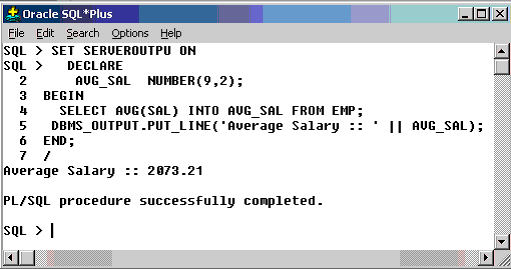
Following screen shot explain you how to write a simple PL/SQL program and execute it.
SET SERVEROUTPUT ON is a command used to access results from Oracle Server. 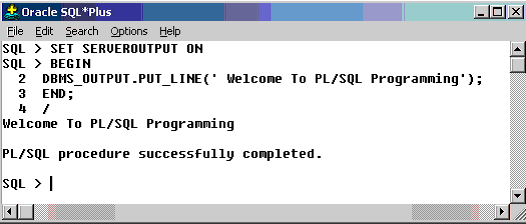
A PL/SQL program is terminated by a “ / “. DBMS_OUTPUT is a package and PUT_LINE is a procedure in it. You will learn more about procedures, functions and packages in the following sections of this tutorial.
Above program can also be written as a text file in Notepad editor and then executed as explained in the following screen shot.
SET SERVEROUTPUT ON is a command used to access results from Oracle Server.
A PL/SQL program is terminated by a “ / “. DBMS_OUTPUT is a package and PUT_LINE is a procedure in it. You will learn more about procedures, functions and packages in the following sections of this tutorial.
Above program can also be written as a text file in Notepad editor and then executed as explained in the following screen shot.
SET SERVEROUTPUT ON is a command used to access results from Oracle Server.
A PL/SQL program is terminated by a “ / “. DBMS_OUTPUT is a package and PUT_LINE is a procedure in it. You will learn more about procedures, functions and packages in the following sections of this tutorial.
Above program can also be written as a text file in Notepad editor and then executed as explained in the following screen shot.
{mospagebreak}
SQL > /

Welcome To PL/SQL Programming


PL/SQL procedure successfully completed.
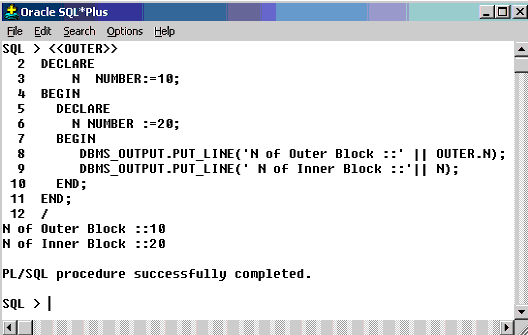
Scope and Visibility of Variables : An identifier in PL/SQL block is considered as local to that block and global to all its Sub-blocks. Which is better understood from the following example.
There are 2 composite datatypes. TABLE and
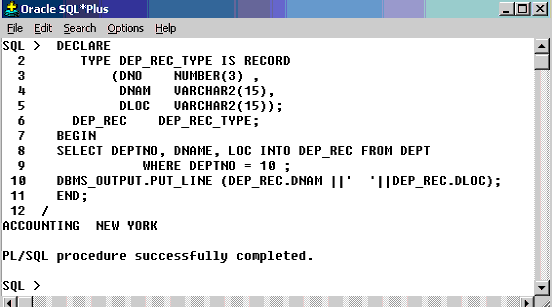
 RECORD. Objects of type RECORD are called records. Objects of type TABLE are called PL/SQL table.
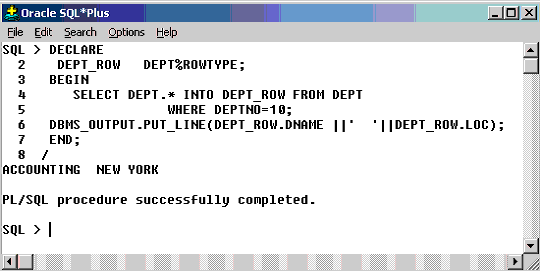
User-Defined Records: The %rowtype attribute can be used to store a record fetched from the table. But it is not possible to declare datatype for the fields in %rowtype. This problem is solved in the object type RECORD. The usage of %rowtype and RECORD object are explained below.
PL/SQL Tables:
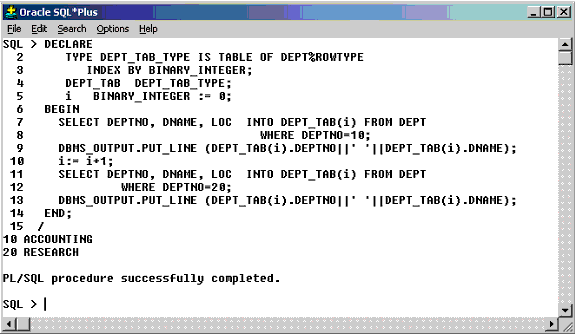
PL/SQL tables are modeled as database tables but are not same as database tables.
The size of a PL/SQL table is unconstrained i.e. it can grow dynamically whenever a new
record is added. Its size is constrained only by the available memory. Every PL/SQL table
will have a primary key column of BINARY_INTEGER type.
[catlist id=172].