
Sponsored Links
Oracle 9i Tutorials
- Tutorial 16: Oracle 9i: Oracle Utilities
- Tutorial 15: Oracle 9i : Oracle Packages
- Tutorial 14: Oracle 9i : Database Triggers
- Tutorial 13: Oracle 9i : Procedures and Functions
- Tutorial 12: Oracle 9i: PL/SQL Collections
- Tutorial 11 : Oracle 9i: Exception Handling
- Oracle 9i:Download example SQL Scripts used in Tutorials
- Tutorial 10: Oracle 9i : Cursors
- Tutorial 9 : Oracle 9i: PL/SQL Control Structures
- Tutorial 8: Building PL/SQL Blocks
- Tutorial 6: Tables and Constraints
- Tutorial 7: More Database Objects
- Tutorial 5: Working with Multiple Tables
- Tutorial 4: SQL functions
- Oracle 9i: SQL, PLSQL, and SQL *Plus - Introduction
- Oracle 9i: SQL, PLSQL, and SQL *Plus - Software Installation and References
- Tutorial 1: Introduction to Oracle 9i:SQL, PLSQL. and SQL *Plus
- Tutorial 2: SQL *Plus Commands
- Tutorial 3 : Restricting and Sorting Data
Tutorials
Oracle 9iTutorial 10: Oracle 9i : Cursors
CURSOR
For every SQL statement execution certain area in memory is allocated. PL/SQL allow you to name this area. This private SQL area is called context area or cursor. A cursor acts as a handle or pointer into the context area. A PL/SQL program controls the context area using the cursor. Cursor represents a structure in memory and is different from cursor variable.
When you declare a cursor, you get a pointer variable, which does not point any thing. When the cursor is opened, memory is allocated and the cursor structure is created. The cursor variable now points the cursor. When the cursor is closed the memory allocated for the cursor is released.
Cursors allow the programmer to retrieve data from a table and perform actions on that data one row at a time. There are two types of cursors implicit cursors and explicit cursors.
Implicit cursors
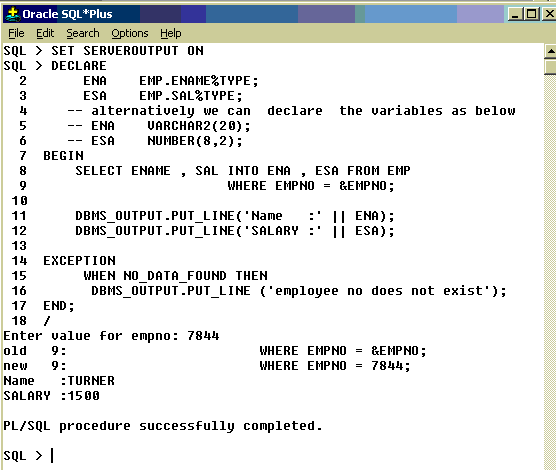
For SQL queries returning single row PL/SQL declares implicit cursors. Implicit cursors are simple SELECT statements and are written in the BEGIN block (executable section) of the PL/SQL. Implicit cursors are easy to code, and they retrieve exactly one row. PL/SQL implicitly declares cursors for all DML statements. The most commonly raised exceptions here are NO_DATA_FOUND or TOO_MANY_ROWS.
Syntax:
SELECT ename, sal INTO ena, esa FROM EMP WHERE EMPNO = 7844;
Note: Ename and sal are columns of the table EMP and ena and esa are the variables
used to store ename and sal fetched by the query.
Explicit Cursors
Explicit cursors are used in queries that return multiple rows. The set of rows fetched by a query is called active set. The size of the active set meets the search criteria in the select statement. Explicit cursor is declared in the DECLARE section of PL/SQL program.
Syntax:
CURSOR <cursor-name> IS <select statement>
Sample Code:
DECLARE
CURSOR emp_cur IS SELECT ename FROM EMP;
BEGIN
----
---
END;
Processing multiple rows is similar to file processing. For processing a file you need to open it, process records and then close. Similarly user-defined explicit cursor needs to be opened, before reading the rows, after which it is closed. Like how file pointer marks current position in file processing, cursor marks the current position in the active set.
Opening Cursor
Syntax: OPEN <cursor-name>;
Example : OPEN emp_cur;
When a cursor is opened the active set is determined, the rows satisfying the where clause in the select statement are added to the active set. A pointer is established and points to the first row in the active set.
Fetching from the cursor: To get the next row from the cursor we need to use fetch statement.
Syntax: FETCH <cursor-name> INTO <variables>;
Example: FETCH emp_cur INTO ena;
FETCH statement retrieves one row at a time. Bulk collect clause need to be used to fetch more than one row at a time.
Closing the cursor: After retrieving all the rows from active set the cursor should be closed. Resources allocated for the cursor are now freed. Once the cursor is closed the execution of fetch statement will lead to errors.
CLOSE <cursor-name>;
Explicit Cursor Attributes
Every cursor defined by the user has 4 attributes. When appended to the cursor name these attributes let the user access useful information about the execution of a multirow query.
The attributes are:
- %NOTFOUND: It is a Boolean attribute, which evaluates to true, if the last fetch failed. i.e. when there are no rows left in the cursor to fetch.
- %FOUND: Boolean variable, which evaluates to true if the last fetch, succeeded.
- %ROWCOUNT: It’s a numeric attribute, which returns number of rows fetched by the cursor so far.
- %ISOPEN: A Boolean variable, which evaluates to true if the cursor is opened otherwise to false.
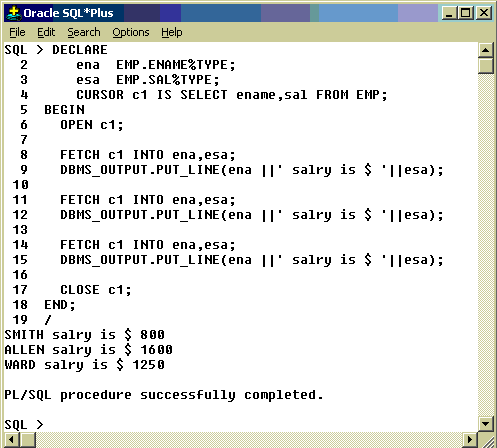
In above example I wrote a separate fetch for each row, instead loop statement could be used here. Following example explains the usage of LOOP.
Using WHILE:
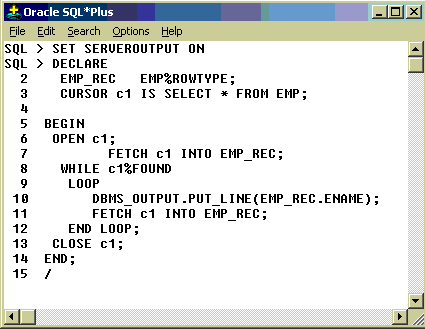
While LOOP can be used as shown in the following example for accessing the cursor values.
Example:
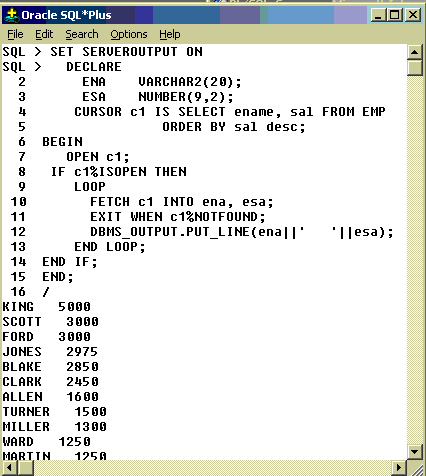
Fetch is used twice in the above example to make %FOUND available. See below example.
Using Cursor For Loop:
The cursor for Loop can be used to process multiple records. There are two benefits with cursor for Loop
1. It implicitly declares a %ROWTYPE variable, also uses it as LOOP index
2. Cursor For Loop itself opens a cursor, read records then closes the cursor automatically. Hence OPEN, FETCH and CLOSE statements are not necessary in it.
Example: 
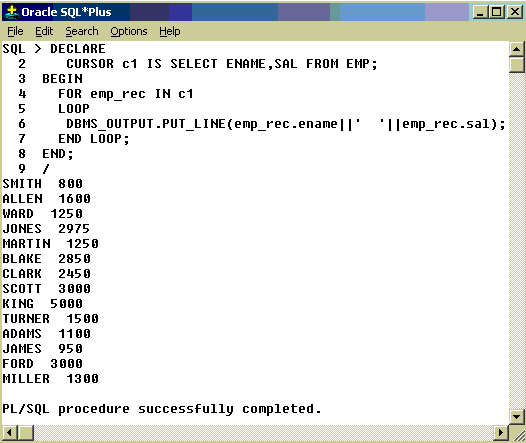
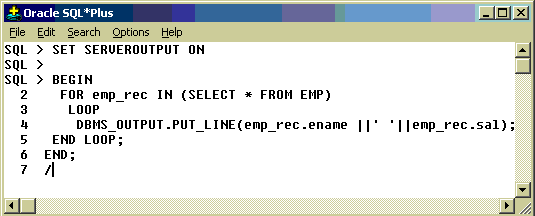
emp_rec is automatically created variable of %ROWTYPE. We have not used OPEN, FETCH , and CLOSE in the above example as for cursor loop does it automatically. The above example can be rewritten as shown in the Fig , with less lines of code. It is called Implicit for Loop.
Deletion or Updation Using Cursor:
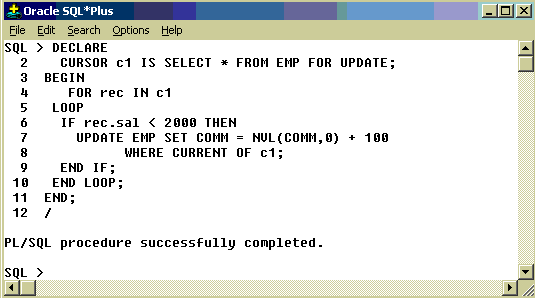
In all the previous examples I explained about how to retrieve data using cursors. Now we will see how to modify or delete rows in a table using cursors. In order to Update or Delete rows, the cursor must be defined with the FOR UPDATE clause. The Update or Delete statement must be declared with WHERE CURRENT OF
Following example updates comm of all employees with salary less than 2000 by adding 100 to existing comm.
Comments
rkphalke said:
| Notes on Cursors. |
vishal mehta said:
| The notes are quite good :D |
mca_banti said:

| really it\'s very nice |
Mihir Kumar said:
| :).it will be the best if you have also mentioned the internal diffrence between implicit and explicit cursor . |
anonymous said:
| Nice Work ....... Short and simple |
mukka ramesh said:
| it helped me a lot.i did it without listening to classes |
ekiran said:

| its very good explanation. and provide real time scenarios then its look very good. |
spriya said:
|
The way it was explained is really good. Thank u |
vjaiswal said:
| very nice explanation is given |
sunil_hirlekar said:
| its very good explanation. and provide real time scenarios then its look very good. |
nitin agarwal said:
|
this is exactly what i needed....everthing is mentioned in its completeness and is to the point. thank a ton!!! |
HABIB_UR_REHMAN said:

|
Very Nice. It Helps alot to the New Comer's. I hope and Prayer this kind of this will be going on from your kind side. I suggest you to go forward with the new & advance features of 9i as well as 10 g technology. Have a nice Day. |
Ajay mishra said:
| very nice . |
Sunil Anant Hirlekar said:
| It helps a lot for beginner like me. Thanks |
dinesh jain said:
| really u have explained complex things in a very simple manner !!! |
SANGRAM KESHARI MOHANTY said:
| Thanks, Good explanatoon it really helps us. |
john smith said:
|
any example for ref cursor ;D |
Hardik Vyas said:
|
Its excellent . Gr8 job man. U can easily understand by reading this topics coz its written in simple language and most of all its with examples. Thanks man. Carry on the good work |
Hari Kancharla said:
| Its good example for learners.It is very clear to understand. |
Deeptichowdary said:
| it's very very nice , it's a greate site . it looks like user friendly. easy to understand without taking the course and joing to institution. The examples are given here is very good to gain knowledge on particular topic. |
Imtiaz Ali said:
| Awsum, Excellent it really helps me! Keep it up. |
Vitor Galveia said:
|
Hi everyone, This is an example of a great site. unfortunately, when we want to know more about some topic this informations is not enough. I have one doubt about who to know the number of rows of a cursor, for example, if we have the following example: open c_myCursor for select p.myName from partners p how can I know the number of rows afected to this cursor after this? Can anyone help me? Thansk. |
JOSEPH GUDAPATI (VIJAYAWADA) said:
| ur detailed explainations helps a lot |
PRAVEEN RAJ said:
| VERY CLEARLY EXPLAINED.. THXS. |
Sandeep Bh said:
| Really Appreciate |
naveen yenigandla said:
| it is very good. provide some more examples thats is very much good |
Sreekanth.K said:
| Examples are good,Its very easy to understand the beginners |
Ram roja said:
| Nice explanation . Pls explain about which tablespace that cursor is located?? |
Vijayalakshmi Gangadasu said:
| This site is really helpful.Provide us with some more examples and complex problems. |
Vibhuti said:
| Very good explanation. Really refreshes the concepts at a glance. |
manoj singh jadaun said:
| please tell me querry to insert the sysdate i.e date of the system into a column 9c_date of data type date )of a table |
TR said:
|
ITS EXCELLENT COURSE.......... I HAVE READ SOME BOOKS BUT I DIDNT UNDERSTAND CLEARLY. BY READING THIS I AM GETTING CLEARLY AND FULL KNOWLEDGE. |
Sandeep Sharma1 said:
|
the content of the article is very nice!.. Very helpful indeed. Thanks |
manoj singh jadaun said:
|
excellent material ,fantastic, Provide us with some more examples and complex problems plz tell me a cursor which insert only the system time into table column thanks |
Manus said:
|
I'm just about to embark on my first PL/SQL course this article has give me a great insight into cursors which I knew nothing about. Supurbly explained Thanks |
arnik said:
| good work . nice explanations |
Sanjay choubey said:
| It's realy a nice collection and verry eassy to understand...... |
S. DeepakKumar said:
|
Its a really amazing website Very helpful and almost all my questions are answered Thank u |
DuraiAS said:
| Very simple and very clear explanations. Good job. Pls continue yourgood effort on advanced topics also. |
Mahender.e said:
|
thanks friends for explaing of cursor indetail |
Vidhu Devaraj said:
| Its was really very helpful.Thanks a lot! |
raviraj1 said:
| it was very simple and understandable to begineers |
ankhenatraj@yahoo.com said:
|
sir/madam, thank you for providing such feature in site can u please send me all the contents with examples it would be very helpful, to me and my felow employees |
pankajs said:
| Its really great help providing to any person unknown about trigger ,function etc.. |
ABHISHEK VERMA said:
|
Really it is fabolus notes that you provided on net.They really helped me. Thanks |
bunty said:
|
had lots of confusion about cursors.. all cleared. thankyou so much for the same. keep the good work going. regards |
Brutus I said:
| Its Good, here its clesrly explianed about theCursors which are very Basics in writing any Procedure |
rerohit said:
| Excellent job in very easy and clear straight way |
Iniyavan SS said:
| Simple and Excellent examples. Anyone could please ellaborate on WHERE CURRENT OF |
yuvaraj.... said:
|
Its very useful for beginners. While reading itself,we can feel tat working with Orale |
ali hamamd said:
|
Thanks for reminding me the oracle cursors. I was hopeless to find any good and simple help unless I got to your website.. Thanks. |
Mohit Makkar said:
|
It is a very simple and good way to understand the meaning of Cursor. Pls every one read it and get the Knoledge about cursor Thanks |
syed salim said:
| It is very nice and examples are fantastic. One can learn a lot from this. |
syed salim said:
| It is very nice. Examples are simply great and understandable. Nice work people -- congratulation |
VRZ said:
|
it's truly very nice. appreciate your work. you explained difficult things in a very good and simple way. thanks.... :) have a gr8 day... |
Yashoshri Shrivastava said:
|
The explanation is very clear and precise. Makes it easy for beginers. Thanx.............. |
Praveen kumar karekkadu neelappa said:
|
One of The Best material i have come across.. Its an excellent desciption in a very simple way. Thanks a lot.. |
Sarann said:
|
Hi , It is Really Good Example; |
Mr.India said:
| very help ful for beginners.providing excellent examples with execution |
Pavindan said:
| its a great site for newcomers!!!!!!!!!!!!!!!!!!!!!!!!!!!!!!!!!!1 |
Swagata said:
| its really very helpful |
koti said:
| this is really good one...thank you very much ...but after emp_rec when i try to work on emp_rec its not displaying records..i am a beginner..this notes helping me lot...once again thank you very much. |
satyan said:
| its really very helpful for beginners |
theja said:
|
very clear. i am beginner this notes helped me a lot |
Ajaysingh7 said:
|
Hi Guys.... The information given here on cursor is very useful... Its quite clearly specified... Thanks |
ji said:
| very useful |
rock said:
|
great work .... keep it up |
Mluhya Bena said:
| A good tutorial. I have never Imagined i could be that way! |
Nirmala_14 said:
|
its really good.. very useful... |
Sanjay said:
| Good Work |
Sudhakar said:
| After reading this article we can understand Cursors concept easily...Thanks |
umamaheshwar said:
| Its really excellent.. Please keep to post the important topics.... |
jeetu said:
| nice explanation |
venugopal Gandham said:
| Good explanation |
Vishweshwar Nath said:
| this is very useful to me...... |
reza said:
| very good tutorial.thank you very much |
srikanth said:
| Excellent job. cursors concept made look simple. Thanks |
Neeraj said:
| I am not much into PL/SQL programming, however due to my project requirements I had to look onto Cursors. The tutorial has given a good insight. Thanks for the material |
Samraj said:
|
Thanks for the updates I am clear on this ... |
Donperion said:
| This is best example and tutorial for Cursors on the Net. I passed my exam because of this. |
Sponsored Links
