
Single-node and multi node installation
In a single-node installation, the database, all product directories, all servers (concurrent processing, forms, and Web) are installed on a single node under one common APPL_TOP whereas in a multi-node installation, you install both application tier and database tier servers across two or more nodes.
The installation steps for single-node and multi-node installation are almost the same. In the 4th step, one needs to choose between the single-node and multi-node installations. Follow the steps as shown below to start your installation.
Step 1. Start the Rapid Install wizard
Start the wizard from the command line by typing rapidwiz at the prompt. The Welcome screen appears.
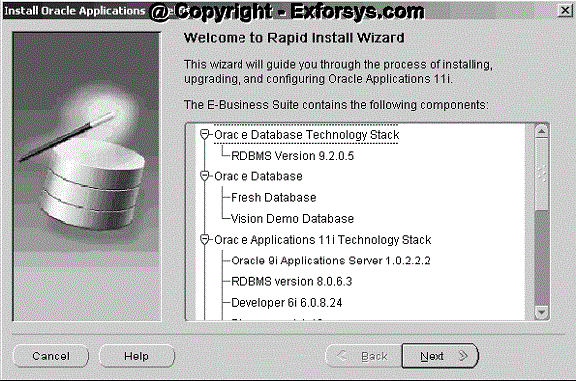
This screen lists the components that are included in, or supported by, this release of Oracle Applications. Use the scroll bar to bring all the components into view. This screen is for information only. No action is required. Click Next to continue.
Step 2. Select a wizard operation
Use the Select Wizard Operation screen to indicate the action you want Rapid Install to perform. You begin both new installations and upgrades from this screen. Based on the action you choose, the Rapid Install wizard continues with the appropriate screen flow. The available actions are as follows:
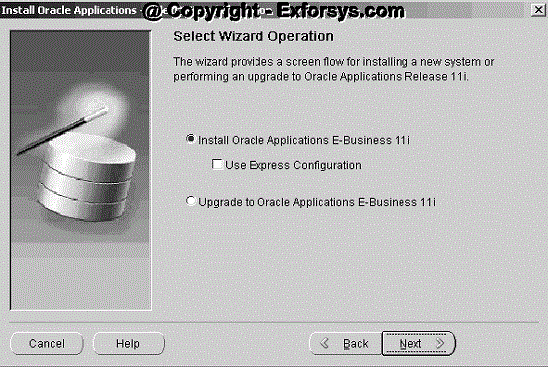
The available actions are as follows:
Install Oracle Applications E-Business 11i
This action sets up a new, fully configured system, with either a fresh database or a Vision Demo database. The configuration is derived from the system-specific configuration parameters you enter in the Rapid Install wizard and save in the configuration file (config.txt). This custom configuration reflects the way you will use your Oracle Applications products.
Express Configuration
This action sets up a fully configured, single-user/single-node system with either a fresh database or Vision Demo database. You supply a few basic parameters, such as database type and name, top-level install directory, and increments for port settings. The remaining directories and mount points are supplied by Rapid Install using default values.
Upgrade to Oracle Applications E-Business 11i
Choose this option to indicate that you are upgrading your E-Business Suite products to the current version of Oracle Applications. The wizard screen flow presents two paths: one that lays down the file system and installs the new technology stack, and one that configures servers and starts services.
In the following steps, you will set up a new installation. Click Install Oracle Applications E-Business 11i. Click Next to continue
Step 3. Identify configuration file
On the Load Configuration screen, you indicate whether you will be using an existing configuration file
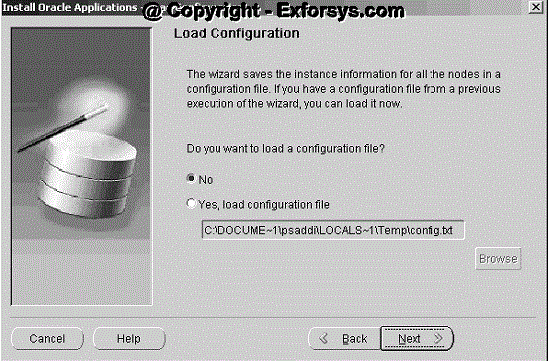
If you answer No, Rapid Install saves the configuration parameters you enter on the wizard screens in a new configuration file (config.txt) that it will use to configure your system for the new installation. You indicate the location and the name of the new configuration file on a subsequent screen.
If you choose "Yes, load configuration file," the directory path field becomes active. Entering the file name and path points Rapid Install to a previously stored configuration and indicates that want to use those parameters. Typically, you choose this option when copying the configuration file to other nodes in a multi-node installation, or when restarting Rapid Install after an interruption in the installation processing.
Because this is a new installation, click No, and click Next to continue.
{mospagebreak}
Step 4. Choose installation type: On the Install Type screen, you indicate whether you want to install servers on a single node or distribute them across multiple nodes.
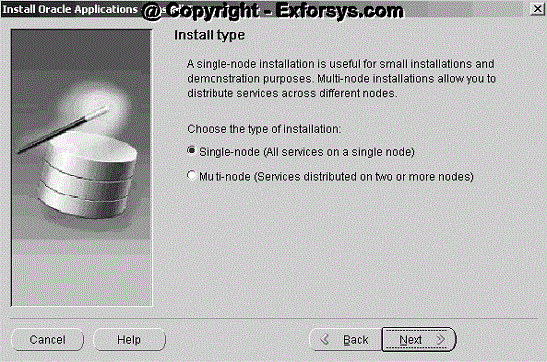
In a single-node installation, the RDBMS, the core AD directories and product directories, and the concurrent processing, forms, and Web servers are installed on one node under a common APPL_TOP.
In a multi-node installation, the RDBMS and the concurrent processing server, forms server, and Web server can be distributed across multiple nodes. The core AD directories and all product directories are installed under the APPL_TOP on all tiers. Nodes can be configured to share an APPL_TOP.
If you select the single node installation, then skip the steps 5, 6 and 7, and start from step 8. For multi-node installation, follow all the steps given below.
Click Next to continue.
Step 5. Use Load Balancing
On the Load Balancing screen, you can set up a configuration that will distribute the forms or concurrent processing load across multiple forms or concurrent processing servers (respectively).
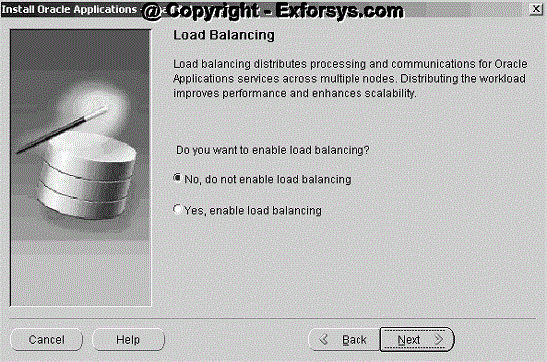
In a system that employs load balancing, requests are automatically directed to a server on the "least loaded" node — the one that has the smallest number of processing tasks in progress. On this screen, you choose whether to enable load balancing. If you choose the "No, do not enable load balancing" option, the wizard assumes that your system will not be configured for multiple forms or concurrent processing servers.
If you choose the "Yes, enable load balancing" option, the wizard prompts you to indicate the number of forms servers and concurrent processing servers, and then steps you through the task of assigning those servers to the nodes in your system.
Step 6. Assign servers to nodes and indicate operating system
The Node Information screen lists the servers to be installed and prompts you to provide a name for each node and indicate the operating system.
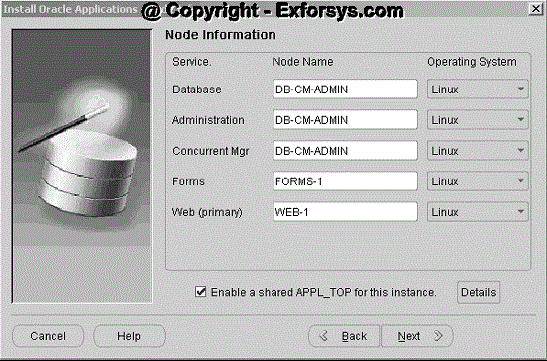
You assign servers to individual nodes using the Node Name field. Type the name of the node where each service will be installed, repeating the same name for all services to be installed on that node. For example, in a system configured for three nodes, type DB-CM-ADMIN as the name of the node that will host the Database and the Concurrent Mgr. The AD core technologies (administration services, also known as the Administration server) are also installed (under the APPL_TOP) on the DB-CM-ADMIN node.
To install the forms server and the Web server on separate nodes, type FORMS-1 as the node name for the Forms services, and WEB-1 as the node name for the Web services. Select Linux from the drop-down list in the Operating System field.
Notice that the "Enable a shared APPL_TOP for this instance" check box at the bottom of the Node Information screen is checked. Rapid Install has set up the shared APPL_TOP configuration based on the nodes you identified on this screen.
{mospagebreak}
Step 7. Set up a shared APPL_TOP In a shared APPL_TOP system, the APPL_TOP is installed on only one node. The other nodes are set up to share that APPL_TOP, making changes to the shared file system immediately visible on all nodes. Using a shared APPL_TOP simplifies the maintenance of your configuration and greatly reduces downtime during maintenance tasks.
Click Details to see the file system actions for this shared configuration.
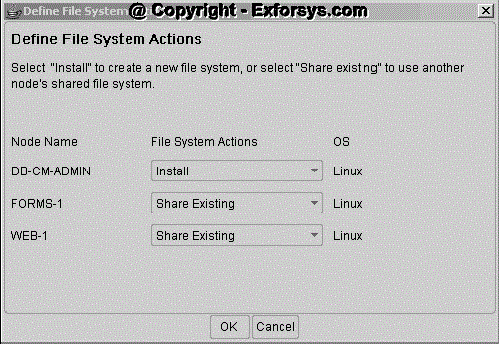
The Define File System screen shows the file sharing for the configuration you have described. It identifies the nodes as follows:
§ Install: This is the base node. Its APPL_TOP is available for sharing with other nodes. On subsequent node-specific screens, the wizard prompts for directory paths for each node you mark as Install.
§ Share Existing: A node marked Share Existing does not have its own APPL_TOP. It must share the APPL_TOP of a node marked Install. Click OK to return to the Node Information screen. Then, click Next to continue.
Step 8. Define database type
On the Database Type screen, indicate the kind of database you want to install in the new system and supply the name you will use to identify it.
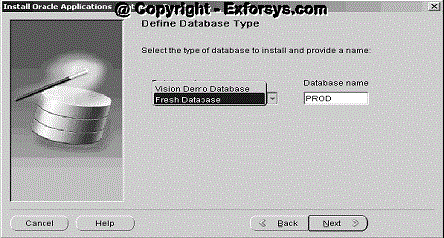
You can install a fresh database or a Vision Demo database.
§ A fresh database is fully configured and ready for a new implementation. This type of database is suitable for any type of system that requires a fresh database, such as a production system or a test system. The default name for a production database is PROD. If you are installing a database for another use, for example as a test system or a backup system, choose the Fresh Database option and enter a Database Name that reflects that purpose, for example TEST.
§ A Vision Demo database is used for demonstration or training purposes. It contains a fully configured Oracle Applications system that has been implemented and populated with a set of transactions for a fictitious company. The Vision Demo database is set up for multiple-organization use. It is installed with the UTF8 character set to maximize the support for character sets in this release. The default database name is VIS.
Click Next to continue.
Step 9. Set up database installation directory
The Database Install Information screen prompts you for information Rapid Install needs to set up and install the database.
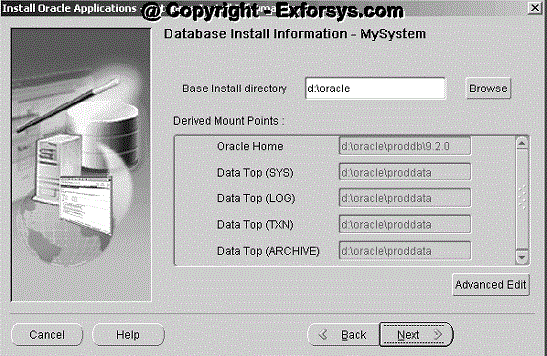
The "Base Install directory" field defaults to a sample directory name, using the operating system syntax for the machine where you started the Rapid Install wizard. In this example, the syntax is for Windows. This directory is the top-level directory that Rapid Install uses to derive the mount points associated with the RDBMS. On a Unix operating system, the screen would look like this.
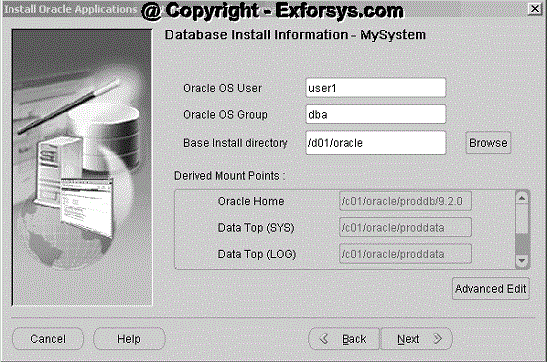
Notice that the syntax has changed, and there are two fields that are specific to this platform. The Oracle OS User is the account that will own the database server file system. Enter the name of the Oracle OS Group. The Oracle OS User may belong to other groups, but it must belong to this group. Enter a base installation directory on this screen, or click Browse.
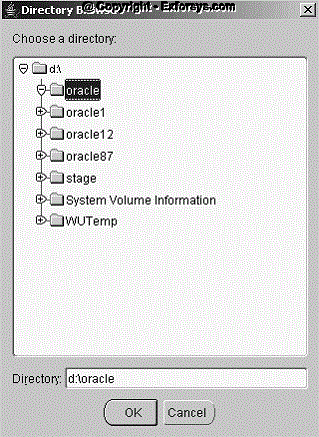
Navigate to the new directory, and highlight the path, or enter a path in the Directory field. Click OK to save the changes and return to the Database Install Information screen. Click Cancel to return without making changes. From the Database Install Information screen, click Advanced Edit to review the derived mount points or to change the directory paths.
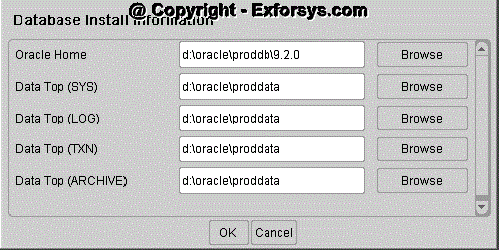
This screen displays default directories based on the base installation directory you specified on the Database Install Information screen. Accept the defaults or change the derived mount points as needed. Click OK to return to the Database Install Information screen. Then, click Next to continue.
We will continue with the installation in next tutorial Single Node and Multi Node Installation Part 2 which explains about different product license types, country-specific functionality, additional languages and internationalization (NLS) settings.
[catlist id=183].