
Implementing Class Library Object in VB.NET 2005
Class: Classical Object Oriented Concepts explain a class as a cookie cutter. A class allows you to create objects of the class. As a programmer you define a class with data fields, properties, methods and events. Then you can create objects based on that class that have state (fields, properties) and behavior (methods, events). A class can be considered as a specification of how the object of the class should look like and behave.
An object of the class is nothing other than a sequence of bytes at a specific memory location in the memory heap. Thus we can understand that an object is an instance of the class. We can see an illustration of a class.
Let’s see an illustration of a class
Public Class Class1
Private VehicleType As String
Private VehicleModel As String
Private VehicleColor As String
Public Sub Accelerate()
‘ add code to Accelerate
End Sub
ReadOnly Property engineCapacity() As Decimal
Get
Return engineCapacity
End Get
End Property
End Class
Creating a Class Library project
- On the File menu, select New Project.
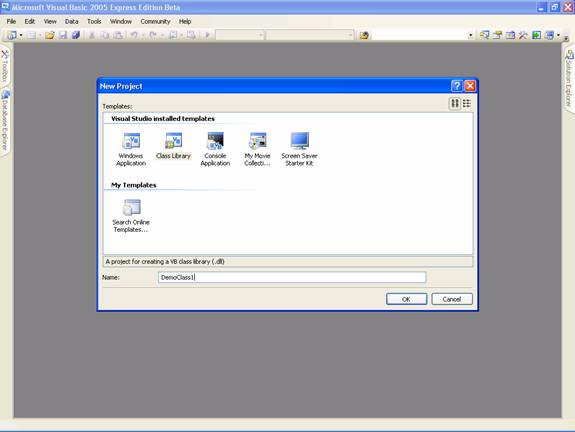
- On the Templates pane, in the New Project dialog box, click Class Library.
- In the Name box, type DemoClass1 and then click OK.
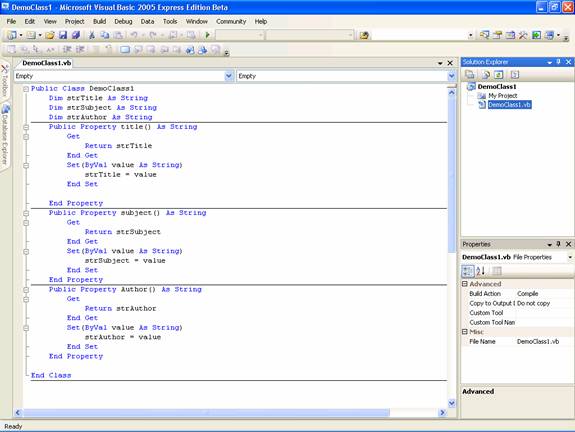
- A new Class Library project opens, and the Code Editor displays the Class module Class1.vb.
- In the Solution Explorer, right-click Class1.vb and select Rename, and then change the name to DemoClass1.vb.
- Note that the name in the Code Editor also changed to DemoClass.vb.
- On the File menu, select Save All.
- In the Save Project dialog box, click Save
Let us see the screen shots for doing this exercise:
Opening the new project:
Codes for the new DemoClass1
Designing .NET Class Libraries: Conclusion and Q&A Session Video Presentations
Watch the finale and Q&A session with the series presenters and their audience, with a special guest appearance by Jeff Richter. 57 Min.
Q&A Transcript in Word Format : Click here to download
Watch Online
Download The Video
[catlist id=175].