
XML – Document Type Definitions (DTD)
In this totuorial you will learn about XML – Document Type Definitions (DTD) – Need, DTD, Types Of DTD’s , Internal DTD , External DTD.
NEED
XML documents can contain many different types of markups including elements, attributes and entity references. Whatever maybe the application it is desirable that the XML document conforms to a certain set of rules governing the data structure it contains. DTD and Schema’s are used for this purpose.
For Example,
< name >12233< /name >
If a DTD defines that data in name tags should contain only characters and if it contains numbers , as shown above, the document is invalidated by the XML parser using the Document Type Definition (DTD) as reference.
DTD
DTD stands for Document Type Definitions. It describes syntax that explains which elements may appear in the XML document and what are the element contents and attributes.
A valid XML document must include the reference to DTD which validates it. When a DTD is absent the validating parser can’t verify the data format but can attempt to interpret the data.
TYPES OF DTD
• Internal DTD: DTD can be embedded into XML document
• External DTD: DTD can be in a separate file
INTERNAL DTD
Internal DTD are embedded in the XML document itself. They are convenient when constraints are applied to a single document. They are also used while designing a complex DTD for testing a sample document. Also, modifications becomes relatively simpler since the DTD and markup are in the same document.
Syntax : < ! DOCTYPE root_name[assignments] >
It begins with the DOCTYPE keyword (after < less than and ! exclamation mark) followed by the name of the root element. The root is followed by a square bracket which signifies beginning of declaration assignments. The last entry is a less than symbol ( >).
In the assignments section elements are declared as follows –
< !ELEMENT child_name(child_name or data type) >
Detailed explanation on this is covered in the next tutorial.
E.g.
< ?xml version=’1.0′ encoding=’utf-8′? >
< !– DTD for a AddressBook.xml — >
< !DOCTYPE AddressBook [
< !ELEMENT AddressBook (Address+) >
< !ELEMENT Address (Name, Street, City) >
< !ELEMENT Name (#PCDATA) >
< !ELEMENT Street (#PCDATA) >
< !ELEMENT City (#PCDATA) >
] >
< AddressBook >
< Address >
< Name >Jeniffer< /Name >
< Street >Wall Street < /Street >
< City >New York< /City >
< /Address >
< /AddressBook >
Above when viewed in IE 5.0 or above
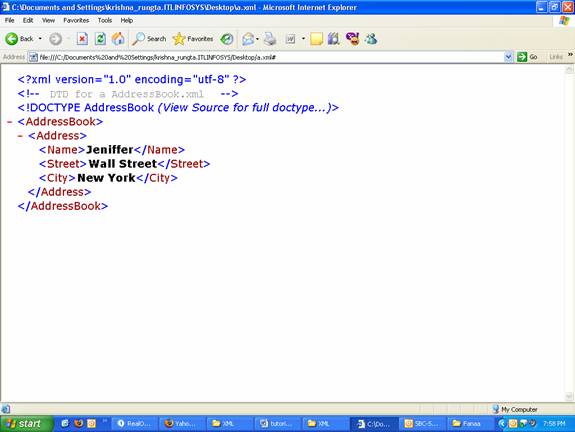
Here the order of the declarations is not important . Thus,
< ?xml version=’1.0′ encoding=’utf-8′? >
< !– DTD for a AddressBook.xml — >
< !DOCTYPE AddressBook [
< !ELEMENT AddressBook (Address+) >
< !ELEMENT Address (Name, Street, City) >
< !ELEMENT Name (#PCDATA) >
< !ELEMENT Street (#PCDATA) >
< !ELEMENT City (#PCDATA) >
] >
is same as
< ?xml version=’1.0′ encoding=’utf-8′? >
< !– DTD for a AddressBook.xml — >
< !DOCTYPE AddressBook [
< !ELEMENT AddressBook (Address+) >
< !ELEMENT City (#PCDATA) >
< !ELEMENT Name (#PCDATA) >
< !ELEMENT Address (Name, Street, City) >
< !ELEMENT Street (#PCDATA) >
] >
EXTERNAL DTD
DTD is present in separate file and a reference is placed to its location in the document. External DTD’s are easy to apply to multiple documents. In case, a modification is to be made in future , it could be done in just one file and the onerous task of doing it for all the documents is omitted.
External DTD’s are of two Types
1) Public
These are standardized DTD’s and give publicly available set of rules for writing XML Documen
2) NonPublic
These are created by private organizations.
Adding Public DTD To Documents
We consider an example to understand the process of adding public DTD to documents
< !DOCTYPE spec PUBLIC “-//W3C//DTD Specification V2.0//EN” “/XML/2005/01/xml v20.dtd ” >
- Here keyword PUBLIC specifies it’s a publicly available DTD.
. - -/+(Minus/Plus) sign implies that DTD isn’t / is a recognized standard.
. - // used for separating category of information.
. - W3C – Owner Of DTD
. - DTD Specification V2.0 – States the label for DTD
. - EN – Abbreviation for ISO 639-1 encoding
. - “/XML/2005/01/xml v20.dtd” – URL where DTD is stored.
ADDING NON- PUBLIC DTD TO DOCUMENTS
The syntax for adding non- public DTD to documents is as follows
< !DOCTYPE root_name SYSTEM “file path” >
In the DOCTYPE declaration after the root_name specify SYSTEM to indicate that it’s a non-public DTD followed by file path where the DTD is stored which could be a URL or a file path.
Example
The DTD for AddressBook.xml is contained in a file AddressBook.dtd
AddressBook.xml contains only XML Data with a reference to the DTD file
< ?xml version="1.0" encoding="UTF-8"? >
< !DOCTYPE AddressBook SYSTEM "file:/// c:/XML/AddressBook.dtd dtd" > " >
< AddressBook >
< Address >
< Name >Jeniffer< /Name >
< Street >Wall Street< /Street >
< City >New York< /City >
< /Address >
< /AddressBook >
[catlist id=166].