
Exforsys.com
 

Sponsored Links


C++ Tutorials

 
Home Tutorials C++
 

C++ Multidimensional Arrays

 
Category: C++
Comments (7)

C++ Multidimensional Arrays

In this C++ tutorial, you will learn about Multidimensional arrays, what is Multidimensional array, how is Multidimensional arrays represented in C++, how to access the elements in the Multidimensional array.


What is a Multidimensional Array?

A Multidimensional array is an array of arrays.


How are Multidimensional Arrays represented in C++

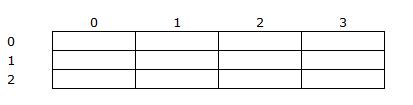
Suppose a programmer wants to represent the two-dimensional array Exforsys as an array with three rows and four columns all having integer elements. This would be represented in C++ as:


int Exforsys[3][4];


It is represented internally as:


Exforsys
Data Type: int

 
0
1
2
3
0


1


2


How to access the elements in the Multidimensional Array

Exforsys
Data Type: int


0
1
2
3
0


1


2


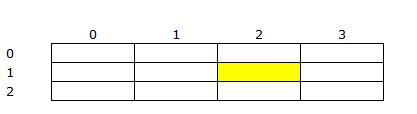
Highlighted cell represent Exforsys[1][2]


Based on the above two-dimensional arrays, it is possible to handle multidimensional arrays of any number of rows and columns in C++ programming language. This is all occupied in memory. Better utilization of memory must also be made.


Multidimensional Array Example: 


#include <iostream.h>
const int ROW=4;
const int COLUMN =3;
void main()
{
   int i,j;
   int Exforsys[ROW][COLUMN];
   for(i=0;i<ROWS;i++)
   for(j=0;j<COLUMN;J++)
   {
   cout << "Enter value of Row "<<i+1;
   cout<<",Column "<<j+1<<":";
   cin>>Exforsys[i][j];
   }
   cout<<"\n\n\n";
   cout<< " COLUMN\n";
   cout<< " 1 2 3";
   for(i=0;i<ROW;i++)
   {
   cout<<"\nROW "<<i+1;
   for(j=0;j<COLUMN;J++)
   cout<<Exforsys[i][j];
}


The output of the above program is


Enter value of Row 1, Column 1:10
Enter value of Row 1, Column 2:20
Enter value of Row 1, Column 3:30
Enter value of Row 2, Column 1:40
Enter value of Row 2, Column 2:50
Enter value of Row 2, Column 3:60
Enter value of Row 3, Column 1:70
Enter value of Row 3, Column 2:80
Enter value of Row 3, Column 3:90
Enter value of Row 4, Column 1:100
Enter value of Row 4, Column 2:110
Enter value of Row 4, Column 3:120


         COLUMN
        1   2   3
ROW 1  10  20  30
ROW 2  40  50  60
ROW 3  70  80  90
ROW 4 100 110 120


In the above example, the keyword const (specifying constant) precedes the data type that specifies the variable ROW and COLUMN to remain unchanged in value throughout the program. This is used for defining the array Exforsys ROW size and COLUMN size, respectively.


Read Next: C++ Structure


Comments


sunil m dogra said:

  I have problem in defing the dimensions in c
I have an array as follows

myArray[999999999][77777]
but when I run my program it just bumps out and when I lower the values to 10000 & 3000, it give error that array dimenions ouyt of range.
any help will be appreciated
thanks
regards
December 10, 2006, 10:07 pm

adeesh said:

  very good notes this site have
November 18, 2008, 3:44 am

Aadil Prabhakar said:

  ...int i,j;
int Exforsys[ROW][COLUMN];
for(i=0;i<ROWS;i++)
for(j=0;j<COLUMN;J++)
{...

Please correct the code, in the inner loop you are increasing J not j,
please rectify
thanks
December 6, 2008, 12:36 pm

Zach said:

  A mere two years later, I'll answer the first question; why "myArray[999999999][77777]" won't work.

Supposing you use the smallest C datatype - char - for your array, this means you have 999999999 * 77777 = 77777777777770 chars, or about 60 billion paper pages.

A char takes up one byte (fancy, that), making it easy to calculate the space this would use in memory;
74,174,669.1 MiB, or 74 TiB. Do you have 74 terabytes of memory? I think not (yet, anyway).

---

But how about the way smaller [10000][3000] array?
30,000,000 B = 30 MiB. That should be able to work just fine using chars, so my guess is you're using something else.

A long int on an x86-machine uses 4 bytes of memory, leaving us at 120 MiB.

Suppose you're using an array of doubles. Those come at 8 bytes a piece, bringing the total up to 240 MiB.

What if you use a struct - say, "struct { double x, y, z; } point3d;".
An array of that would be "struct point3d myArray[10000][3000].
That weights in at almost ¾ GiB of RAM.

At least with values as small as can be counted in megabytes, the program has the decency to tell you that your array dimensions are out of range.

---

In conclusion, the number of items in a multidimensional array is the dimensions multiplied;

char array[4][3] // Twelve chars.
char array[2][4][3] // Twenty-four chars.
char array[2][2][2][2][2][2][2][2] // 256 chars.
char array[1000][2] // Two thousand chars.

... I think you get the idea.
December 16, 2008, 4:38 pm

mselema the great said:

  i got a problem in sorting this multidimensional arrays.is there any simple syntax one can follow in sorting out the arrays?since the procedures i meet in different books seems to be difficult for me to understand!with great regards!!!!
December 29, 2008, 3:31 am

LJ said:

  I have problem in defing the dimensions in c
I have an array as follows

>> myArray[999999999][77777]
>> but when I run my program it just bumps out and when I lower
>> the values to 10000 & 3000, it give error that array dimenions >> ouyt of range.
>> any help will be appreciated
>> thanks
>> regards

The Myarray which you have defined is static allocation. But you have not specicifed for which type of data you have specififed the array. So if your RAM doesn't have the number of bytes specified ( any type[ int, float, double, char]) this will give you an error.
June 8, 2009, 2:59 am

Austin said:

  Can anyone tell me how to put an single dimentional array into a multi dimentional array... ex.

int singarray[7]={0,1,2,3,4,5,6};
int multarray[7][4]={singarray,singarray,singarray,singarray};

-I want mult array to equal {{0,1,2,3,4,5,6},{0,1,2,3,4,5,6},{0,1,2,3,4,5,6},{0,1,2,3,4,5,6}}
August 8, 2009, 7:34 pm

Dan said:

  Austin,

First you will want to size your multarray to [4][7] (think of it as 4 sized 7 arrays). Unfortunately, you can't provide the singarray as a constructor argument to the multarray. You could do it in a simple for loop, though.

for (int i=0; i<4; ++i)
for (int j=0; j<7; ++j)
multarray[i][j] = singarray[j];
October 26, 2009, 12:54 pm

Post Your Comment:

Members Please Login
Your Name:*
e-mail ID:(required for notification)*
Image Verification: 
 
 Subscribe    

Sponsored Links


Subscribe via RSS


Get Daily Updates via Subscribe to Exforsys Free Training via email


Get Latest Free Training Updates delivered directly to your Inbox...

Enter your email address:


Subscribe to Exforsys Free Training via RSS


Partners -  Privacy and Legal Policy -  Site News -  Contact   Sitemap  

Copyright © 2000 - 2010 exforsys.com. All Rights Reserved

Page copy protected against web site content infringement by Copyscape