Exception can be defined as the state of an entity, which is different from its conventional and normal behavior. In context to programming language, exception refers to the abnormal situation in the normal flow of the program. Oracle server raises exception whenever it encounters a logical violation of the flow during program execution.
I have listed the common situations which end up raising exceptions and subsequently termination of the program.
- Design Faults and illogical flow
- Exception propagation from referenced program unit
- Coding mistakes
- Hardware failures
Exception Propagation in a Program Unit
The figure below shows the program flow, which is followed when an exception situation occurs in the PL/SQL block and the exception has been handled. Once the exception has been raised and trapped, and the control moves to EXCEPTION section, the program propagates in the forward direction.
If the exception has not been handled, the program terminates abruptly or propagates to the calling environment.

Fig 1a: Program flow when the Exception has been trapped and handled

Fig 1b: Program flow when the Exception has not been handled
Exception Handling
Exceptions can be trapped in the EXCEPTION section of a PL/SQL block. Oracle supports two ways to raise exception in a program, implicitly or explicitly.
Exceptions which are automatically raised by the oracle server fall under the category of implicit way raising an exception. PL/SQL runtime engine identifies the abnormal flow and raises the exception. For example, NO_DATA_FOUND or TOO_MANY_ROWS are the system defined exceptions which are raised by the server during program execution.
Exceptions which are trapped in executable section and handled in the EXCEPTION block by the programmer are explicit ways raising exceptions. In this category, a user can either explicitly raise an already existing system defined exception or create a new exception and invoke in the program.
Syntax [1]
EXCEPTION
  WHEN exception1 [OR exception2 . . .] THEN
    statement1;
    statement2;
    . . .
  [WHEN exception3 [OR exception4 . . .] THEN
    statement1;
    statement2;
    . . .]
  [WHEN OTHERS THEN
    statement1;
    statement2;
    . . .]
In the syntax, a single WHEN-THEN statement is called as Exception Handler. Likewise, there can be multiple exception handlers in the EXCEPTION section of a PL/SQL block. An exception handler consists of exception name and set of statements, which would be executed once the exception has been raised. An exception handler can have more than one exception aligned using OR operator. So, the same action would be applicable for multiple exceptions.
Out of multiple exception handlers, only one can be executed at a time before the termination of the block.
One exception handler handles a single exception. Repetitive handling of an exception is not allowed in a single block.
Exception Trapping Functions: SQLCODE and SQLERRM
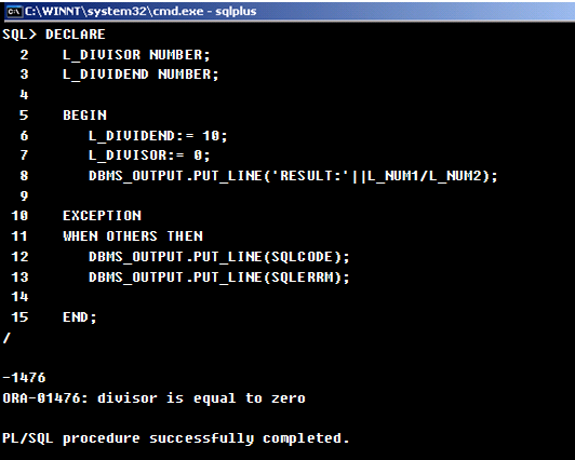
Oracle uses two built in functions for catching exceptions and getting its information, SQLCODE and SQLERRM.
SQLCODE returns the error number for the latest occurred exception in the PL/SQL block, while SQLERRM returns the error message associated with the latter error number.
Code [1]:
The screen dump below shows the usage of SQLCODE and SQLERRM in a program.

Pre Defined Exceptions
Oracle maintains set of defined exceptions, which are implicitly raised by the server, if an abnormal situation occurs in the program. The table below lists some of the commonly occurring exceptions.
|
Error |
Named Exception |
|
ORA-00001 |
DUP_VAL_ON_INDEX |
|
ORA-01001 |
INVALID_CURSOR |
|
ORA-01012 |
NOT_LOGGED_ON |
|
ORA-01017 |
LOGIN_DENIED |
|
ORA-01403 |
NO_DATA_FOUND |
|
ORA-01422 |
TOO_MANY_ROWS |
|
ORA-01476 |
ZERO_DIVIDE |
|
ORA-01722 |
INVALID_NUMBER |
|
ORA-06504 |
ROWTYPE_MISMATCH |
|
ORA-06511 |
CURSOR_ALREADY_OPEN |
|
ORA-06530 |
ACCESS_INTO_NULL |
|
ORA-06531 |
COLLECTION_IS_NULL |
|
ORA-06532 |
SUBSCRIPT_OUTSIDE_LIMIT |
|
ORA-06533 |
SUBSCRIPT_BEYOND_COUNT |
Raising Exceptions Implicitly
These exceptions are automatically processed and raised by Oracle server.
As soon as Oracle server encounters any illogical flow in the program flow, it stops further execution of program, identifies and throws the appropriate exception; program terminates abruptly.
Refer the example illustration below.
Code [2]:
In the below PL/SQL block, a test message is displayed before and after the SELECT statement. The SELECT statement selects multiple rows through an SQL cursor. Since the query returns multiple rows, it raises an exception. As soon as the exception is raised, control jumps to the EXCEPTION section, skipping the further statements in executable section of the block. The message after the query was not displayed.
DECLARE
   L_DEPTID NUMBER := 10;
   L_ENAME VARCHAR2(100);
   L_SAL NUMBER;
BEGIN
   DBMS_OUTPUT.PUT_LINE('Before SQL query');

   SELECT EMPLOYEE_NAME,SALARY
   INTO L_ENAME, L_SAL
   FROM EMPLOYEES
   WHERE DEPARTMENT_ID = L_DEPTID;

   DBMS_OUTPUT.PUT_LINE('After SQL query');
END;
/

BEFORE SQL query
DECLARE
*
ERROR at line 1:
ORA-01422: exact fetch RETURNS more than requested NUMBER OF ROWS
ORA-06512: at line 7
The above block also complies with the fact that the once the exception scenario is identified, server skips the execution of the further statements in the block and terminates immediately. For this reason, the second test message doesn’t appear in the output.
Raising Exception Explicitly: System Defined and User Defined Exceptions
A developer can explicitly raise the system defined exceptions. In the Code [], the TOO_MANY_ROWS exception can be captured by defining an exception handler in the EXCEPTION section.
Code [3]
In the below PL/SQL code, TOO_MANY_ROWS exception has been explicitly trapped by the developer bypass the situation (abnormal termination) with an informative message in the application.
DECLARE
   L_DEPTID NUMBER := 10;
   L_ENAME VARCHAR2(100);
   L_SAL NUMBER;
BEGIN
   DBMS_OUTPUT.PUT_LINE('Before SQL query');
   SELECT EMPLOYEE_NAME,SALARY
   INTO L_ENAME, L_SAL
   FROM EMPLOYEES
   WHERE DEPARTMENT_ID = L_DEPTID;
   DBMS_OUTPUT.PUT_LINE('After SQL query');
EXCEPTION
   WHEN TOO_MANY_ROWS THEN
     DBMS_OUTPUT.PUT_LINE ('Use Oracle Bulk Collect feature or Cursor to select multiple rows from a table');
END;
/

BEFORE SQL query
USE Oracle Bulk Collect feature OR Cursor TO SELECT multiple ROWS FROM a TABLE

PL/SQL PROCEDURE successfully completed.
An exception handler may contain alternate operations to be performed at the situations of exception in the program.
System defined exceptions can be the part of business logic too. If a business logic implementation or conditional logic requires a system defined exception to be raised, it can be achieved using RAISE statement. Check the example below.
Code [4]:
Oracle raises NO_DATA_FOUND exception, when the SQL query in the executable section returns no records. To avoid the exception, it can be rewritten using a PL/SQL cursor, without omitting the exception action. System defined exception can be explicitly raised by the programmer like below.
DECLARE
   L_DEPTID NUMBER := 15;
   L_ENAME VARCHAR2(100);
   L_SAL NUMBER;
CURSOR C IS
   SELECT EMPLOYEE_NAME,SALARY
   FROM EMPLOYEES
   WHERE DEPARTMENT_ID = L_DEPTID;
BEGIN
   DBMS_OUTPUT.PUT_LINE('Before SQL query');
   OPEN C;
   FETCH C INTO L_ENAME, L_SAL;
   IF C%ROWCOUNT = 0 THEN
      RAISE NO_DATA_FOUND;
   END IF;
   CLOSE C;
   DBMS_OUTPUT.PUT_LINE('After SQL query');
EXCEPTION
   WHEN NO_DATA_FOUND THEN
     DBMS_OUTPUT.PUT_LINE ('No Employees in the department');
END;
/

BEFORE SQL query
No Employees IN the department

PL/SQL PROCEDURE successfully completed.
User Defined Exceptions
User defined exceptions allow the developers to create their own customized exceptions and raise them within the program wherever required. They are declared in the DECLARE section of the block with type as EXCEPTION and raised using RAISE statement.
This feature gives them flexibility to create exception with their convenient name, which can be more handful for use and easy to remember in large formulated applications.
Code [5]:
The PL/SQL block used in the earlier examples has been reused to declare a user defined exception LOCAL_EXCEPTION. It is raised at the same logic (when no employees exist in a department) using RAISE statement.
DECLARE
   L_DEPTID NUMBER := 15;
   L_ENAME VARCHAR2(100);
   L_SAL NUMBER;
   LOCAL_EXCEPTION EXCEPTION;
CURSOR C IS
   SELECT EMPLOYEE_NAME,SALARY
   FROM EMPLOYEES
   WHERE DEPARTMENT_ID = L_DEPTID;
BEGIN
   DBMS_OUTPUT.PUT_LINE('Before SQL query');
   OPEN C;
   FETCH C INTO L_ENAME, L_SAL;
   IF C%ROWCOUNT =0 THEN
      RAISE LOCAL_EXCEPTION;
   END IF;
   CLOSE C;
   DBMS_OUTPUT.PUT_LINE('After SQL query');
EXCEPTION
   WHEN LOCAL_EXCEPTION THEN
     DBMS_OUTPUT.PUT_LINE ('No Employees in the department');
END;
/

BEFORE SQL query
No Employees IN the department

PL/SQL PROCEDURE successfully completed.
Associating a User Defined Exception with an Error Number (or Exception Code)
A user defined exception can be associated with an error number using PRAGMA EXCEPTION_INIT. The pragma is a compiler directive which hints the compiler to accept the directions provided in the program. The PRAGMA EXCEPTION_INIT directs the compiler to align the user defined exception with a self assigned error number. The error number must be one of the valid ORA error codes, which are defined by the server.
Syntax [2]
PRAGMA EXCEPTION_INIT([EX NAME],[ERROR NUMBER], [TRUE | FALSE])
Code [6]
In the PL/SQL block below, the LOCAL_EXCEPTION exception is linked with the error number -100 through the PRAGMA EXCEPTION_INIT. Note the usage of SQLCODE, which returns the same associated error number.
DECLARE
   L_DEPTID NUMBER := 15;
   L_ENAME VARCHAR2(100);
   L_SAL NUMBER;
   LOCAL_EXCEPTION EXCEPTION;
   PRAGMA EXCEPTION_INIT(LOCAL_EXCEPTION, -100);
CURSOR C IS
   SELECT EMPLOYEE_NAME,SALARY
   FROM EMPLOYEES
   WHERE DEPARTMENT_ID = L_DEPTID;
BEGIN
   DBMS_OUTPUT.PUT_LINE('Before SQL query');
   OPEN C;
   FETCH C INTO L_ENAME, L_SAL;
   IF C%ROWCOUNT =0 THEN
      RAISE LOCAL_EXCEPTION;
   END IF;
   CLOSE C;
   DBMS_OUTPUT.PUT_LINE('After SQL query');
EXCEPTION
   WHEN LOCAL_EXCEPTION THEN
     DBMS_OUTPUT.PUT_LINE (‘Exception Error NUMBER:’||SQLCODE);
     DBMS_OUTPUT.PUT_LINE ('No Employees in the department');
END;
/

BEFORE SQL query
Exception Error NUMBER:-100
No Employees IN the department

PL/SQL PROCEDURE successfully completed.
Customizing the Error Numbers: RAISE_APPLICATION_ERROR
Oracle facilitates the developer by privileging them to create an error number of their own choice and associating them with a customized message. RAISE_APPLICATION_ERROR is an Oracle API, which allows choosing the error numbers in range of -20000 to -20999 and fix them with an error message
It can be used in executable section or exception section in a PL/SQL block.
Syntax [3]
RAISE_APPLICATION_ERROR (error_number, error_message[, {TRUE | FALSE}])
Code [7]
DECLARE
   L_DEPTID NUMBER := 15;
   L_ENAME VARCHAR2(100);
   L_SAL NUMBER;
CURSOR C IS
   SELECT EMPLOYEE_NAME,SALARY
   FROM EMPLOYEES
   WHERE DEPARTMENT_ID = L_DEPTID;
BEGIN
   DBMS_OUTPUT.PUT_LINE('Before SQL query');
   OPEN C;
   FETCH C INTO L_ENAME, L_SAL;
   IF C%ROWCOUNT =0 THEN
      RAISE_APPLICATION_ERROR(-20001,' No Employees in the department');
   END IF;
   CLOSE C;
   DBMS_OUTPUT.PUT_LINE('After SQL query');
END;
/

BEFORE SQL query
DECLARE
*
ERROR at line 1:
ORA-20001:  No Employees IN the department
ORA-06512: at line 14
[catlist id=185].