UTL_FILE is an oracle supplied built in package, which can be used for text file operations located within a file system. The file system can exist either on the server side or on the client machine.
The files accessed or operated by UTL_FILE are clear text files and not the binary files due to its incapability to handle the special characters.
File Access Philosophy
UTL_FILE cannot directly access any of the files located on the operating systems, but this is made possible through database directories. The DBA creates the server side directory for the file, on which the user must possess read and write access before using it in UTL_FILE operation.
If the target file location is on the server machine operating system, UTL_FILE has no access restrictions. But if the file location is a client machine, UTL_FILE has access only to those locations, which are shared and accessible from the server.
Prior to Oracle 10g, UTL_FILE operations used to be dependent upon a parameter UTL_FILE_DIR. All the directories to be used have to be registered under this parameter. But since its irrelevant dependency was identified, it was deprecated and direct usage of the directory object is recommended. Directory method provides direct and dynamic verification of the file path location.
Database Directories
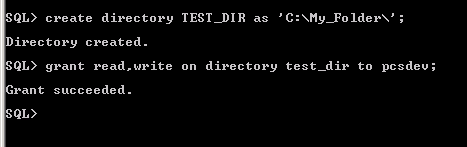
As stated earlier, database directories are server side objects which point to a specific location on a system. The location can be either on the database server or on the client machine. By default, only SYSDBA enjoys the CREATE ANY DIRECTORY system privilege, so only a DBA can create the directory upon request. The user, who is using the directory, must have read/write access on it. Check the Syntax below to create the directory
If the location is on the server operating system, directory has to be created with the actual path.
Syntax
CREATE DIRECTORY [DIRECTORY NAME] AS [SPECIFIC ACTUAL FILE PATH];
Example Code

If the location is on the client machine, the path needs to be shared and directory has to be created with the relative path. Relative path includes the client machine name and the shared path.
Syntax
CREATE DIRECTORY [DIRECTORY NAME] AS [RELATIVE PATH]
Example Code

Note that the path verification process is not done during the directory creation. It is only during its use in UTL_FILE operation, when the associated path is verified and acted accordingly.
{mospagebreak}
UTL_FILE: Subcomponents
I shall list the public constructs/components of UTL_FILE package specification categorized according to their area of operation.
Type
FILE_TYPE is a record type, which is a public construct of UTL_FILE package. It is used to declare a UTL_FILE file handler, which is mandatory in majority of UTL_FILE operations, starting from opening of the file till closing it.
The structure of the record is as below
TYPE file_type IS RECORD
(
id BINARY_INTEGER,
datatype BINARY_INTEGER
)
Since the file handler components are private to UTL_FILE, any reference to the record type attributes would raise an exception.
UTL_FILE contains subprograms to open a file in specified mode, verify directory path and file existence, read or write data into the file, and closing it. I shall present them in order of their operational utility.
Verification
IS_OPEN
Subprogram Name: IS_OPEN Subprogram Type: Function Syntax:
UTL_FILE.IS_OPEN (FILE IN FILE_TYPE)
RETURN BOOLEAN;
Description: The function checks for a file handler, whether it points to an open file or not.
Open
The OPEN utility lists the UTL_FILE methods which are used to open a disk file.
FOPEN function
Subprogram Name: FOPEN Subprogram Type: Function Syntax:
UTL_FILE.FOPEN (
location IN VARCHAR2,
filename IN VARCHAR2,
open_mode IN VARCHAR2,
max_linesize IN BINARY_INTEGER)
RETURN file_type;
Description: The function opens a file from the directory in the specified mode and assigns the file handler with the appropriate file id. The directory specification is case sensitive and must be accessible to the user. If the file open process succeeds, it returns a file handler, else raises appropriate exception. The file with the specified ‘filename’ must exist at the directory location for read/write operations. Note that the file handler retuned during OPEN operation has to be used in all subsequent file operations.
The modes can be any of ‘r’ for Read Text, ’w’ for Write Text, ’a’ for Append Text, ’rb’ for Read byte mode, ’wb’ for Write byte mode or ’ab’ for Append byte mode. The modes ‘a’ and ‘ab’ have the ability of creating a new file in write mode, if it doesn’t exists at the time of specification.
The last parameter max_linesize is the maximum length of the characters in a line of the file. The value lies in the range of 1to 32767. By default, its value is 1024.
FOPEN_NCHAR Function
Subprogram Name: FOPEN_NCHAR Subprogram Type: Function Syntax:
UTL_FILE.FOPEN_NCHAR (
location IN VARCHAR2,
filename IN VARCHAR2,
open_mode IN VARCHAR2,
max_linesize IN BINARY_INTEGER)
RETURN file_type;
Description: The function works similar to the FOPEN function but different in the character set mode. It opens the file in national character set mode for all operations, which is different from the database character set. The parameter legends remain the same as that of FOPEN.
Read
The section lists the UTL_FILE subprograms which deal with read operations on the file.
GET_LINE Procedure
Subprogram Name: GET_LINE Subprogram Type: Procedure Syntax:
UTL_FILE.GET_LINE (
FILE IN FILE_TYPE,
buffer OUT VARCHAR2,
len IN PLS_INTEGER DEFAULT NULL);
Description: The procedure returns a text contained by the file. The file, in read mode, allows a line of text to be read and assigned to the out ‘buffer’ parameter. ‘LEN’ specifies the characters of line to be read in each attempt. If it is null, then the procedure reads the line till the line is terminated, provided the length is less than the max_linesize.
GET_LINE_NCHAR Procedure
Subprogram Name: GET_LINE _NCHAR Subprogram Type: Procedure Syntax:
UTL_FILE.GET_LINE_NCHAR (
FILE IN FILE_TYPE,
buffer OUT NVARCHAR2,
len IN PLS_INTEGER DEFAULT NULL);
Description: Its role is same as that of GET_LINE. But the difference is with the character sets. It follows Unicode set instead of database character set. The file must be opened in national character set mode and must be encoded in UTF8 character set.
GET_RAW Function
Subprogram Name: GET_RAW Subprogram Type: Procedure Syntax:
UTL_FILE.GET_RAW (
fid IN utl_file.file_type,
r OUT NOCOPY RAW,
len IN PLS_INTEGER DEFAULT NULL);
Description: This procedure too works similar to GET_LINE. But it reads RAW data from the file, while later reads a text file in regular format.
Write
The section lists the UTL_FILE subprograms which are used for ‘write’ operations on a file.
NEW_LINE Procedure
Subprogram Name: NEW_LINE Subprogram Type: Procedure Syntax:
UTL_FILE.NEW_LINE (
FILE IN FILE_TYPE,
lines IN NATURAL := 1);
Description: The procedure writes a new line character into the file, under Write operation.
{mospagebreak}
PUT Procedure
Subprogram Name: PUT Subprogram Type: Procedure Syntax:
UTL_FILE.PUT (
FILE IN FILE_TYPE,
buffer IN VARCHAR2);
Description: The procedure writes a text in the file, which is under Write operation. Note that is has ability to just write a piece of text into the file, but fails to change the line. Actually, it writes the text to the file buffer, which can hold maximum of 32767 bytes.
PUT_LINE Procedure
Subprogram Name: PUT_LINE Subprogram Type: Procedure Syntax:
UTL_FILE.PUT_LINE (
FILE IN FILE_TYPE,
buffer IN VARCHAR2,
autoflush IN BOOLEAN DEFAULT FALSE);
Description: The procedure achieves the same purpose as that by PUT procedure. Only difference is that it appends the text with the line terminator. As a pre-requisite, the file must be in Write mode.
PUT_LINE_NCHAR Procedure
Subprogram Name: PUT_LINE_NCHAR Subprogram Type: Procedure Syntax:
UTL_FILE.PUT_LINE_NCHAR ( FILE IN FILE_TYPE,
buffer IN NVARCHAR2);
Description: The procedure is the analogous of PUT_LINE to support national character set.
PUT_NCHAR Procedure
Subprogram Name: PUT_NCHAR Subprogram Type: Procedure Syntax:
UTL_FILE.PUT_NCHAR ( FILE IN FILE_TYPE,
buffer IN NVARCHAR2);
Description: The procedure is the analogous of PUT to support national character set.
PUTF Procedure
Subprogram Name: PUTF Subprogram Type: Procedure Syntax:
UTL_FILE.PUTF (
FILE IN FILE_TYPE,
format IN VARCHAR2,
[arg1 IN VARCHAR2 DEFAULT NULL,
. . .
arg5 IN VARCHAR2 DEFAULT NULL]);
Description: The procedure is a formatted form of PUT with many options like new line and substitution in main text to be written into the file. Argument 1 to 5 in the Syntax denotes the substitutable text in the main text. All occurrences of %s in the main text would be replaced by these texts in sequence. For example, first occurrence would be replaced by Argument 1, second with Argument 2 and so on. The main text ‘Format’ can also have new line character ‘n’.
PUTF_NCHAR Procedure
Subprogram Name: PUTF_NCHAR Subprogram Type: Procedure Syntax:
UTL_FILE.PUTF_NCHAR (
FILE IN FILE_TYPE,
format IN NVARCHAR2,
[arg1 IN NVARCHAR2 DEFAULT NULL,
. . .
arg5 IN NVARCHAR2 DEFAULT NULL]);
Description: The procedure is national character set supported version of PUTF.
PUT_RAW Function
Subprogram Name: PUTF_RAW Subprogram Type: Procedure Syntax:
UTL_FILE.PUT_RAW (
fid IN utl_file.file_type,
fir IN RAW,
autoflush IN BOOLEAN DEFAULT FALSE);
Description: Like PUT function, it accepts RAW value and writes to the buffer, which in turn would be written into the file. If the ‘Auto flush’ is true, buffer content would be immediately written into the file and buffer would be flushed off.
FFLUSH Procedure
Subprogram Name: FFLUSH Subprogram Type: Procedure Syntax:
UTL_FILE.FFLUSH (FILE IN FILE_TYPE);
Description: The procedure forcefully writes the buffered data immediately into the file.
FCOPY Procedure
Subprogram Name: FCOPY Subprogram Type: Procedure Syntax:
UTL_FILE.FCOPY (
src_location IN VARCHAR2,
src_filename IN VARCHAR2,
dest_location IN VARCHAR2,
dest_filename IN VARCHAR2,
start_line IN BINARY_INTEGER DEFAULT 1,
end_line IN BINARY_INTEGER DEFAULT NULL);
Description: The UTL_FILE procedure copies a portion of content from one file (source) to another file (target). The portion of the content is specified using ‘Start Line’ and ‘End Line’ of the source file. The source file must be opened in Read mode, while the target file should be in Write mode.
Close
The section lists the UTL_FILE subprograms which are used to close a file.
FCLOSE Procedure
Subprogram Name: FCLOSE Subprogram Type: Procedure Syntax:
UTL_FILE.FCLOSE (FILE IN OUT FILE_TYPE);
Description: The procedure closes a file, which is currently held by the input file handler.
FCLOSE_ALL Procedure
Subprogram Name: FCLOSE_ALL Subprogram Type: Procedure Syntax:
UTL_FILE.FCLOSE_ALL;
Description: The procedure is used to close all the file handlers of the current session.
Common tasks
The section lists the UTL_FILE subprograms which perform useful activity related to file operations.
FGETATTR Procedure
Subprogram Name: FGETATTR Subprogram Type: Procedure Syntax:
UTL_FILE.FGETATTR(
location IN VARCHAR2,
filename IN VARCHAR2,
fexists OUT BOOLEAN,
file_length OUT NUMBER,
blocksize OUT BINARY_INTEGER);
Description: The procedure is used to retrieve the file statistics on the storage disk.
FGETPOS Function
Subprogram Name: FGETPOS Subprogram Type: Function Syntax:
UTL_FILE.FGETPOS ( fileid IN file_type) RETURN PLS_INTEGER;
Description: The function returns the offset position in a file under operation.
FREMOVE Procedure
Subprogram Name: FREMOVE Subprogram Type: Procedure Syntax:
UTL_FILE.FREMOVE (
location IN VARCHAR2,
filename IN VARCHAR2);
Description: The procedure deletes the given file from the specified directory location.
FRENAME Procedure
Subprogram Name: FRENAME Subprogram Type: Procedure Syntax:
UTL_FILE.FRENAME (
location IN VARCHAR2,
filename IN VARCHAR2,
dest_dir IN VARCHAR2,
dest_file IN VARCHAR2,
overwrite IN BOOLEAN DEFAULT FALSE);
Description: In UNIX, we have ‘MV’ command, whose ability to move the file contents between locations, is applied to rename an existing file. FRENAME is an analogous of MV command in oracle. It takes source file specification and destination file specification as inputs. Destination file specification is the new directory and name of the file.
‘Overwrite’ parameter allows overwriting of contents in a file, if the new file created by the program already exists in the location. By default, it is FALSE.
FSEEK Procedure
Subprogram Name: FSEEK Subprogram Type: Procedure Syntax:
UTL_FILE.FSEEK (
fid IN utl_file.file_type,
absolute_offset IN PL_INTEGER DEFAULT NULL,
relative_offset IN PLS_INTEGER DEFAULT NULL);
Description: The procedure moves the file pointer within a file. It either moves to an absolute position (absolute offset) or moves from its current position in terms of bytes (relative offset).
{mospagebreak}
UTL_FILE: Handling Exceptions
There are situations where UTL_FILE fails to operate due to junk input to subprogram or junk data in the source text file. Apart from normal NO_DATA_FOUND and VALUE_ERROR, UTL_FILE maintains list of exceptions pre-defined in its specification, as listed below.
Exception Remarks
- INVALID_PATH Raised if the file location is invalid
- INVALID_MODE Raised when invalid open mode parameter is given in FOPEN subprogram
- INVALID_FILEHANDLE Raised for invalid file handle
- INVALID_OPERATION Raised when invalid operation is attempted on a file
- READ_ERROR Raised when operating system fails complete read operation
- WRITE_ERROR Raised when operating system fails complete write operation
- INTERNAL_ERROR Raised due to unspecified PL/SQL error
- CHARSETMISMATCH Raised due to mismatch in character sets of FOPEN and
- PUTF/GET_LINE FILE_OPEN Raised when the file is already open
- INVALID_MAXLINESIZE Raised when MAX_LINESIZE crosses its range i.e. 1..32767
- INVALID_FILENAME Raised if invalid filename is attempted for open
- ACCESS_DENIED Raised if the directory is not accessible to the user
- INVALID_OFFSET Raised under below conditions
- ABSOLUTE_OFFSET = NULL and RELATIVE_OFFSET = NULL, or
- ABSOLUTE_OFFSET < 0, or
- Either offset caused a seek past the end of the file
- DELETE_FAILED Raised when delete operation on the file fails
- RENAME_FAILED Raised when rename operation on the file fails
Have a look at the sample EXCEPTION block which contains all the UTL_FILE exception handlers. It uses RAISE_APPLICATION_ERROR to customize the associated error message.
EXCEPTION
WHEN utl_file.invalid_path THEN
raise_application_error(-20001,'Invalid directory path or file name');
WHEN utl_file.invalid_mode THEN
raise_application_error(-20002,'Invalid mode for the file operation');
WHEN utl_file.invalid_filehandle THEN
raise_application_error(-20002,'Invalid file handler encountered');
WHEN utl_file.invalid_operation THEN
raise_application_error(-20003,'Invalid operation request on the file');
WHEN utl_file.read_error THEN
raise_application_error(-20004,'System error occurred during read operation');
WHEN utl_file.write_error THEN
raise_application_error(-20004,'System error occurred during write operation');
WHEN utl_file.internal_error THEN
raise_application_error(-20006,'System error occurred during UTL_FILE
operation');
END;
Examples and Illustrations
I have a file TestFile.txt at a drive location. The DBA creates the directory UTLDIR to access the content of the file.
The PL/SQL block below reads and displays the contents of the file.
DECLARE
LH UTL_FILE.FILE_TYPE;
L_TXT VARCHAR2(1000);
BEGIN
LH := UTL_FILE.FOPEN('UTLDIR','TESTFILE.TXT','R');
LOOP
UTL_FILE.GET_LINE(LH, L_TXT);
DBMS_OUTPUT.PUT_LINE(L_TXT);
END LOOP;
EXCEPTION
WHEN NO_DATA_FOUND THEN
UTL_FILE.FCLOSE(LH);
END;
/
Testing UTL_FILE read operation
Operation SUCCESSFUL
PL/SQL PROCEDURE successfully completed.
Append Operation:
Now, if I shall demonstrate the addition/writing of content into the above file. Note that the file is not empty and already holds the data. Therefore, new data has to be appended to it.
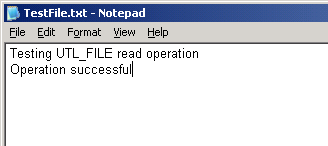
Check the content of the TestFile.txt before ‘Append’ operation.
The PL/SQL block below writes a line in the above view.
DECLARE
LH UTL_FILE.FILE_TYPE;
L_TXT VARCHAR2(1000);
BEGIN
LH := UTL_FILE.FOPEN('UTLDIR','TESTFILE.TXT','A');
UTL_FILE.PUT_LINE(LH, 'Appended from PL/SQL');
EXCEPTION
WHEN NO_DATA_FOUND THEN
UTL_FILE.FCLOSE(LH);
END;
PL/SQL PROCEDURE successfully completed.
The snapshot of the file content after the execution of above block is pasted below.

Write operation:
If UTL_FILE fails to find the file, which is specified under Append mode, it creates it in the OS at the same directory location. The case is demonstrated by the below PL/SQL block.
DECLARE
LH UTL_FILE.FILE_TYPE;
L_TXT VARCHAR2(1000);
BEGIN
LH := UTL_FILE.FOPEN('UTLDIR','Demo_write_file.TXT','A');
UTL_FILE.PUT(LH, 'UTL_FILE is a great utility from Oracle to access OS files');
EXCEPTION
WHEN NO_DATA_FOUND THEN
UTL_FILE.FCLOSE(LH);
END;
PL/SQL PROCEDURE successfully completed.
Check the contents of the newly created file.

{mospagebreak}
FCOPY and FREMOVE
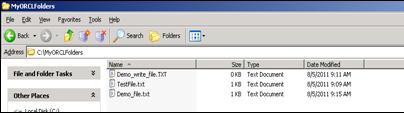
The screen dump below shows the file structure information of the directory UTLDIR.

Now, as per the requirement, I need to make a copy of Demo_file.txt in the same directory. The PL/SQL block below achieves the purpose.
DECLARE
LH UTL_FILE.FILE_TYPE;
L_TXT VARCHAR2(1000);
BEGIN
UTL_FILE.FCOPY('UTLDIR','Demo_file.txt','UTLDIR','Demo_file_moved.txt');
EXCEPTION
WHEN NO_DATA_FOUND THEN
UTL_FILE.FCLOSE(LH);
END;
PL/SQL PROCEDURE successfully completed.
Check the UTLDIR new file structure as below.

Similarly, FREMOVE is used to delete a file from a directory.
DECLARE
LH UTL_FILE.FILE_TYPE;
L_TXT VARCHAR2(1000);
BEGIN
UTL_FILE.FREMOVE('UTLDIR','Demo_file_moved.txt');
EXCEPTION
WHEN NO_DATA_FOUND THEN
UTL_FILE.FCLOSE(LH);
END;
Conclusion
In the tutorial, we saw the strength of the UTL_FILE operations. For static OS file management systems, UTL_FILE is one of the most frequent used utility in Oracle, where tasks like data loading and file operations can be easily carried out.
[catlist id=185].