1. What is Oracle Virtual Private Database(VPD)
Oracle has provided several solutions to ensure and secure the database. An efficient security policy not only prevents the database against the database corruption or hacking threats but also minimizes the risk of unprivileged user access. Several data security surveys have concluded that unauthorized data access to unprivileged users is a frequent severe threat to the data. Simple password settings, DBA roles and grants or user accounts are just not enough to monitor the data security of an organization.
The tutorial discusses one of the security methods which allow a user to see only the privileged data i.e. an explicit policy will restrict the user data access. The security feature is known as Virtual Private Database.
2. Virtual Private Database: The Need
Quite often, we encounter a traditional database design which follows the protocol of single Master server with multiple user accounts to access it.
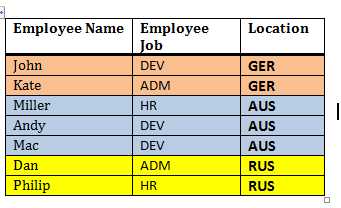
For instance, a table designed to hold the data for different sub-entities, each one of them differentiated by a key column. An employee table can hold the employees data flowing from all locations. Table structure and sample data can be as below.
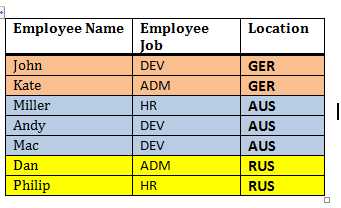
Now, a user from Australia (AUS) must have the privilege to view or modify employee details working in AUS only. Several options tend to achieve this problem
- Local servers must maintain only local data
- For Single master servers, one table per location must exist. Alternatively, separate views for each location can also be created.
- For single Master servers, each query must be filtered (WHERE clause) based on ‘Location’.
The third option seems most straightforward, basic oriented and self explanatory, but still runs the risk of data authorization. But it comes out with certain potential problems like code development, maintenance overhead, and most importantly The Protocol follow up; no surety of how soon the protocol would vanish in large applications.
Therefore, Oracle extended the same concept to create Virtual Private Database for each location, where a local user would be able to view the data from its respective VPD only.
From the above table, three abstract VPDs can be easily extracted. First VPD would hold employee data from GER, second one from AUS and third one from RUS.
3. Virtual Private Database: The understanding and implementation
VPD works with the help of security policies and context to ensure the fine grained control on database objects. Virtual Private database policy dynamically appends the WHERE clause in SELECT queries and DML operations on the target table or view or synonyms.
It enables the creation and setting of security policies, which ensure authorized data access at row and column level. Note that VPD actions and objectives are limited up to data access operations (query and DMLs) only and does not supports data definitions (DDL).
How it works?
Whenever a user tries to access a table, the VPD policy on the table is activated. The figure below shows the process of VPD policy evaluation and query execution.

So, if a user from AUS queries the EMPLOYEES table as
SELECT * FROM EMPLOYEES
The VPD policy function appends the LOCATION filter and the server rewrites the above query as
SELECT * FROM EMPLOYEES WHERE LOCATION=’AUS’
Since the VPD policy execution is dynamic, users cannot view the data from other locations.
4. VPD implementation
Implementation of VPD in database involves the below steps, which we shall discuss in detail thereafter.
- Create a Policy Function
- Attach the Policy function to the Table
4.1. Creating a Policy function
A Policy is a condition to filter the target data, which appears as virtual database for the authorized user. During its evaluation, the server executes and prepares the predicate i.e. the WHERE clause. It might be a performance hit since an extra amount of time is involved in the query execution. This cause branches a Policy into two categories, Static Policy and Dynamic Policy.
Static policies are the one which are evaluated only once for each query. In the first execution, the policy result is cached in SGA. Thus, for the subsequent executions of the same query, the cached policy function result is used.
Dynamic Policies are evaluated each time it is invoked.
4.2. Usage Notes
The Policy function must be created with definer’s rights, not with the Invoker’s rights.
- Policy functions can either hardcode the predicate condition (static) or use context attributes to define a predicate (dynamic).
- Multiple policies can be imposed on a table
4.3. Creating a Policy
Once the policy function is associated with a database object (Table, views or synonyms), the security policy creation process is completed. A policy handling is done using DBMS_RLS package subprograms. The package serves to achieve all the objectives in regards to row and column level security in database tables, view or synonyms. The DBA must grant EXECUTE privilege on the DBMS_RLS package to the user, which intends to implement VPD.
- DBMS_RLS.ADD_POLICY – Adds a policy to a table, view, or synonym
- DBMS_RLS.ENABLE_POLICY – Enables (or disables) a policy you previously added to a table, view, or synonym
- DBMS_RLS.REFRESH_POLICY – Invalidates cursors associated with non static policies
- DBMS_RLS.DROP_POLICY – To drop a policy from a table, view, or synonym
4.4. Illustration
4.4.1. In the master server (which can be accessed globally), EMPLOYEES table contains employee details (NAME, JOB and LOCATION) from various locations. A user from each location is able to see the details of the EMPLOYEES table.
SQL> SELECT * FROM EMPLOYEES;

EMPNAME    EMPJOB     LOCAT
---------- ---------- -----
John       DEV        GER
Kate       ADM        GER
Miller     HR         AUS
Andy       DEV        AUS
Mac        DEV        AUS
Dan        ADM        RUS
Philip     HR         RUS

7 ROWS selected.
The SCOTT user creates a policy function, which returns a condition to filter the LOCATION by AUS.
CREATE OR REPLACE FUNCTION F_LOC_POLICY (p_schema varchar2, p_obj varchar2)
RETURN VARCHAR2
IS
BEGIN
  RETURN 'LOCATION=''AUS''';
END;
/

FUNCTION created.
The above policy function can be used to create a Policy EMPLOCATION using DBMS_RLS package. Note the SQL statement type parameter to specify the VPD protected statements.
BEGIN
dbms_rls.add_policy
(object_schema => ‘SCOTT’,
object_name => ‘EMPLOYEES’,
policy_name => ‘EMPLOCATION’,
function_schema => ‘SCOTT’,
policy_function => ‘F_LOC_POLICY’,
statement_types => ‘SELECT, UPDATE, INSERT’,
update_check => TRUE );
END;
/
Query the EMPLOYEES table to get the employee which belong to AUS only
SQL> SELECT * FROM EMPLOYEES;

EMPNAME    EMPJOB     LOCAT
---------- ---------- -----
Miller     HR         AUS
Andy       DEV        AUS
Mac        DEV        AUS
5. Policy Function using Context attributes
The above Policy function uses hardcoded information to prepare the predicate. In large and extending application, it might violate the application standards. Since the predicate information is set for the user, it can make use of the persistent session variables. Let us catch up the Policy function using Contexts.
5.1. Context
Oracle defines certain attributes in key-value format under a label, which reveal relevant information about the user in a session. The label is known as ‘Namespace’, while key-value pair is a ‘Name-Value’ set. They are stored in a secure data cache of UGA (user Global Area) for session persistence and faster access in applications. A context can be created, modified and deleted.
Since the Policy predicate is a deemed feature of the user in a session, it can be realized as a context attribute.
5.1.1. Creation of a Context
The Context creation requires a trusted package, which has to be created by the user.
CONN SCOTT/TIGER
Connected.

SQL> CREATE OR REPLACE PACKAGE PKG_CONTEXT IS
  2  PROCEDURE P_SET_CONT (P_VAL VARCHAR2);
  3  END;
  4  /

Package created.
The package takes a value as input and assigns it to LOCATION attribute under LOC_CONTEXT namespace. The context shall be created using this namespace only.
SQL>  CREATE OR REPLACE PACKAGE BODY PKG_CONTEXT IS
  2    PROCEDURE P_SET_CONT (P_VAL VARCHAR2)
  3    IS
  4    BEGIN
  5       dbms_session.set_context(namespace => 'LOC_CONTEXT',
                                   attribute => 'LOCATION' ,
                                   VALUE => P_VAL);
  6    END;
  7   END;
  8  /

Package body created.
A DBA can create the context with the user’s trusted package
SQLPLUS / AS SYSDBA
Connected.

SQL> CREATE CONTEXT LOC_CONTEXT USING SCOTT.PKG_CONTEXT;

Context created.
5.1.2. Verify the Context Setting
CONN SCOTT/TIGER
Connected
Explicitly set the context by executing the Package PKG_CONTEXT
SQL> EXEC PKG_CONTEXT.P_SET_CONT;

PL/SQL PROCEDURE successfully completed.
Query the LOCATION attribute of namespace LOC_CONTEXT using SYS_CONTEXT function.
SQL>  SELECT SYS_CONTEXT('LOC_CONTEXT','LOCATION') FROM DUAL;

SYS_CONTEXT('LOC_CONTEXT','LOCATION')
-----------------------------------------
AUS
5.1.3. Re define the Policy Function
The policy function has to be modified to remove hardcoded predicate clause and include Context.
CREATE OR REPLACE FUNCTION F_LOC_POLICY (p_schema varchar2, p_obj varchar2)
RETURN VARCHAR2
IS
BEGIN
  RETURN 'LOCATION='||'sys_context(''LOC_CONTEXT'',''LOCATION'')';
END;

FUNCTION created.
5.1.4. Re associate the policy with the EMPLOYEES table
BEGIN
dbms_rls.add_policy
(object_schema => ‘SCOTT’,
object_name => ‘EMPLOYEES’,
policy_name => ‘EMPLOCATION’,
function_schema => ‘SCOTT’,
policy_function => ‘F_LOC_POLICY’,
statement_types => ‘SELECT, UPDATE, INSERT’,
update_check => TRUE );
END;
5.1.5. Verify the VPD policy by querying the table
SQL> SELECT * FROM EMPLOYEES;

EMPNAME    EMPJOB     LOCAT
---------- ---------- -----
Miller     HR         AUS
Andy       DEV        AUS
Mac        DEV        AUS
5.1.6. Create a LOGON trigger to automate the Context setting process for a user
To avoid explicit context setting, usually, DBAs set the context as soon as a user logs in to the database. This can be done by creating a LOGON trigger and invoking the context setting program.
SQLPLUS / AS SYSDBA
Connected.

CREATE OR REPLACE TRIGGER ON_LOGON
AFTER LOGON
ON DATABASE
BEGIN
IF USER='SCOTT' THEN
 SCOTT.PKG_CONTEXT.P_SET_CONT('AUS');
END IF;
END;
/

TRIGGER created.
5.1.7. Verify the working of the LOGON trigger
Disconnect and re-log into the database to observe the VPD effect
CONN SCOTT/TIGER
Connected.

SQL> SELECT * FROM employees;

EMPNAME              EMPJOB               LOCAT
-------------------- -------------------- -----
Miller               HR                   AUS
Andy                 DEV                  AUS
Mac                  DEV                  AUS
5.1.8. Modify the LOGON trigger definition to alter the context
For verification, I shall just change the context setting call during the LOGON trigger
SQLPLUS / AS SYSDBA
Connected.

CREATE OR REPLACE TRIGGER ON_LOGON
AFTER LOGON
ON DATABASE
BEGIN
IF USER='SCOTT' THEN
 SCOTT.PKG_CONTEXT.P_SET_CONT(‘GER’);
END IF;
END;

TRIGGER created.
SQL> SELECT * FROM employees;

EMPNAME              EMPJOB               LOCAT
-------------------- -------------------- -----
John                 DEV                  GER
Kate                 ADM                  GER
6. Column Level VPD
Similar to row level enforcement, VPD can be enforced at the column level also. It behaves in the same way but only when the specified columns are selected. The policy would not be activated if the specified columns are not queried or included in the SELECT statement.
The column specification has to be made in the DBMS_RLS package at the same time when policy function is aligned with the database table. The parameter ‘sec_relevant_cols’ accepts the list of columns to be protected under the Policy.
6.1. Define the policy EMP_COL_LOCATION. Note that LOCATION column has been secured with the policy F_LOC_POLICY against SELECT and DMLs.
BEGIN
DBMS_RLS.add_policy
(object_schema => 'SCOTT',
OBJECT_NAME => 'EMPLOYEES',
policy_name => 'EMP_COL_LOCATION',
function_schema => 'SCOTT',
POLICY_FUNCTION => 'F_LOC_POLICY',
STATEMENT_TYPES => 'SELECT, UPDATE, INSERT',
sec_relevant_cols => 'LOCATION' );
END;
6.2. Query the EMPLOYEES table without ‘*’ or LOCATION as a selectable
SQL> SELECT EMPNAME FROM employees;

EMPNAME
--------------------
John
Kate
Miller
Andy
Mac
Dan
Philip

7 ROWS selected.
6.3. Now select employee name along with their location. The query will be VPD protected.
SQL> SELECT EMPNAME, LOCATION FROM employees;

EMPNAME              LOCAT
-------------------- -----
John                 GER
Kate                 GER
7. Policy Metadata
The below data dictionary views hold the necessary information about the policies enforced upon the user.
- [ALL | USER]_POLICIES – The view contains the complete specification of a Policy. It holds the information of the policy function, protected SQL statements, and policy type information.
- [ALL | USER]_POLICY_GROUPS – Maintains the association of a Policy group with the object.
- [ALL | USER]_POLICY_CONTEXTS – Maintains the association of a Context with an object.
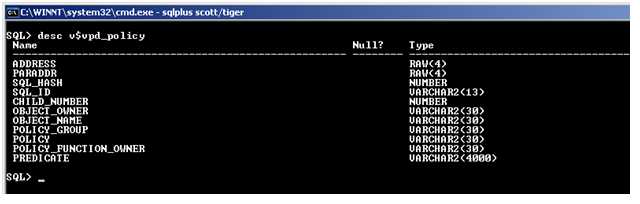
The DBA maintains the view V$VPD_POLICY to store the information about the policy function and its owner details.
8. Conclusion
The tutorial lists the VPD implementation in Row and Column level. Besides the individual policies, policy groups can also be declared with many more utilities. One of the most interesting facts is that the Explain Plan for the VPD protected queries shows the VPD predicate and also follows the indexing guidelines available for the query.
Hope the tutorial drives the readers to try their hands out in VPD implementation and use to impose application security.
[catlist id=185].