Exforsys

H I D E


Analysis Services Training

Microsoft Analysis Services is a collection of Online Analytical Processing (OLAP) and Data Mining services supplied in Microsoft SQL Server. ‘Data warehouse’ and ‘OLAP’ are often used interchangeably to describe two different elements of a decision support system.

Advances in data storage, transmission, database management tools and computerizing business processes
allow for constant technological development in data manipulation and analysis. Analysis Services provides managers the possibility to explore a cache of collected and current data, define business trends and patterns and mine data to make discerning business decisions.

An administrator operating the Microsoft SQL Server Analysis Services section of a data warehouse will face operational issues in the field. Analysis Services and its appropriately configured environment is applied and utilized in all aspects, from the development to the production environment. An Analysis Services administrator managing databases will have to operate and maintain Analysis Services within a preexisting IT and database infrastructure. Change control, operational issues, problem resolution, automation and tracking techniques will need to be understood and employed, in order to test for changes to an existing environment and database structure. An Analysis Systems administrator must actively anticipate capacity issues, problem solve and ensure availability of Analysis Services cubes. 

Data Warehouse Interview Questions
Abinitio Interview Questions
MSAS Interview Questions
Data Warehousing Basic Questions
BO Designer Interview Questions
Business Intelligence Interview Questions
Business Objects Interview Questions
Cognos Interview Questions
Data Warehousing Concepts
Data Integration Interview Questions
DataStage Interview Questions
ETL Interview Questions
Impromptu Interview Questions
Informatica Interview Questions
MicroStrategy Interview Questions
Reportnet Interview Questions

Data Warehouse FAQ's
Abinitio Faqs Informatica Faqs
Data Warehousing FAQs DataStage Faqs


Training Index
  1. MSAS - Browsing the Dependency Network

    The predictive model of the decision tree helps users determine whether similar cases will have a similar behavior. The attributes of the tree can be examined for impact analysis by using the Dependency Network Browser. This can be opened by right clicking on a decision tree data mining model in the Analysis services explorer tree control.
  2. MSAS - Building a Relational Decision Tree Model

    Let us assume FoodMart wants the members with Golden Membership to be studied. It wants to focus on broadening the membership of the Gold Card. This can be done now using the Decision Tree Model. The Decision Tree model can be created from the relational data contained in the FoodMart 2000 Access database. 1. In the Analysis Manager tree pane right
  3. MSAS - Introduction to Data Mining

    The process of probing into a set of information for descriptive and predictive purposes is called data mining. The purpose is to identify those trends and patterns which indicate the direction of effort to achieve desired outcomes. SQL Server 2000 and Analysis Services has inbuilt powerful data mining capabilities including algorithms for Clustering
  4. MSAS - Applying security to a Dimension

    When roles are assigned for cubes the user has access or no access to the cube. When roles are assigned to a dimension the user gains only partial access to parts of the cube. The simplest method of restricting access to a dimension is to prevent access to all levels except the top level of the dimension. In the Cube role dialog box all users were
  5. Tutorial 65: MSAS - Managing Cube Roles

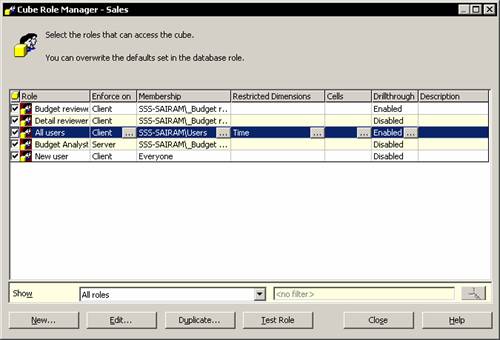
    In the Analysis Manager console tree expand the cubes folder and right click the Sales cube and click Manage roles The Cube Role Manager Dialog box appears. The dialog box shows all the users whose roles have been already assigned in the database. It also allows us to
  6. MSAS - Understanding Database Roles

    When a new database is created a default role is created for all OLAP Administrators to have access to the Analysis Manager. However other users have to be given rights to access the database and its objects. Users can be given rights to Browse the cubes and objects but not to use Analysis Manager. If the user has to be given a right to use both the
  7. MSAS - Securing User Authentication

    The enforcement of security defined by the roles must be preceded by user authentication. When the user connects to the Analysis server the first thing that happens is authentication. The user login is validated and the user is given access to the data on the server in accordance with the roles. If authentication is unsuccessful he will not be able
  8. MSAS - Introducing Analysis Services Security

    Security of data is of paramount importance to most industries and organizations. All organizations want to restrict access to data hierarchically or define role based access. Analysis Services provides for this need. The number of Administrators and users having access to Analysis services data can be restricted by setting the role definitions in
  9. MSAS - Writebacks

    Dimensions can be modified so that the contents of the dimension changes. The impact of these changes can be viewed by end users browsing cubes. End user’ s get an added analytical option due to this process. This option is only available in the Enterprise Edition of Microsoft SQL Server 2000 .Write-Enabled Dimensions Dimensions can be modified
  10. MSAS - Defining and Creating Drillthrough

    Actions used by end users to select a single cube cell and retrieve a result set from the source data of the cell are known as Drillthrough actions. Drillthrough has to be enabled if administrators want to drillthrough in a Cube Browser and the Cube Editor data tab. The DrillThrough operations are extremely useful when the user wants to look at the
  11. MSAS - Defining and Creating Auctions

    This tutorial explains about defining Auctions Creating Auctions Creating Actions in Regular Cubes Creating and Maintaining Actions in Virtual Cubes Importing an Action into a Virtual Cube and Editing an Action in a Virtual Cube.Defining Actions End users can define certain operations to be performed or cubes or portions of a cube. These user
  12. MSAS - Creating and Maintaining Calculated Members in Virtual Cubes

    Calculated members can be imported into virtual cubes from their component cubes. New calculated members also can be created directly into virtual cubes. The Calculated member Builder can be used to build the members or calculated members created in component cubes can be imported and then the same can be edited. The virtual cube editor is used to
  13. MSAS - Building a Virtual Cube

    In the above section we studied some of the reasons why we would want to create virtual cubes and how logical results can be obtained by making such cubes. We also saw that a virtual cube can be built quickly and easily by using the Virtual Cube Wizard.Building a Virtual Cube The Wizard takes the user through a series of steps that prompt him to
  14. MSAS - Understanding Virtual Cubes

    This tutorial explains about Defining Virtual cubes Benefits of using virtual cubes Working with Virtual Cubes and Obtaining logical results.Defining Virtual cubes Virtual Cubes can be defined as a combination of multiple cubes into one logical cube. Virtual cubes resemble relational database views in so far as they combine other views and tables.
  15. MSAS - Introducing Solve Order

    Before understanding what is solve order it is essential to understand the concept of Pass order. Solve order and pass order together determine the manner in which a cube is resolved in Analysis services.Pass order Every cube calculated as the result of a multidimensional Expression Query goes through a number of stages of calculations. Analysis
  16. MSAS - Implementing Calculations using MDX Part 2

    In this part 2 of  Implementing Calculations Using MDX we will be learning about Renaming Calculated members Creating Non Measure Calculated members Using Functions in Calculated Members Setting calculations at Member level  and Setting a Calculation for a subcube or a selection of cells.Renaming Calculated members 1. In the
  17. MSAS - Implementing Calculations using MDX Part 1

    In this tutorial we will be learning about  Calculated members Creating Calculated Members Using Function Libraries to Build Calculated Members and Calculated Member Builder.Understanding Calculated members Calculated members are members of a dimension whose value is calculated at run time using Multidimensional expressions. The values of a
  18. MSAS - Merging Partitions

    Cubes with multiple partitions can be extremely confusing. Users may like to organize the cubes into a cube with fewer partitions by merging some of the partitions together. The preconditions to the merger of cubes is that the Storage and aggregation design should be the same in the partitions being merged. To merge partitions with different storage
  19. MSAS - Introduction and Managing Partitions

    The cube is a storage container that contains data and aggregations of data. Every cube must have at least one partition which must be stored in the Analysis server in which the cube is defined. Partitions are stored as separate files in the Partitions folder under the cube. If a cube contains multiple partitions some of them can be stored in different
  20. MSAS - Troubleshooting Cube Processing

    Microsoft SQL Server 2000 Analysis Services provides the user with many ways of tracking and solving errors. A large number of error logs built into the service help the user pinpoint the exact nature of errors and find solutions for them. Microsoft Tech Net also provides the user online support to troubleshoot problems. This requires paid membership.
  21. MSAS - Optimizing Cube Processing

    Cubes are made up of a fact table and several dimensions.  Optimizing cube processing therefore involves optimizing dimensions also.  Let us look at two scenarios.  One in which the dimensions are not optimized and the cube is processed and another in which the dimensions are optimized and the cube is processed.  When the
  22. MSAS - Processing Dimensions and Cubes

    As stated earlier maps are created when a dimension is processed. However existing maps of a dimension are destroyed when it is processed and new maps are created. Consequently all cubes accessing the dimension will find it inaccessible and the cube will be invalid. The dimension will become accessible only when the cube is reprocessed.When cubes
  23. MSAS - Introducing Dimension and Cube Processing

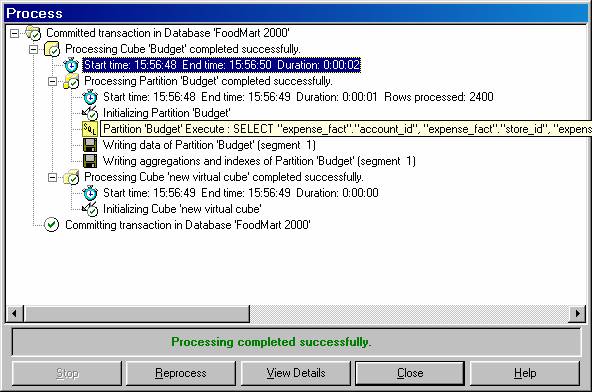
    The Analysis server is like a black box. Everything that happens in the server is recorded but the end user sees a multidimensional cube created out of the data in the data warehouse and has very little taste of what really goes on behind the scenes. In this section we will be examining this black box to understand how the Analysis server processes
  24. MSAS: Optimization Tuning Part 2

    The SQL Server Query Analyzer is a feature rich Query Analyzer. The tool can provide a graphical representation of a query and helps the user mould queries into more efficient shapes. It also helps identify faulty queries. To Tune the index created the user will have to open the SQL query analyzer and open a query or enter one. On the Query menu click
  25. MSAS: Optimization Tuning Part 1

    SQL Server 2000 Analysis services comes with certain features that optimize performance without the intervention of the Administrator. The Storage Engine is optimized by incorporating the following features; Record size and Data types should be kept as short as possible in the Fact tables and should only include fields for measures and indexed key columns.
  26. MSAS: Usage-Based Optimization

    This tutorial explains the usage of the  Usage Based Optimization Wizard The Server Cache Query Usage and Manipulating the query log. Using the Usage Based Optimization Wizard. 1. When a set of queries have accumulated in the Usage log the Usage based Optimization wizard can be pressed into service. 2. The task on hand is to
  27. MSAS: Analysis Services Aggregations

    Pre-calculated summaries of data that improve query response time are called aggregations. OLAP technology organizes data into the multidimensional structures of cubes. The dimensions and their hierarchies define the queries that can be asked of the cubes.Cells store the value at the intersection of dimension coordinates. Whenever a query is made on
  28. MSAS: The Storage Design Wizard

    The Storage Design Wizard helps the user set the storage options and design the aggregations for a cube. While choosing from the three available storage modes the user has to keep certain factors in mind. ROLAP stores aggregations in a relational database and hence it does not make sense to select ROLAP as a storage mode for cubes if the aim is to
  29. MSAS: Analysis Server Cube Storage

    Online Analytical Processing OLAP is essentially data presented as Cubes dimensions hierarchies and measures. Users can navigate a complex set of data intuitively using these objects. In this context consistent response times for each view or slice of data become important. Therefore modes of storing and retrieving data became the key tenet of
  30. MSAS: Defining Cube Properties

    Each object in the properties pane of the Cube Editor has its own set of properties which can be used to modify the settings of the object.  The properties of a cube defined in the properties pane are as tabulated below.  In this section we shall use these properties to set the properties of our cubes. Aggregation Prefix This is a prefix
  31. MSAS: Introduction and Working with Measures

    The quantitative and numerical columns from a fact table of a cube are the measures of the cube. When the cube is processed the data in the measures get aggregated across the dimensions of the cube. These measures are of primary interest to the end user and are the central values that get analyzed in a cube.Introduction to Measures The quantitative
  32. MSAS: Introduction and Working with Cubes

    The main object in Online Analytical processing is the cube. A cube is defined as a subset of the data in the data warehouse organized and summarized into multidimensional structure that consists of dimensions and measures. Introduction to Cubes The purpose of creating cubes is to provide an easy to use mechanism for data access and quick and uniform
  33. MSAS: Virtual Dimensions

    A logical dimension created out of the columns of a physical dimension is a virtual dimension. The contents of a virtual dimension are member properties of the physical dimension or columns and tables of a physical dimension. For instance the Store name level of the Store dimension has a member property named Store Sqft. This member property identifies
  34. MSAS: Introducing Member Properties

    Member properties are attributes associated with members. They contain some additional information about a member but cannot be used to create a level in the dimension by themselves. For example each member of the Month level has an associated Boolean number property called Bonus month.If records the bonus given during the month if any. Since the frequency
  35. MSAS: Creating Custom Rollups

    To enable proper aggregation of values along a dimension each member of the dimension needs its own aggregation rule. These rules are provided by custom roll up. Custom rollup operators provide a simple way of controlling the process of rolling up a member to its parents values. Custom rollup operators assigned to a column during the process of creating
  36. MSAS: Creating a Time Dimension

    Time dimensions are part and parcel of OLAP cubes. At the lowest level of detail a time dimension may contain a month minute or even a second. At the most summarized level it may contain a year a decade or a century. The repetitive nature of time encourages users to view data in terms of a time dimension. How much sales of x product occurred during
  37. MSAS: Understanding Hierarchies

    A hierarchy defines the relative positions of members in a dimension. Hierarchies are sometimes represented as pyramidal structures. The members in this structure are arranged in an expansive order— from the most summarized to the most detailed. For instance in a geography dimension the country may the most summarized and the individual cities
  38. MSAS: Dimension Storage Modes and Levels

    Dimensions are stored in the Multidimensional OLAP or Relational OLAP. The storage mode determines the location and form of the dimensions data. While MOLAP stores data in a multidimensional structure on the Analysis server ROLAP stores the data in the relational tables. The storage mode can be set using the Dimension or cube editor.When a Dimension’ s
  39. MSAS: Working with Levels and Hierarchies

    Dimensions are defined as structural attributes of a cube made up of levels arranged in hierarchies. A level is a set of members of a dimension organized such that all members of the set are at an equal distance from the root of the hierarchy. A hierarchy is the set of members in a dimension and their positions relative to one another.Working with Levels
  40. MSAS: Working with Parent-Child Dimensions

    Parent child dimensions when viewed from within a cube reveal some interesting features. We will add an private employee parent child dimension to the sales cube and study the features thereof.In the cube Editor right click the Dimensions folder and click New Dimension to launch the Dimension wizardSelect the parent child option and click Next. Select
  41. MSAS : Basics of Levels

    A level is an element of a dimension hierarchy that describes the hierarchy from the highest level to the lowest level of data. Levels exist within dimensions and are based on columns in the dimension table or member properties in the dimension. They specify the contents and structure of the dimension’ s hierarchy and determine the members that
  42. MSAS : Working with Standard Dimensions

    Dimensions are created based on dimension table columns member properties or from the structure of OLAP data mining models. When a dimension is defined there are a number of possible approaches. Each approach produces a different dimension variety. Standard Dimensions are regular dimensions. They can be of two types. The standard star schema dimension
  43. MSAS : Shared vs Private Dimensions

    This tutorial explains how to create Shared dimension using Dimension Editor Private dimension using Dimension Editor and the differences between them.Creating Shared Dimension using Dimension Editor 1. In the Analysis Manager tree pane expand the database in which you want to create the shared dimension.2. Right-click the Shared Dimensions folder
  44. Understanding Dimension Basics

    The next 6 tutorials explains Building Dimensions using Dimensions Editor. Dimensional modeling is the conceptualization and visualization of numerical data models as a set of measures that are derived from the common parameters used in a business. It summarizes and rearranges data and presents views of data to support data analysis. Dimensional modeling
  45. MSAS : Office 2000 OLAP Components

    PivotTable component in Office 2000 is the PivotTable report feature. It allows the user select and cross tabulate numerical values in ways that are similar to the processes of a cube. The earlier versions of this report in Excel could only extract values from relational data sources. The version under reference can present data directly form an OLAP
  46. MSAS : Client Architecture

    The PivotTable Service The interfaces used by client applications to access OLAP data and data mining data on the server are provided by the PivotTable Service. The PivotTable service is a set of tools that enable the transfer of OLAP cubes to client applications from the OLAP server. Two programming interfaces for querying data are available to the
  47. MSAS : Cube Storage options

    In the first tutorial of this series Introduction to Data Warehousing and OLAP” we briefly touched upon storage options that are used in data warehousing. In the second chapter Introducing Analysis Manager Wizards” we learnt how to use the cube Storage wizard to set storage options for the cube we had created. In this section
  48. MSAS : Meta data Repository

    Metadata is a description of data. It provides a consistent way to describe data structures. It is used to describe data as it is being transformed and gives a clear explanation of the meaning of different fields measures levels and dimensions. All releases of Microsoft development and data management tools support and allow access to the Repository.
  49. MSAS : Analysis services Tools for Extended Functionality

    Analysis services provides various tools that can be programmatically used to extend its functionality. Analysis services supports OLE DB to meet the OLAP specific requirements and is also designed to meet the requirements for Data mining specifications. The Analysis services is made compatible with the ActiveX Data Objects ADO and its multidimensional
  50. MSAS : The Wizards

    The primary aim of Microsoft was to ease the process of building and using data warehouses. A large number of wizards editors and tools have been built into the Analysis services to fulfill this objective. The wizards available for use are The Cube wizard that helps the user build all the structures necessary to create an OLAP cube. It walks the user
  51. MSAS : The Analysis Manager and Analysis Server

    Analysis services is the middle tier server component of the MS SQL 2000. It manages multidimensional OLAP cubes of data and ease of access to such data to end users. It also enables user to create data mining models from the data in the cubes or in the relational databases. The Analysis Manager and Analysis ServerThe Analysis Manager The MS SQL Server
  52. MSAS : The Data warehousing framework of SQL Server 2000 - Part 2

    This is part 2 of  MSAS The Data warehousing framework of SQL Server 2000.  It s very important that you understand the concepts if you are really trying to get job in Data Warehousing field.MSAS The Data warehousing framework of SQL Server 2000 - Part 2The Online Analytical Processing OLAP tools offered by Microsoft are impressive
  53. MSAS : The Data warehousing framework of SQL Server 2000 - Part 1

    The Data warehousing framework is a set of components and API’ s that implement the data warehousing features of the SQL server 2000. The common interface of the server known as the Enterprise Manager can be used by various components to build and use the data warehouse or a data mart.The Data warehousing framework of SQL Server 2000The following
  54. MSAS : Microsoft Data Warehousing Overview

    This tutorial explains various functions available and the tools available for building and managing data warehouses.  MSAS Microsoft Data Warehousing OverviewModern day enterprises believe that mission critical decisions should be information based. Vast information repositories and historical data available with them need to be analyzed and
  55. MSAS : Browsing the Cube

    This tutorial explains about the  Cube Browser it s  a tool provided within the Analysis Services to display the results of the cube process without the need to add external software.Tutorial 16 MSAS Browsing the CubeThe processed cube can now be analyzed. For the purpose of this tutorial we will use slice and dice’ and
  56. MSAS : Designing Storage and Processing the Cube

    This tutorial covers the storage modes for the cube before it can be processed. The kind of storage selected will determine the query performance and enhance the cube efficiency.Tutorial 15 MSAS Designing Storage and Processing the CubeWe have already discussed in detail the type of storage options that are available in OLAP. Analysis Services offers
  57. MSAS : Building the Cube Part #3

    This is part 3 in MSAS Building the Cube series If you have not completed reading part 1 and 2 please do so before continuing with this tutorial. Tutorial 14 MSAS Building the Cube Part 3The next dimension that we need to create is the Time dimension. This is the most common dimension and inevitably forms a dimension of every cube. However
  58. MSAS : Building the Cube Part #2

    This is part 2 in MSAS Building the Cube series If you have not completed reading  part1 please do so before  continuing with this tutorial.Tutorial 13 MSAS Building the Cube Part 2Click New Dimension… button to launch the Dimension Wizard. The welcome dialog box of the Dimension wizard appears. The Check box option
  59. MSAS : Building the Cube Part #1

    This three part tutorial explains about cubes Dimensions and how to create them using the wizards. You need to understand and learn how to create the cubes since it s very critical step.Tutorial 12 MSAS Building the Cube Part 1A cube is a multidimensional structure consisting of dimensions and measures. Therefore we need to know what dimensions
  60. MSAS : Setting up the Database in Analysis Server

    This tutorial explains Setting up the Database in Analysis Server and how to connect and test the connectivity.Setting up the Database in Analysis ServerThe first step in creating a cube is the setting up of the Database. Double click on the server and connect to it. Once the connection is established the user can proceed to create the database. Right
  61. MSAS : Preparing to Create the Cube

    This tutorial explains the steps to create the cube and the preparation like settip the datasource.Preparing to Create the CubeA cube is the fundamental unit of data storage and retrieval in the Analysis Server. A cube can be created with either the Cube Wizard or the Cube Editor. The cube wizard provides very limited options as against the options
  62. MSAS : Introducing Analysis Manager Wizards

    This tutorial covers brief introduction to Analysis Manager Wizards how to start Previewing and Defining terms which helps to understand the navigation along with the screen shots.Introducing Analysis Manager WizardsThe Analysis Manager is a console application in Microsoft SQL Server 2000. It provides an interface for accessing Analysis servers and
  63. Microsoft Analysis Services Installation

    This tutorial covers the download and step by step installation instructions along with the screen shots which helps with your PC setup  to contine learning MSAS. Download or order the SQL Server 2000 120-day Trial Software. SQL Server is a complete database and data analysis package that opens the door to a new generation of enterprise-class business
  64. MSAS - Applying OLAP Cubes

    This tutorial covers the types of changes that impact on cubes and Synchronization OLAP and data warehouse data. Multidimensional cubes are created out of the data stored in the data warehouse. Numerical measures are also summarized into pre-aggregated values when cubes are constructed. These cubes are then stored in multidimensional structures that
  65. Understanding OLAP Models

    This tutorial covers the different types of OLAP models like Relational Online Analytical Processing mode ROLAP Multidimensional Online Analytical processing mode MOLAP and Hybrid Online Analytical Processing mode or HOLAP. Cubes in a data warehouse are stored in three different modes. A relational storage model is called Relational Online Analytical
  66. Designing the Dimensional Model and Preparing the data for OLAP

    This tutorial covers Designing the Dimensional Model Dimensional Model schemas like Star Schema Snowflake Schema Optimizing star schema and Design of the Relational Database OLAP Cubes and Data mining tools Security considerations metadata and backup and recovery plans.Preparing the data for OLAP The global issues out of the way the enterprise
  67. Design of the data warehouse: Kimball Vs Inmon

    This tutorial covers the basic design concepts The top down approach The Bottom-Up Approach Hybrid Approach and Federated approach.Ralph Kimball and Inmon the co-founders of the data warehouse significantly had their own differences in the design and architecture of the data warehouse. Inmon advocated a dependent data mart structure”
  68. Defining OLAP Solutions and Data Warehouse design

    This tutorial covers OLAP solutions used by Data warehouses and understanding Data Warehouse design. The enterprise needs to ask itself certain fundamental questions before actually launching on the process of designing the data warehouse. It must begin with a conviction that a data warehouse would really help its business and the return on investment
  69. Microsoft Analysis Services Training

    Microsoft Analysis Services Training We are glad to let you know that we are starting with Microsoft Analysis Services Training in the following topics. We will be publishing the tutorials as we complete. Please use discussion board if you have any questions and would like to discuss any. We will be providing step by step screen shots
  70. Data Warehouse database and OLTP database

    In this tutorial we will learn about the differences between Data Warehouse database and OLTP database and the objectives of a Data warehouse and Data flow. The data warehouse and the OLTP data base are both relational databases. However the objectives of both these databases are different. The OLTP database records transactions in real time and aims
  71. Introduction to Data Warehousing

    This tutorial starts with the introduction to Data Warehousing Definition of OLAP difference between Data warehouse and the OLTP Database Objectives of data warehousing and data flow. Computerization of business processes; technological advances in transmission and storage of data; and powerful database management tools have opened up new possibilities
  72.