Configuring and Deploying ASP.NET Applications

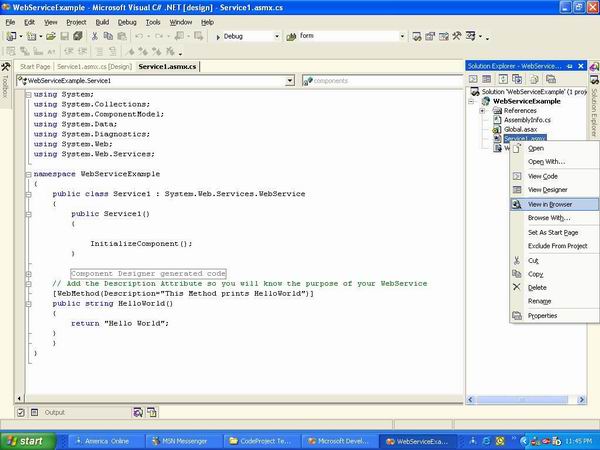
Asp.net applications can be easily configured by using web.config files. You can store number of things in the configuration file. Let’s see some important stuff that can be stored in this file.Database Connections The most important thing to store in the web.config file is the database connection string. The reason of storing connection string in the web.config file makes sense since if later we ever want to change the location of our database we just have to change the connection string in the web.config file and thats it. This will… Read More
Oracle 10g Installation Guide on Windows 7

Oracle 10g Installation tutorial depicts step by step installation of Oracle 10g on Windows 7, 64bit (10204_vista_w2k8_x64_production_db) operating system. Installation on Windows 7 will return a operating system version compatibility error. However, there will not be any such issue during installation on older version of Windows operating system. It is important to note that this installation method is neither certified nor recommended by Oracle. If you are planning to install Oracle 10g for production purpose then please follow the Oracle specified installation guidelines and use only the correct and supported… Read More

Oracle Apps 11i : Getting started with Oracle Applications

This tutorial explains about Oracle Apps login, Choosing Responsibility, Choosing Function / Opening Form, Switch Responsibility, Query Form and Keyboard Shortcuts. This chapter would tell a user about the basics of login to the Oracle Applications instance. It would also demonstrate the basics of working with Oracle Applications. To understand the complete functionality of a particular responsibility please refer to the respective User Guide. Oracle Applications Login Before you connect to Oracle Applications you must know the URL of the Oracle Applications server you want to connect to. Clicking on… Read More

Caching in ASP.NET

This tutorial explains about The Importance of Caching, Declarative Page Output Caching, Programmatic Page Caching, Caching Page Fragments, Caching Data and Monitoring Performance. Introduction: Caching is one of the coolest features in Asp.net. Caching enables you to store the expensive data into Cache object and later retrieve it without doing expensive operations. A very common example where you want to use caching is datagrid paging. I am sure you all are familiar with datagrid paging which enables you to view the records in multiple pages. Each time you visit a… Read More

A Unit Ttesting Framework for the Oracle PL/SQL Language

The utPLSQL unit testing framework consists of several different elements: A set of tables to hold information about unit tests and test suites. A set of packages that allow you to run tests, build test packages and access information about tests you have run.  We learn best by following the examples of those who have gone before us. So you will find in this document sample test packages and different approaches to using utPLSQL to test your PL/SQL code like it has never been tested before! http://utplsql.sourceforge.net/Doc/examples.html How to Build… Read More

Usability Engineering – Usability Testing

Usability Engineering, an empirical science has quite a simple definition. It studies the human interaction and cognitive behavior of an individual with respect to performing as task. It could be as simple as a driving a vehicle or using a product. Users interaction in performing a task should be in sync with the workflow of the product. Usability Engineering as a science helps in achieving this goal. Usability for a Product A Product should be usable. It means that people can use a product easily and efficiently to accomplish their… Read More

Bluetooth Technology Models and Future

This article discusses about various Bluetooth Technology Models & Application in the market and Bluetooth in Future. Bluetooth Technology Models & Applications HomeRF like Bluetooth is a specification for connectivity and mobility in a home-like environment. HomeRF Working Group has developed a specification for wireless communications in the home called the Shared Wireless Access Protocol (SWAP). The Federal Aviation Administration (FAA) and other aviation regulatory bodies worldwide are currently reviewing the use of Bluetooth products on private and commercial aircraft. In the U.S. the FAA is the governing body to… Read More

Bluetooth Vs 802.11b Wireless LANs

This article discusses about the differences between Bluetooth and 802.11b Wireless LANs, Co-existence of Bluetooth & Wi-Fi and Advantages & Disadvantages. 1) Bluetooth has lower distance range (less than 30 feet) than 802.11b (up to 200 feet). Therefore, you would need many more access points to cover the same area of an office. Simple mathematics will show that you may need as many as 20-50 times the number of access points 2) Bluetooth has generally lower speed than that of 802.11b wireless LANs. 3) Bluetooth components (chips and radios) and device… Read More

MSAS – Browsing the Dependency Network

The predictive model of the decision tree helps users determine whether similar cases will have a similar behavior. The attributes of the tree can be examined for impact analysis by using the Dependency Network Browser. This can be opened by right clicking on a decision tree data mining model in the Analysis services explorer tree control.   The Dependency Network Browser window contains a slider on the left and a display window on the right. It contains a Close and help button at the bottom. When the slider is moved… Read More

MSAS – Building a Relational Decision Tree Model

Let us assume FoodMart wants the members with Golden Membership to be studied. It wants to focus on broadening the membership of the Gold Card. This can be done now using the Decision Tree Model. The Decision Tree model can be created from the relational data contained in the FoodMart 2000 Access database. 1. In the Analysis Manager tree pane right click the Mining model folder and select New mining model… 2. In the Wizard Welcome screen click Next to proceed. 3. In the Select the source type screen select… Read More

MSAS – Introduction to Data Mining

The process of probing into a set of information for descriptive and predictive purposes is called data mining. The purpose is to identify those trends and patterns which indicate the direction of effort to achieve desired outcomes. SQL Server 2000 and Analysis Services, has inbuilt powerful data mining capabilities including algorithms for Clustering and for Decision Trees.Before actually studying the data mining capabilities of Analysis Services, let us briefly look at some terminology generally used while discussing data mining. Understanding Terms used in Data Mining A case is the term… Read More

MSAS – Applying security to a Dimension

When roles are assigned for cubes the user has access or no access to the cube. When roles are assigned to a dimension, the user gains only partial access to parts of the cube. The simplest method of restricting access to a dimension is to prevent access to all levels except the top level of the dimension. In the Cube role dialog box all users were given complete access to the sales cube. Let us restrict the access of users by permitting them to see only values broken out by… Read More

Tutorial 65: MSAS – Managing Cube Roles

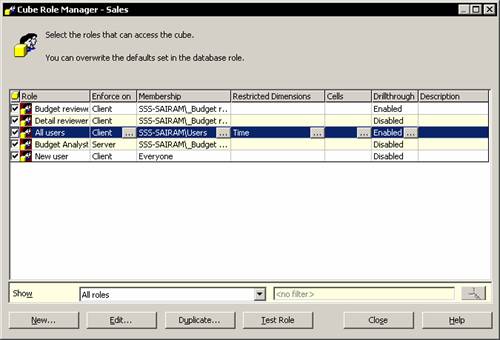
In the Analysis Manager console tree, expand the cubes folder and right click the Sales cube and click Manage roles The Cube Role Manager Dialog box appears. The dialog box shows all the users whose roles have been already assigned in the database. It also allows us to create a new role. On clicking the New button, new roles can be added to the Cube role dialog box. The create a cube role dialog box appears. Type in the name for the cube role and click Add button. The Add… Read More

MSAS – Understanding Database Roles

When a new database is created a default role is created for all OLAP Administrators to have access to the Analysis Manager. However, other users have to be given rights to access the database and its objects. Users can be given rights to Browse the cubes and objects but not to use Analysis Manager. If the user has to be given a right to use both the database objects and the Analysis Manager, specific rights have to be assigned. To assign database roles to users, right click the database and… Read More

Oracle Apps 11i: Advantages of Oracle E-Business Suite

Oracle ERP Suite is based on Oracle Apps framework. What that essentially means to the customers is that no matter which component of the suite you buy, you get the same look and feel.Advantages of Oracle E-Business Suite Oracle Database The biggest USP of Oracle ERP is that it is based on Oracle Database, which in itself is a market leader. So the Oracle ERP is best placed to take advantage of the advances in the database technology. The buzzword is "If it is in the database, you will get… Read More

Oracle Apps 11i: Overview of popular ERP Products

This tutorial explains about different ERP Products and how they are being used in the industry.Oracle E- Business Suite Oracle E-Business Suite is the industry’s only complete and integrated set of enterprise applications, working together seamlessly to streamline every area of your business—from sales, service, and marketing, through financials and human resources, to supply chain and manufacturing. Oracle E-Business Suite is your fastest path to high-quality enterprise intelligence, bringing your company a true 360-degree view of your finances, your customers, and your supply chains, so you can make faster, better… Read More

Managing State with ASP.NET and C#

Web Applications are disconnected in nature which means that there is no way for the browser to know who is using the application at present time. In classic Asp programming maintaining state was a headache for the developers. They had to write alot of code to maintain state. But Asp.net model provides easy state management. In this article we will see how we can persist state in multiple pages so the user is recognized by the browser.Preserving State in Web Applications There are number of ways that you can use… Read More

ERP Overview

ERP (Enterprise Resource Planning) Overview covers What is ERP, Brief history of ERP, Why is it necessary, Market Leaders and the future of ERP. What is ERP? Enterprise Resource Planning or ERP is an industry term for integrated, multi-module application software packages that are designed to serve and support multiple business functions. An ERP system can include software for manufacturing, order entry, accounts receivable and payable, general ledger, purchasing, warehousing, transportation and human resources. Evolving out of the manufacturing industry, ERP implies the use of packaged software rather than proprietary… Read More

MSAS – Securing User Authentication

The enforcement of security defined by the roles must be preceded by user authentication. When the user connects to the Analysis server, the first thing that happens is authentication. The user login is validated and the user is given access to the data on the server in accordance with the roles. If authentication is unsuccessful, he will not be able to access the data on the server. End user security can be enforced at multiple levels. The levels are as under: 1. Server level : This controls whether an end… Read More

MSAS – Introducing Analysis Services Security

Security of data is of paramount importance to most industries and organizations. All organizations want to restrict access to data hierarchically or define role based access. Analysis Services provides for this need. The number of Administrators and users having access to Analysis services data can be restricted by setting the role definitions in Analysis manager. End users who have access to data through client applications can be restricted in various ways. Security levels can be set for various objects within the database such as cubes, dimensions and cells. The Microsoft… Read More

How Bluetooth Technology works?

This is the first article on the Bluetooth Technology by Nupur Mittal.  Bluetooth is a high-speed, low-power microwave wireless link technology, designed to connect phones, laptops, PDAs and other portable equipment together with little or no work by the user. Connective convenience Unlike infra-red, Bluetooth does not require line-of-sight positioning of connected units. The technology uses modifications of existing wireless LAN techniques but is most notable for its small size and low cost. The current prototype circuits are contained on a circuit board 0.9cm square, with a much smaller single… Read More

What is Bluetooth Technology

This is the first article on the Bluetooth Technology by Nupur Mittal. Blue tooth has been regarded as a new wave in the IT sector from the day of its origin. Blue tooth is continuing its success story. Toshiba introduced blue tooth in September 2000 to consumers for $ 199. The new technology is supported by SIG (Special Interest Group). SIG founded in 1998 consists of 2000 members who have access to the Blue tooth specifications (information needed to make a blue tooth product). The SIG works to promote the… Read More

MSAS – Writebacks

Dimensions can be modified so that the contents of the dimension changes. The impact of these changes can be viewed by end users browsing cubes. End user’s get an added analytical option due to this process.(This option is only available in the Enterprise Edition of Microsoft SQL Server 2000).Write-Enabled Dimensions Dimensions can be modified so that the contents of the dimension changes. The impact of these changes can be viewed by end users browsing cubes. End user’s get an added analytical option due to this process.(This option is only available… Read More

MSAS – Defining and Creating Drillthrough

Actions used by end users to select a single cube cell and retrieve a result set from the source data of the cell are known as Drillthrough actions. Drillthrough has to be enabled if administrators want to drillthrough in a Cube Browser and the Cube Editor data tab. The DrillThrough operations are extremely useful when the user wants to look at the underlying causes for some abnormally high or low outputs in specific fields. For example, let us say a store is doing extremely well and the sales in that… Read More

MSAS – Defining and Creating Auctions

This tutorial explains about defining Auctions, Creating Auctions, Creating Actions in Regular Cubes, Creating and Maintaining Actions in Virtual Cubes, Importing an Action into a Virtual Cube and Editing an Action in a Virtual Cube.Defining Actions End users can define certain operations to be performed or cubes or portions of a cube. These user defined operations are called Actions. The end user can use an action as a parameter for starting an application or for retrieving information. He can go beyond traditional analysis and initiate solutions to discovered problems and… Read More

ASP .NET Migration and Interoperability

Before Asp.net invasion there were many other programming languages and technologies on which the dynamic pages were made. In this tutorial I will explain how we can migrate our classic asp application to the modern asp.net application. Most of the components that were written was in visual basic 6 which communicated with the asp application using the COM components. Using COM Objects in Asp.net The Asp.net processor understands nearly all the syntax and all the objects that ASP itself supported. Let’s see how you can create a simple ADO Connection… Read More

MSAS – Creating and Maintaining Calculated Members in Virtual Cubes

Calculated members can be imported into virtual cubes from their component cubes. New calculated members also can be created directly into virtual cubes. The Calculated member Builder can be used to build the members or calculated members created in component cubes can be imported and then the same can be edited. The virtual cube editor is used to maintain the calculated members in virtual cubes. The Virtual cube Editor provides a single click access to Calculated Member Builder and the Import Calculated Members dialog box, which can be used to… Read More

MSAS – Building a Virtual Cube

In the above section we studied some of the reasons why we would want to create virtual cubes and how logical results can be obtained by making such cubes. We also saw that a virtual cube can be built quickly and easily by using the Virtual Cube Wizard.Building a Virtual Cube The Wizard takes the user through a series of steps that prompt him to specify the cubes, measures and dimensions to be used for building the virtual cube. The virtual cube then creates a combined view of the selected… Read More

MSAS – Understanding Virtual Cubes

This tutorial explains about Defining Virtual cubes, Benefits of using virtual cubes, Working with Virtual Cubes and Obtaining logical results.Defining Virtual cubes Virtual Cubes can be defined as a combination of multiple cubes into one logical cube. Virtual cubes resemble relational database views in so far as they combine other views and tables. A virtual cube is created by selecting measures and dimensions from a consolidated set of dimensions and measures underlying component cubes. End users will see the virtual cube as a single cube. Virtual cubes can also be… Read More

Functional Testing Tools

Here is the list of free Open Source Functional testing tools available.  If you know of any other , please send them over, so we can include them. Abbot Java GUI Test Framework http://abbot.sourceforge.net/ Description: The Abbot framework provides automated event generation and validation of Java GUI components, improving upon the very rudimentary functions provided by the java.awt.Robot class (A Better ‘Bot). The framework may be invoked directly from Java code or accessed without programming through the use of scripts. It is suitable for use both by developers for unit… Read More

SDLC : Software Development Life Cycle

This article explains about SDLC : Software Development Life Cycle  which is also known as Classic Life Cycle Model or Linear Sequential Model.   Author:  Madhavi Bade, QA Analyst.SDLC : Software Development Life Cycle The following are the actives of the SDLC   1) System engineering and modeling 2) Software require analysis 3) Systems analysis and design 4) Code generation 5) Testing 6) Development and Maintenance System Engineering and Modeling In this process we have to identify the projects requirement and main features proposed in the application. Here the development team visits the… Read More

MSAS – Introducing Solve Order

Before understanding what is solve order it is essential to understand the concept of Pass order. Solve order and pass order together determine the manner in which a cube is resolved in Analysis services.Pass order Every cube calculated as the result of a multidimensional Expression Query goes through a number of stages of calculations. Analysis server makes a complete pass of the calculations applicable for a stage and the stage is referred to as a calculation pass. The number of passes required to compute fully all the cells of a… Read More

MSAS – Implementing Calculations Using MDX Part 2

In this part 2 of  Implementing Calculations Using MDX, we will be learning about Renaming Calculated members, Creating Non Measure Calculated members, Using Functions in Calculated Members, Setting calculations at Member level and Setting a Calculation for a subcube or a selection of cells.Renaming Calculated members 1. In the Analysis Manager tree pane, under the database that contains the calculated member, expand the Cubes folder. 2. Right-click the cube that contains the calculated member, and then click Edit. 3. In the Cube Editor tree pane, right-click the calculated member, and then click Rename.… Read More

MSAS – Implementing Calculations Using MDX Part 1

In this tutorial we will be learning about Calculated members, Creating Calculated Members, Using Function Libraries to Build Calculated Members and Calculated Member Builder.Understanding Calculated members Calculated members are members of a dimension whose value is calculated at run time using Multidimensional expressions. The values of a calculated member may be derived from other member’s values. For instance Profit is determined by subtracting the value of member costs from value of member sales. This is unlike an input member whose value is directly loaded from the data base. The expressions for… Read More

MSAS – Merging Partitions

Cubes with multiple partitions can be extremely confusing. Users may like to organize the cubes into a cube with fewer partitions by merging some of the partitions together. The preconditions to the merger of cubes is that the Storage and aggregation design should be the same in the partitions being merged. To merge partitions with different storage designs, the partitions being merged must be edited to have the same storage design. The cubes must then be reprocessed before the merger is attempted. We will merge the Sales 97 partition back… Read More

MSAS – Introduction and Managing Partitions

The cube is a storage container that contains data and aggregations of data. Every cube must have at least one partition which must be stored in the Analysis server in which the cube is defined. Partitions are stored as separate files in the Partitions folder under the cube. If a cube contains multiple partitions, some of them can be stored in different physical locations. Partitions of a cube can also have different data sources. The aggregations of the data in the partitions can also be stored in different locations. The… Read More

MSAS – Troubleshooting Cube Processing

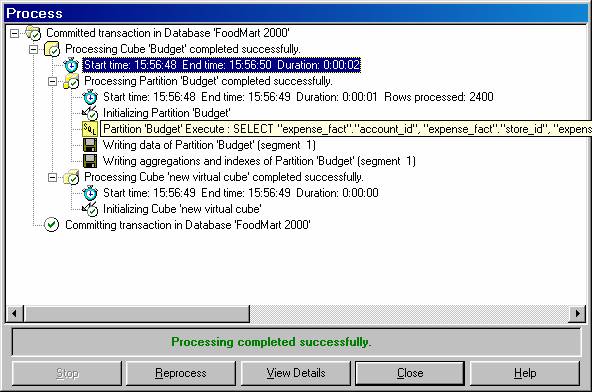
Microsoft SQL Server 2000 Analysis Services provides the user with many ways of tracking and solving errors. A large number of error logs built into the service help the user pinpoint the exact nature of errors and find solutions for them. Microsoft Tech Net also provides the user online support to troubleshoot problems. This requires paid membership. FAQs of different kinds are available for the reference of users. SQL Server Books Online FAQ SQL Server Enterprise Manager FAQ Administration Tools FAQ Failover Clustering FAQ Multiple Instance FAQ Programming FAQ Replication… Read More

MSAS – Processing Dimensions and Cubes

As stated earlier, maps are created when a dimension is processed. However, existing maps of a dimension are destroyed when it is processed and new maps are created. Consequently all cubes accessing the dimension will find it inaccessible and the cube will be invalid. The dimension will become accessible only when the cube is reprocessed.When cubes contain a large number of dimensions and some of the dimensions undergo a change, reprocessing a cube can become a daunting task. However, Analysis server has a solution to this problem. It is possible… Read More

MSAS – Introducing Dimension and Cube Processing

The Analysis server is like a black box. Everything that happens in the server is recorded, but the end user sees a multidimensional cube created out of the data in the data warehouse and has very little taste of what really goes on behind the scenes. In this section we will be examining this black box to understand how the Analysis server processes Dimensions and cubes. We will also learn how to optimize cube processing and how to troubleshoot cube processing.Processing Dimensions: Introduction Dimensions are building blocks on which the… Read More

Creating and consuming XML Web Services with C#

Introduction: We all talk about webservices, webservices can do this and webservices can do that. But when we are asked to make one, we hesitate. Maybe it’s because we never made a webservice before, and all the time playing with Webforms and Windows Forms or even Console Applications. By the way, I love Console applications. In this article, I will show you how to create a simple webservice that is consumed by a Console application client. Motivation of the XML Web Services Most of the people does not understand that… Read More

MSAS: Optimization Tuning Part 2

The SQL Server Query Analyzer is a feature rich Query Analyzer. The tool can provide a graphical representation of a query and helps the user mould queries into more efficient shapes. It also helps identify faulty queries. +To Tune the index created the user will have to open the SQL query analyzer and open a query or enter one. On the Query menu click on Index Tuning Wizard and follow the steps of the wizard. On the Specify workload screen select SQL Query Analyzer Selection and click Next. Select the… Read More

MSAS: Optimization Tuning Part 1

SQL Server 2000 Analysis services comes with certain features that optimize performance without the intervention of the Administrator. The Storage Engine is optimized by incorporating the following features;Record size and Data types should be kept as short as possible in the Fact tables and should only include fields for measures and indexed key columns. The Measure fields should use the smallest data type consistent with the measure data but the data type should be large enough to contain summarized values and prevent overflow when aggregations are calculated. Even saving two… Read More

MSAS: Usage-Based Optimization

This tutorial explains the usage of the Usage Based Optimization Wizard, The Server Cache , Query Usage and Manipulating the query log. Using the Usage Based Optimization Wizard. 1. When a set of queries have accumulated in the Usage log, the Usage based Optimization wizard can be pressed into service. 2. The task on hand is to select the Logged queries that should be applied and then design aggregations based on them 3. Let us assume that a user has browsed the sales cube and accumulated log entries by manipulating data. 4.… Read More

MSAS: Analysis Services Aggregations

Pre-calculated summaries of data that improve query response time are called aggregations. OLAP technology organizes data into the multidimensional structures of cubes. The dimensions and their hierarchies define the queries that can be asked of the cubes.Cells store the value at the intersection of dimension coordinates. Whenever a query is made on the data, the results have to be fetched from the various locations of cells on the multidimensional structure, affecting response time.  Aggregations consist of all the possible combinations of one level from each dimension in the cube. This… Read More

QuickTest Professional 8.0 CBT Tutorial and Evaluation Copy

Please find the step to get QuickTest Professional 8.0 CBT Step by Step Tutorial and Evaluation copy of the software. It takes couple of min to register and you get everything you need to learn and practice. The best part is comes with 1200 Page PDF Manual with kind of step by step instructions along with screen shots.Introduction to QuickTest Professional 8.0, Computer Based Training Register for free account, you will be able to download QuickTest CBT and Evaluation Copy software. QuickTest Professional is today’s answer for keeping pace with… Read More

MSAS: The Storage Design Wizard

The Storage Design Wizard helps the user set the storage options and design the aggregations for a cube. While choosing from the three available storage modes the user has to keep certain factors in mind. ROLAP stores aggregations in a relational database and hence it does not make sense to select ROLAP as a storage mode for cubes if the aim is to have speed of performance in analysis. Aggregations in Relational databases are slow and bulky and it defeats the very purpose of creating the aggregations. However, if the… Read More

MSAS: Analysis Server Cube Storage

Online Analytical Processing (OLAP) is essentially data presented as Cubes, dimensions, hierarchies and measures. Users can navigate a complex set of data intuitively using these objects. In this context, consistent response times for each view or slice of data become important. Therefore modes of storing and retrieving data became the key tenet of storage design. In the early days OLAP technology focused upon specialized, non-relational storage models as the only possible mode for OLAP. They called this technology Multidimensional OLAP(MOLAP). Later vendors discovered that the use of database structures(Star and… Read More

MSAS: Defining Cube Properties

Each object in the properties pane of the Cube Editor has its own set of properties which can be used to modify the settings of the object.  The properties of a cube defined in the properties pane are as tabulated below.  In this section we shall use these properties to set the properties of our cubes. Aggregation Prefix: This is a prefix appended to aggregation name for the cube’s partitions, provided that the partition’s aggregation prefix begins with a plus sign (+). In this case, this property’s value is appended… Read More

MSAS: Introduction and Working with Measures

The quantitative and numerical columns from a fact table of a cube are the measures of the cube. When the cube is processed the data in the measures get aggregated across the dimensions of the cube. These measures are of primary interest to the end user and are the central values that get analyzed in a cube.Introduction to Measures The quantitative and numerical columns from a fact table of a cube are the measures of the cube. When the cube is processed the data in the measures get aggregated across… Read More

MSAS: Introduction and Working with Cubes

The main object in Online Analytical processing is the cube. A cube is defined as a subset of the data in the data warehouse, organized and summarized into multidimensional structure that consists of dimensions and measures. Introduction to Cubes The purpose of creating cubes is to provide an easy to use mechanism for data access and quick and uniform response time for queries. User interface controls are inbuilt into Analysis Services to enable end users to connect to the server for queries and manipulate the cube. Aggregations built into the… Read More

Managing Data with ADO.NET DataSets and C#

This tutorial explains about The Role of DataSets in ADO.NET , Using DataSets in ASP.NET , Saving DataSets in Session State, Using DataTable Constraints, DataSet, DataRelations Using DataSets with DataAdapters to Modify Data and the Transactional Model in DataSets.   ASP.NET: Managing Data with ADO.NET DataSets and C#   Introduction In this article we will explore the DataSet, DataTable and DataRelations classes. Those who have worked with classic asp will be familiar with record sets. Record set was the individual rows that were retrieved from the database and than binded… Read More

Oracle 9i Packages

This weeks tutorial explains about Oracle Packages, Developing Packages, Package Specification, Package Body; Overloading, Oracle Supplied Packages and Dbms_output. Oracle Packages A package is a group of procedures, functions, variables and SQL statements created as a single unit. It is used to store together related objects. A package has two parts, Package Specification or spec or package header and Package Body. Package Specification acts as an interface to the package. Declaration of types, variables, constants, exceptions, cursors and subprograms is done in Package specifications. Package specification does not contain any… Read More

MSAS: Virtual Dimensions

A logical dimension created out of the columns of a physical dimension is a virtual dimension. The contents of a virtual dimension are member properties of the physical dimension or columns and tables of a physical dimension. For instance the Store name level of the Store dimension has a member property named Store Sqft. This member property identifies the area of the store in square feet. This member property can be used to create a virtual dimension and this can be added to any cube that contains the Store Dimension.The… Read More

MSAS: Introducing Member Properties

Member properties are attributes associated with members. They contain some additional information about a member but cannot be used to create a level in the dimension by themselves. For example each member of the Month level has an associated Boolean number property called Bonus month.If records the bonus given during the month, if any. Since the frequency of bonus is irregular, all months may not have Bonus awarded during the month. This attribute of the month therefore may be 0 or 1 and provides additional information about the month. It… Read More

MSAS: Creating Custom Rollups

To enable proper aggregation of values along a dimension each member of the dimension needs its own aggregation rule. These rules are provided by custom roll up. Custom rollup operators provide a simple way of controlling the process of rolling up a member to its parents values. Custom rollup operators assigned to a column during the process of creating a dimension. The rollup then, uses the contents of the column as custom rollup operator for each member and is used to evaluate the value of the member’s parents.Custom rollups are… Read More

MSAS: Creating a Time Dimension

Time dimensions are part and parcel of OLAP cubes. At the lowest level of detail a time dimension may contain a month, minute or even a second. At the most summarized level it may contain a year, a decade or a century. The repetitive nature of time encourages users to view data in terms of a time dimension. How much sales of x product occurred during the month of March or April in the year 2000 compared to the year 2001? This would be a query on a sales cube… Read More

MSAS: Understanding Hierarchies

A hierarchy defines the relative positions of members in a dimension. Hierarchies are sometimes represented as pyramidal structures. The members in this structure are arranged in an expansive order—from the most summarized to the most detailed. For instance in a geography dimension the country may the most summarized and the individual cities and localities may be the most detailed members of the hierarchy.Analysis Services supports three kinds of hierarchies. Balanced, unbalanced and ragged. A balanced hierarchy is a hierarchy in which all branches descend to the same level and each… Read More

MSAS: Dimension Storage Modes and Levels

Dimensions are stored in the Multidimensional OLAP or Relational OLAP. The storage mode determines the location and form of the dimensions data. While MOLAP stores data in a multidimensional structure on the Analysis server, ROLAP stores the data in the relational tables. The storage mode can be set using the Dimension or cube editor.When a Dimension’s storage mode is set to ROLAP the following settings have to be made to the levels in the dimension. The lowest level’s Member Keys Unique property is to be set to TRUE.The dimension must… Read More

MSAS: Working with Levels and Hierarchies

Dimensions are defined as structural attributes of a cube made up of levels arranged in hierarchies. A level is a set of members of a dimension organized such that all members of the set are at an equal distance from the root of the hierarchy. A hierarchy is the set of members in a dimension and their positions relative to one another.Working with Levels and hierarchiesThe basic facts relating to levels was discussed in “Building Dimensions using Dimension Editor”. In this tutorial we will go a little deeper into how… Read More

MSAS: Working with Parent-Child Dimensions

Parent child dimensions when viewed from within a cube reveal some interesting features. We will add an private employee parent child dimension to the sales cube and study the features thereof.In the cube Editor right click the Dimensions folder and click New Dimension to launch the Dimension wizardSelect the parent child option and click Next. Select the Employee dimension table and click Next. Select the Employee_ID in the member key list, Supervisor_ID in the Parent Key List, and Full_Name in the Member Name list. Then click Next. Click Next to… Read More

MSAS : Basics of Levels

A level is an element of a dimension hierarchy that describes the hierarchy from the highest level to the lowest level of data. Levels exist within dimensions and are based on columns in the dimension table or member properties in the dimension. They specify the contents and structure of the dimension’s hierarchy and determine the members that are included in the hierarchy and their positions relative to one another within the hierarchy.Levels get created when a dimension is created using the Dimension Wizard, Editor or the Cube Editor. The levels… Read More

MSAS : Working with Standard Dimensions

Dimensions are created, based on dimension table columns, member properties, or from the structure of OLAP data mining models. When a dimension is defined, there are a number of possible approaches. Each approach produces a different dimension variety. Standard Dimensions are regular dimensions. They can be of two types. The standard star schema dimension and the standard snowflake dimension.Within the Dimension editor a new standard dimension can be created in two ways:-Using the Dimension Wizard or multiple dimension tablesOpen the Dimension editor and select <new> from the dimension drop down… Read More

MSAS : Shared vs Private Dimensions

This tutorial explains how to create Shared dimension using Dimension Editor , Private dimension using Dimension Editor and the differences between them.Creating Shared Dimension using Dimension Editor 1. In the Analysis Manager tree pane, expand the database in which you want to create the shared dimension.2. Right-click the Shared Dimensions folder, point to New Dimension, and then click Editor3. In the Choose a Dimension Table dialog box, expand a data source, click the dimension table for the dimension, and then click OK.Dimension Editor appears with the dimension table showing in… Read More

Understanding Dimension Basics

The next 6 tutorials explains Building Dimensions using Dimensions Editor. Dimensional modeling is the conceptualization and visualization of numerical data models as a set of measures that are derived from the common parameters used in a business. It summarizes and rearranges data and presents views of data to support data analysis. Dimensional modeling focuses on data such as counts, weights, balances and occurrences. Understanding Dimensions BasicsDimensional modeling is the conceptualization and visualization of numerical data models as a set of measures that are derived from the common parameters used in… Read More

Oracle 9i Database Triggers

This Weeks tutorial explains about Oracle Triggers, Building a Trigger, Trigger Execution, Trigger Restrictions and Testing Mutating Tables.Database Triggers A database triggers is stored PL/SQL program unit associated with a specific database table or view. The code in the trigger defines the action the database needs to perform whenever some database manipulation (INSERT, UPDATE, DELETE) takes place. Unlike the stored procedure and functions, which have to be called explicitly, the database triggers are fires (executed) or called implicitly whenever the table is affected by any of the above said DML… Read More

ASP.NET Using the DataList and Repeater, Datagrid Controls

In this tutorial of Week 6 we will be learning about Overview of List-Bound Controls, Creating a Repeater Control, Creating a DataList Control, Introduction to the DataGrid, Setting Up the DataGrid , Using Advanced DataGrid Features and Adding Advanced Features. Overview of List-Bound Controls As we have seen in the previous tutorials that Asp.net ships with many controls. We already discussed different types of buttons, validation controls and the calendar controls. But the most power of Asp.net comes with the Databound controls. Databound controls are those controls which can be… Read More

MSAS : Office 2000 OLAP Components

PivotTable component in Office 2000 is the PivotTable report feature. It allows the user select and cross tabulate numerical values in ways that are similar to the processes of a cube. The earlier versions of this report in Excel could only extract values from relational data sources. The version under reference can present data directly form an OLAP cube.There is another PivotTable in Office 2000 which is a PivotTable list feature. This is a part of the Office Web Components. This component has the same functionalities as the PivotTable report,… Read More

MSAS : Client Architecture

The PivotTable Service:The interfaces used by client applications to access OLAP data and data mining data on the server are provided by the PivotTable Service. The PivotTable service is a set of tools that enable the transfer of OLAP cubes to client applications from the OLAP server. Two programming interfaces for querying data are available to the developer from the PivotTable Services:–The OLE DB for OLAP and the ActiveX Data objects Multidimensional (ADO MD). Tools such as those available in VisualStudio.Net are harnessed to create applications that query multi dimensional… Read More

MSAS : Cube Storage options

In the first tutorial of this series “Introduction to Data Warehousing and OLAP” we briefly touched upon storage options that are used in data warehousing. In the second chapter “ Introducing Analysis Manager Wizards” we learnt how to use the cube Storage wizard to set storage options for the cube we had created. In this section of the tutorial we will be going into a little more detail on the various kinds of storage options available in Analysis Services and will be touching on the pros and cons of the… Read More

MSAS : Meta data Repository

Metadata is a description of data. It provides a consistent way to describe data structures. It is used to describe data as it is being transformed and gives a clear explanation of the meaning of different fields, measures, levels and dimensions. All releases of Microsoft development and data management tools support and allow access to the Repository. The storage of data about data in a central location has some advantages.Reusability: With the storage at a central location the data can be used and reused. Dependency tracking: the repository stores information… Read More

MSAS : Analysis services Tools for Extended Functionality

Analysis services provides various tools that can be programmatically used to extend its functionality. Analysis services supports OLE DB to meet the OLAP specific requirements and is also designed to meet the requirements for Data mining specifications. The Analysis services is made compatible with the ActiveX Data Objects(ADO) and its multidimensional counterpart ADO MD. User defined functions for creating Component Object Model(COM) libraries enable the Analysis services to extend its capabilities of using automation languages such as Microsoft Visual Basic or Microsoft Visual C++. These libraries can be registered and… Read More

MSAS : The Wizards

The primary aim of Microsoft was to ease the process of building and using data warehouses. A large number of wizards, editors and tools have been built into the Analysis services to fulfill this objective. The wizards available for use are: The Cube wizard that helps the user build all the structures necessary to create an OLAP cube. It walks the user through the entire cube design and implementation process. The user can map the data sources, create dimensions and define measures using this wizard. The Cube Editor is useful… Read More

Accessing Data with C#

This tutorial explains about Accessing Data with C# with an Overview of ADO.NET, Connecting to Data , Executing Commands , Working with Data and Choosing an ADO.NET Provider along with the Project files used in this.   ASP.NET: Accessing Data with C#  Introduction: When working with classic asp we had ADO, object model for communication with the database. Microsoft.NET has introduced ADO.NET components that lets the developer communicate with the database more efficiently and easily. In this article we will see how we can make use of the ADO.NET classes… Read More

SQL Unit Testing Tools

Please find the Open source SQL Unit Testing tools available. SQL Unit Testing Tools SPUnit SPUnit  Description: SPUnit is an application of the popular xUnit framework concept to enable unit testing of SQL Server stored procedures.  SPUnit is (loosely) based on the xUnit family of Unit Test Frameworks. It is intended for testing MS SQL Server stored procedures using actual stored procedures. The idea was to make it really painless to test the code in stored procedures, and facilitate test-first programming of stored procs. It is a port inspired by… Read More

Microsoft .NET Unit testing Tools

Here are the few Microsoft .NET Unit testing Tools available. Most of them are opensource and free.Microsoft .NET Unit testing Tools csUnit http://www.csunit.org/ Description: csUnit is a unit testing framework for the Microsoft .NET Framework. It targets test driven development using C#, Visual Basic .NET, and managed C++. Requirement : csUnit has been tested using the Microsoft .NET framework 1.0 Service Pack 2 runtime on an Intel-compatible platform. Unit Testing with C# Tutorial How do I make use of the Assert class? How do I implement simple test cases for… Read More

MSAS : The Analysis Manager and Analysis Server

Analysis services is the middle tier server component of the MS SQL 2000. It manages multidimensional OLAP cubes of data and ease of access to such data to end users. It also enables user to create data mining models from the data in the cubes or in the relational databases. The Analysis Manager and Analysis ServerThe Analysis Manager: The MS SQL Server 2000 Analysis services, includes the Analysis manager, which is a console application. This application provides user interface for accessing the Analysis servers and the meta data repositories associated… Read More

MSAS : The Data warehousing framework of SQL Server 2000 – Part 2

This is part 2 of  MSAS : The Data warehousing framework of SQL Server 2000.  It’s very important that you understand the concepts if you are really trying to get job in Data Warehousing field.MSAS : The Data warehousing framework of SQL Server 2000 – Part 2The Online Analytical Processing (OLAP) tools offered by Microsoft are impressive, considering the fact that Microsoft entered the OLAP market only in 1998. A review of the growth of Microsoft tools in this area, clearly indicates that they have grown from being a mere… Read More

SQL Server 2000: Using Views in SQL Server

This tutorial on Views in SQL Server covers the concept of views, Creating Simple View, deleting views and how to use them.Using Views in SQL ServerViews are nothing but saved SQL Statements, and are sometimes referred as “Virtual Tables”. Views cannot store data; rather they only refer to data present in tables. As the name implies, they are just used to view the contents of the tables by means of joins etc. They can be used to provide row- or column-level access to data, to wrap up complex joins, to… Read More

MSAS : The Data warehousing framework of SQL Server 2000 – Part 1

The Data warehousing framework is a set of components and API’s that implement the data warehousing features of the SQL server 2000. The common interface of the server known as the Enterprise Manager can be used by various components to build and use the data warehouse or a data mart.The Data warehousing framework of SQL Server 2000The following illustration details the Microsoft SQL Server 2000 data warehousing overview.The relational database engine of the SQL server is a modern, highly scalable and reliable engine for storing data. The database stores data… Read More

MSAS : Microsoft Data Warehousing Overview

This tutorial explains various functions available and the tools available for building and managing data warehouses. MSAS : Microsoft Data Warehousing OverviewModern day enterprises believe that mission critical decisions should be information based. Vast information repositories and historical data available with them need to be analyzed and emerging patterns examined before any decisions are taken. Data warehousing and business intelligence solutions were looked upon as means of achieving this purpose. This need triggered off a proliferation of data warehousing and business intelligence solutions in the market. Initially these solutions were scattered,… Read More

Oracle 9i Procedures and Functions

This tutorial covers Developing Procedures and Functions, Creating a Procedure, Executing a Procedure, Creating a Function, Executing a Function, Passing Parameters – IN Parameters, OUT Parameters, IN OUT Parameters, Purity of a User-Defined Function and Positional and Named Notations. Oracle 9i : Procedures and Functions PL/SQL subprograms A subprogram is a named block of PL/SQL. There are two types of subprograms in PL/SQL namely Procedures and Functions. Every subprogram will have a declarative part, an executable part or body, and an exception handling part, which is optional. Declarative part contains… Read More

SQL Server 2000: Using System and Extended Stored Procedures

This tutorial covers how to use System Stored Procedures which are stored in master and msdb databases and normally begin with ‘sp_’ and Extended Stored Procedures normally begin with ‘xp_’.Using System Stored Procedures Whenever you add a database, add a login, create a table or modify any object, the changes reflect in the system tables. System tables are used by the SQL server’s for its own reference but we can also view their contents. But the information stored in them is somewhat in binary or unreadable format, therefore Microsoft has… Read More

SQL Server 2000: Securing Your Stored Procedure

This tutorial explains how to secure your stored procedures if you ever need to.  Procedures resides on the database server in open fashion. It means that every body can easily access and view its code. Securing Your Stored ProcedureStored Procedures resides on the database server in open fashion. It means that every body can easily access and view its code. They are present in “syscomments” system table in each database and completely accessible. In order to secure it, we can encrypt them by using “WITH ENCRYPTION” keyword. Remember that encrypting… Read More

SQL Server 2000: Creating Stored Procedure with Input and Output Parameters

This tutorial explains how to create and use Stored Procedures with Input Parameters and output parameters along with the screen shots and sample code. Creating Stored Procedure with Input ParametersInput Parameters in Stored Procedures are placeholders for data that the user needs to send. Technically, input parameters are memory variables because they are stored in memory. For creating Stored Procedure with Input Parameters, just change the above code to look like CREATE PROCEDURE Show_Customer @City varchar(50) AS SELECT FirstName, LastName FROM Customer WHERE Location=@City ORDER BY FirstName Here the placeholder… Read More

SQL Server 2000:Creating and Using Stored Procedures

This tutorial series covers the basic concepts of Stored Procedures in SQL Server and hot create and execute a simple stored procedure.Using Stored ProceduresSome of the most important concerns to a database user are speed and efficiency. Faster data retrieval provides applications to responds and behaves quickly. SQL Server provides “Stored Procedures” for faster and quick data access. Stored Procedures is a query that is stored in a database on SQL Server rather than being stored in the front-end code on users machine. You may think that storing queries in… Read More

Using Rich Server Controls with C#

In the last article we saw some of the simple controls. Those included validation controls, TextBox, Label and other simple controls. Microsoft.net framework provides the developer with more advanced controls. Among those are the Calendar, AdRotator and the Xml Control. In this Tutorial we will see how we can make use of the rich controls provided by the framework.Using Rich Server Controls with C# Introduction: In the last article we saw some of the simple controls. Those included validation controls, TextBox, Label and other simple controls. Microsoft.net framework provides the… Read More

SQL Server 2000 Training Details

We are glad to let you know that we have started SQL Server 2000 training series. See the topics below which we will be providing the tutorials. Please let us know if there anything you would like to add to the topics.SQL Server 2000 Training1. Introduction to Microsoft SQL Server 2000 Overview of SQL Server 2000 | Components of SQL Server 2000 | Overview of SQL Server 2000 Architecture 2. Installing SQL Server 2000 Planning to Install SQL Server 2000 | Deciding SQL Server 2000 Setup Configuration Options | Running… Read More

MSAS : Browsing the Cube

This tutorial explains about the Cube Browser,  it’s a tool provided within the Analysis Services to display the results of the cube process without the need to add external software.Tutorial 16: MSAS : Browsing the CubeThe processed cube can now be analyzed. For the purpose of this tutorial we will use ‘slice and dice’ and drill down capabilities of the Cube Browser to browse the cube. The Cube Browser is a tool provided within the Analysis Services to display the results of the cube process without the need to add external software.… Read More

MSAS : Designing Storage and Processing the Cube

This tutorial covers the storage modes for the cube before it can be processed. The kind of storage selected will determine the query performance and enhance the cube efficiency.Tutorial 15: MSAS : Designing Storage and Processing the CubeWe have already discussed in detail the type of storage options that are available in OLAP. Analysis Services offers the end user all the different storage options of the OLAP. Multidimensional OLAP (MOLAP), Relational OLAP(ROLAP) and Hybrid OLAP(HOLAP) are available in Microsoft Analysis services. Now that the design of the cube has been… Read More

MSAS : Building the Cube Part #3

This is part 3 in MSAS : Building the Cube series, If you have not completed reading part 1 and 2 , please do so before continuing with this tutorial. Tutorial 14: MSAS : Building the Cube Part #3The next dimension that we need to create is the Time dimension. This is the most common dimension and inevitably forms a dimension of every cube. However, there are certain specific conditions that arise when we create the time dimension. In the Select Dimensions dialog box of the Cube Wizard we will… Read More

MSAS : Building the Cube Part #2

This is part 2 in MSAS : Building the Cube series, If you have not completed reading part1, please do so before continuing with this tutorial.Tutorial 13: MSAS : Building the Cube Part #2Click ‘New Dimension…’ button to launch the Dimension Wizard. The welcome dialog box of the Dimension wizard appears. The Check box option is to be checked if we want to skip this screen in future. For the present we leave it as it is and click the Next button.The next requirement is to select the kind of schema we… Read More

MSAS : Building the Cube Part #1

This three part tutorial explains about cubes, Dimensions and how to create them using the wizards. You need to understand and learn how to create the cubes since it’s very critical step.Tutorial 12: MSAS : Building the Cube Part #1A cube is a multidimensional structure consisting of dimensions and measures. Therefore, we need to know what dimensions we intend to use and what measures will be captured. In short, we need to know what quantitative values we want to analyze or monitor from our database. Usually organizations capture actual measures… Read More

MSAS : Setting up the Database in Analysis Server

This tutorial explains Setting up the Database in Analysis Server and how to connect and test the connectivity.Setting up the Database in Analysis ServerThe first step in creating a cube is the setting up of the Database. Double click on the server and connect to it. Once the connection is established, the user can proceed to create the database. Right click on the server node and select ‘New Database’. On clicking on “New Database” a tiny window opens prompting the user to enter the name of the database and a… Read More

MSAS : Preparing to Create the Cube

This tutorial explains the steps to create the cube and the preparation like settip the datasource.Preparing to Create the CubeA cube is the fundamental unit of data storage and retrieval in the Analysis Server. A cube can be created with either the Cube Wizard or the Cube Editor. The cube wizard provides very limited options as against the options available in the Cube Editor. In this section of the tutorial we propose to concentrate on the Cube Wizard and learn how to create a cube, process a cube and browse… Read More

MSAS : Introducing Analysis Manager Wizards

This tutorial covers brief introduction to Analysis Manager Wizards, how to start, Previewing and Defining terms which helps to understand the navigation along with the screen shots.Introducing Analysis Manager WizardsThe Analysis Manager is a console application in Microsoft SQL Server 2000. It provides an interface for accessing Analysis servers and their metadata repositories. The Analysis manager console can be used to administer servers, create databases, cubes, data mining objects, or for specifying storage options and optimizing query performance. The console also allows the user browse data sources, shared dimensions and… Read More

Oracle 9i PL/SQL Collections

This tutorial covers Defining and Using Collections – Declaring, Initializing, and Referencing PL/SQL Collections and Collection Methods – Using the Collection Methods. Oracle 9i: PL/SQL Collections Introduction Version 8.0 and higher versions of Oracle are referred to as ORDBMS (Object-Relational Database Management System). The traditional Oracle database management system is extended to include Object-Oriented Concepts and structures such as abstract data types, nested tables, varying arrays, object views and references. Abstract Datatypes Also called user-defined datatypes are those that consist one or more subtypes. Apart from using standard oracle datatypes… Read More

Microsoft Analysis Services Installation

This tutorial covers the download and step by step installation instructions along with the screen shots which helps with your PC setup to contine learning MSAS. Download or order the SQL Server 2000 120-day Trial Software. SQL Server is a complete database and data analysis package that opens the door to a new generation of enterprise-class business applications. SQL Server CE is the compact database for rapidly developing applications that extends enterprise data management to mobile and embedded devices. This fully functional trial software will be automatically turned off after four… Read More

ASP .NET: Validating User Input with C#

This tutorial covers Validating User Input with C# covers Overview of ASP.NET Validation Controls , Using the Simple Validators , Using the Complex Validators and Summarizing Results with the Validation Summary Control. In this tutorial we will see the validation controls. The purpose of the validation controls is to validate the user input. Asp.net provides the developer with different types of validation controls. One most important point to note is that the validation is done on the client side as well as on the server side. You can always turn… Read More