
Input Output operations are useful for program that interact with user, take input from the user and print messages. The standard library for input output operations used in C is stdlib. When working with input and output in C there are two important streams: standard input and standard output. Standard input or stdin is a data stream for taking input from devices such as the keyboard. Standard output or stdout is a data stream for sending output to a device such as a monitor console.
To use input and output functionality in your program, you need to include stdio header:
#include <stdio.h>
Single Character Input and Output
getc is used to accept a character from standard input and is declared as follows:
int getc(FILE *stream);
You would pass stdin for the stream to get input from the command line. getchar also has the same definition as getc. It is equivalent to getc with stdin as its argument.
getc(stdin);
fgetc function is recommended for accepting a single character from standard input and is declared as follows:
int fgetc(FILE *stream);
If the call to fgetc is successful it returns char, otherwise it will return EOF (End of File).
putc is used for sending a single character to standard output and is defined as follows:
int putc(int c, FILE *stream);
fputc function is recommended instead of putc. fputc syntax is shown here below:
int fputc(int c, FILE *stream);
Below example demonstrates fgetc and fputc functions.
When fputc is successful, it will return the value, if it fails it will return EOF.
getachar.c:
#include <stdio.h>void main() {
char ip;
//prompt for character and get input.printf("Type a character and press enter.n");
ip = fgetc(stdin);
//write input value back out to standard out.fputc(ip, stdout);
printf("n");
}
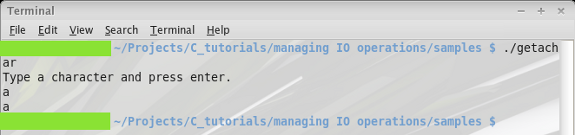
Here is the output I got when typing
“a” for my character:
String Input and Output
You need not consider constructing for loops to get and print more than one character at a time. You can make use of similar functions for getting whole strings from standard input and printing them to standard output. They are fgets and fputs respectively.
Prototypes:
int fgets(char *restrict s, int n, FILE *restrict stream);
int fputs(char *restrict s, FILE *restrict stream);
The first argument you pass to fgets is a character array for putting the string value taken from the file stream. The n value is used as a limiter for the size (in bytes) of input accepted into the argument s. fgets will read from the file stream until it detects an EOF, a press of “Enter”, or n – 1 bytes have been read. It returns the value of s or a NULL pointer.
fputs is almost the same, besides that it does not require you to pass a number of bytes that will be accepted. It takes the character array you want to print out, and the stream you want to print it to.
Let us modify our example to read and print a string instead of just a character.
getastring.c:
#include <stdio.h>void main() {
int n = 40;
char ip[n];
//prompt for a sentence and get input.printf("Type a sentence and press enter.n");
fgets(ip, n, stdin);
//write input value back out to standard out.fputs(ip, stdout);
}
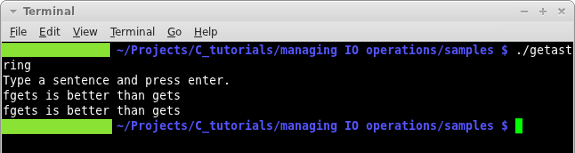
In the above program fgetc and fputc function calls are replaced with fgets and fputs. We also added an integer
value for bytes to be read. Now the program will accept a sentence instead
of just a single character.
Formatted Input with Scanf
The prototype of the scanf function is shown below:
int scanf(const char *restrict format, ...);
scanf takes a variable number of arguments from standard input. You can get values for more than one variables with a single call to this function. All you have to do is specify the type of value you want with the conversion specifier operator (%) and the specifier and/or size.
Conversion specifiers may be of the following forms: %s, %ns, where s stands for specifier and n is the size.
For example:
%3d would accept the first 3 unsigned decimal numbers it encountered while reading the stream. The whole call to scanf could look something like this:
scanf(%3d, anum);
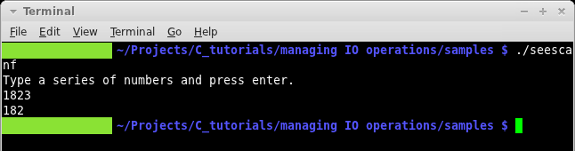
If you type 1823 in a prompt where scanf was accepting %3d, it would assign only the 182 part to anum, the 3 would simply be discarded.
Let us do a quick example.
scanf.c:
#include <stdio.h>void main() {
int anum;
//prompt for character and get input.printf("Type a series of numbers and press enter.n");
scanf("%3d", &anum);
//write input value back out to standard out.printf("%dn", anum);
}
Note that you must pass your variable/s by reference because it needs to be able to modify them.
Expected output for the above program is showing below:
Input Specifications for Real Number
Use the %f specifier to accept floating point values. Ironically enough, the %d specifier will not accept decimal places. In order to accept a real number you would need to make a scanf call as follows:
scanf("%f", &anum);
Assuming that anum has been declared as a float.
You could now take 2.98 from standard input and it would be stored as 2.98, rather than 2 if you had used the %d specifier.
Input Specifications for a Character
Accepting character input from standard input to the scanf function works just like it did with integers. You can take a single character, or a specified number of them.
Let us modify our example program scanf.c to accept characters instead of integers. If we change scanf call for accepting 3 integers to 3 characters all we have to do is change the specifier. Of course we also have to change anum to a character array, but you get the idea.
scanf(%3c, anum);
Printing One Line
You can print a single line to the standard output as shown below:
printf("Type a series of numbers and press enter.n");
Note the newline added at the end of the string. That is so the cursor will move down to the next line. Still technically one line though.
Conversion Strings and Specifiers
The usage of printf is almost identical to the usage of scanf we have just talked about. Take a look at the prototype:
int printf(const char *restrict format, ...);
Printf takes specifiers and a variable number of arguments. You can enter a whole list of arguments and specifiers, just make sure they line up so you do not put the wrong value in the wrong variable.
You can also insert newline, as you may have seen throughout the tutorials thus far.
Let us make a call to printf that will print that same value:
scanf("%f", &anum);
printf("%f", anum);
The above program is similar to the call to scanf to read a real number, the difference being that we did not have to pass anum by reference to printf.
Specifier Meaning
There are more specifiers than we have shown up until now.
- %d, %i: signed integer values
- %o: unsigned octal
- %s: character array
- %c: unsigned character
- %f, %F: float
- %ld: long
- %x: lowercase hexadecimal
- %X: uppercase hexadecimal
- %e: exponential form for a double
- %p: pointer
- %a: unsigned integer

