
Exforsys

SQL Server 2005 Training

  1. SQL Server 2005 - Configuring Replication
  2. SQL Server 2005 Replication Enhancements
  3. SQL Server 2005 - Mirror Server
  4. SQL Server 2005 - Introduction to Data Availability
  5. SQL Server 2005 - Backing up a Database
  6. SQL Server 2005 - Using Database Snapshots
  7. SQL Server 2005 - Disaster Recovery
  8. SQL Server 2005 - Managing Certificates
  9. SQL Server 2005 - Managing Permissions
  10. Managing SQL Server 2005 Security
  11. SQL Server 2005 - Using the Database Tuning Advisor
  12. SQL Server 2005 - Tuning a Database
  13. Maintain indexes in a SQL Server 2005 database
  14. SQL Server 2005 - Defining Indexes
  15. SQL Server 2005 - Database Backup
  16. SQL Server 2005 - Populating the Database
  17. SQL Server 2005 Configuration Manager
  18. SQL Server 2005 - Using the Sqlcmd Utility
  19. Using the SQL Management Objects
  20. Using SQL Sever Management Studio - Part 2
  21. Using SQL Sever Management Studio - Part 1
  22. SQL Server 2005 - Using Event Notifications
  23. SQL Server 2005 - Using DDL Triggers
  24. SQL Server Monitoring Tools - Server Profiler
  25. SQL Server 2005 - Testing Troubleshooting
  26. SQL Server 2005 - Upgrading from earlier versions of SQL Server
  27. SQL Server 2005 Installation - Maintenance Plan Without Using Wizard
  28. SQL Server 2005 - Unattended Installations
  29. SQL Server 2005 Installation - Maintenance Plan Using Wizard
  30. Installing a Second Copy of SQL Server 2005
  31. Planning to Install SQL Server 2005
  32. SQL Server 2005 Installation
  33. SQL server 2005 Editions
  34. SQL Server 2005 Architecture Overview
  35. SQL Server 2005 - Management studio interface Summary Page
  36. SQL Server 2005 - Server Groups
  37. SQL Server 2005 - Registered Servers
  38. SQL Server 2005 Administrative Tools
  39. Developing Client applications in SQL Server 2005
  40. SQL Server Management Objects
  41. NET CLR in SQL Server 2005
  42. Native HTTP Support in SQL Server 2005
  43. XML Data Types in SQL Server 2005
  44. Using XML in SQL Server 2005
  45. Using Notification Services in SQL Server 2005
  46. SQL Server 2005 - Service Broker
  47. Data Manipulation Language (DML) in SQL Server 2005
  48. T-SQL Enhancements in SQL Server 2005
  49. Security Features in SQL Server 2005 for the Developer
  50. SQL Server Architecture and Components
  51. SQL Server 2005 Management Studio
  52. Overview of SQL Server 2005 for the Database Developer
  53. Getting started with SQL Server 2005

Ads


Home arrow Technical Training arrow SQL Server 2005 Training

SQL Server 2005 - Management studio interface Summary Page

Author : Exforsys Inc.     Published on: 23rd Nov 2005

SQL Server 2005 - Management studio interface Summary Page

The summary page appears as the largest window on the Management studio interface. This window presents information about the item selected in the object window. The summary page can be configured to start as soon as SQL Server Management Studio starts or later. When the list mode is selected the summary page shows information about the higher nodes. When lower nodes are double clicked the information with reference to the clicked item is displayed. Clicking on F7 invokes the summary page.

Ads

The summary page can be displayed at startup by clicking on the Tools menu and selecting Options. Under options select Environment/General and under At Startup select Open Object Explorer.
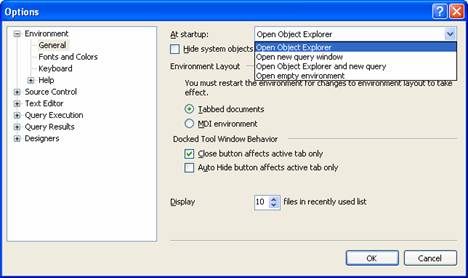
The purpose of hiding or displaying the Summary page and the different windows in SQL Sever Management Studio is to maximize user workspace for development and management. The aim is reduce the number of windows cluttering up the work area and to enable customization of user environment. Windows can be docked, undocked or Auto hidden(pushpin at the upper right of window), Windows are displayed on mouse-over and so on. Some of the components can be configured in tabbed mode in the same window or in a multiple document interface mode. All these features can be configured by accessing the window displayed above.

The Database Engine Administration

The Database Engine is the core service of SQL Server. It is the data store and the repository from which data is processed and in which data is secured. The Database Engine of SQL Server meets the most demanding data applications of an enterprise and provides support and sustains high availability.

The data store is in tabular or in XML format. The Database Administrator has a number of tasks to perform with reference to the database. The tasks are:

1. Creation of databases for storing relational tables or XML documents
2. Implementation of systems to access and change data stored in the database.
3. Deployment of the systems.
4. Administrative support for optimization of performance of the database.

The SQL Server 2005 data base engine comes with many self tuning database configuration options. However, Administrators will have to perform a number of configuration tasks to customize the server to match the needs of the enterprise.

Microsoft SQL Server 2005 runs as a service in the background in Windows 2000, Microsoft Windows Server 2003. The database engine, SQL Server Agent and other SQL Server components are services that are started when the operating system starts if specified during the setup process.

Starting the database engine in effect is the starting of a service. Users have to establish a connection to the server. This service named MSSQLSERVER, can be started and stopped locally or remotely.

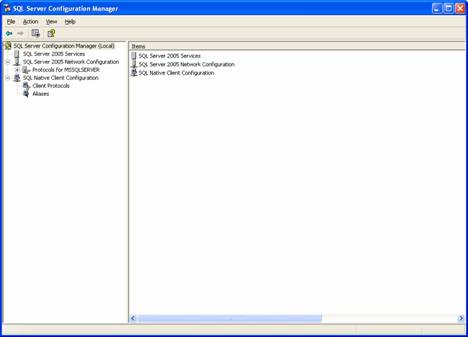
The SQL Configuration manager is a snap in tool in the Microsoft Management Console that combines the functionality of the Server Network Utility, Client Network Utility and the Service manager of SQL Server 2000. The SQL Server 2005 services can be started, stopped, paused using the configuration manager. The properties of the selected services can also be viewed using the configuration manager.

The configuration manager can be accessed by clicking on the Start menu >All Programs>Microsoft SQL Server 2005 >SQL Server Configuration Manager.

.

>
Ads

In this section of the tutorial we have examined the features of SQL Management Studio and how it helps in registering servers and managing objects that are available in the server. In the next section of this module we shall examine in greater detail each of the management of the database server.


This tutorial is part of a SQL Server 2005 Training tutorial series. Read it from the beginning and learn yourself.

SQL Server 2005 Training

  1. SQL Server 2005 - Configuring Replication
  2. SQL Server 2005 Replication Enhancements
  3. SQL Server 2005 - Mirror Server
  4. SQL Server 2005 - Introduction to Data Availability
  5. SQL Server 2005 - Backing up a Database
  6. SQL Server 2005 - Using Database Snapshots
  7. SQL Server 2005 - Disaster Recovery
  8. SQL Server 2005 - Managing Certificates
  9. SQL Server 2005 - Managing Permissions
  10. Managing SQL Server 2005 Security
  11. SQL Server 2005 - Using the Database Tuning Advisor
  12. SQL Server 2005 - Tuning a Database
  13. Maintain indexes in a SQL Server 2005 database
  14. SQL Server 2005 - Defining Indexes
  15. SQL Server 2005 - Database Backup
  16. SQL Server 2005 - Populating the Database
  17. SQL Server 2005 Configuration Manager
  18. SQL Server 2005 - Using the Sqlcmd Utility
  19. Using the SQL Management Objects
  20. Using SQL Sever Management Studio - Part 2
  21. Using SQL Sever Management Studio - Part 1
  22. SQL Server 2005 - Using Event Notifications
  23. SQL Server 2005 - Using DDL Triggers
  24. SQL Server Monitoring Tools - Server Profiler
  25. SQL Server 2005 - Testing Troubleshooting
  26. SQL Server 2005 - Upgrading from earlier versions of SQL Server
  27. SQL Server 2005 Installation - Maintenance Plan Without Using Wizard
  28. SQL Server 2005 - Unattended Installations
  29. SQL Server 2005 Installation - Maintenance Plan Using Wizard
  30. Installing a Second Copy of SQL Server 2005
  31. Planning to Install SQL Server 2005
  32. SQL Server 2005 Installation
  33. SQL server 2005 Editions
  34. SQL Server 2005 Architecture Overview
  35. SQL Server 2005 - Management studio interface Summary Page
  36. SQL Server 2005 - Server Groups
  37. SQL Server 2005 - Registered Servers
  38. SQL Server 2005 Administrative Tools
  39. Developing Client applications in SQL Server 2005
  40. SQL Server Management Objects
  41. NET CLR in SQL Server 2005
  42. Native HTTP Support in SQL Server 2005
  43. XML Data Types in SQL Server 2005
  44. Using XML in SQL Server 2005
  45. Using Notification Services in SQL Server 2005
  46. SQL Server 2005 - Service Broker
  47. Data Manipulation Language (DML) in SQL Server 2005
  48. T-SQL Enhancements in SQL Server 2005
  49. Security Features in SQL Server 2005 for the Developer
  50. SQL Server Architecture and Components
  51. SQL Server 2005 Management Studio
  52. Overview of SQL Server 2005 for the Database Developer
  53. Getting started with SQL Server 2005
 

Comments