
Controlling Database Objects, GRANT, REVOKE Roles and Privileges.
COMMIT, ROLLBACK and SAVEPOINT
SQL*PLUS has a facility to automatically commit all the work, without explicitly issuing the commit command i.e. SET AUTOCOMMIT ON — Enables autocommit feature.
SET AUTOCOMMIT OFF — Is the default and disables the automatic committing
Note: Certain actions automatically force a commit. DDL Commands CREATE, DROP, ALTER and DCL commands EXIT, GRANT, REVOKE, CONNECT, DISCONNECT, AUDIT and NOAUDIT are example for this. (i.e. the work done by these commands can not be taken back by ROLLBACK command).
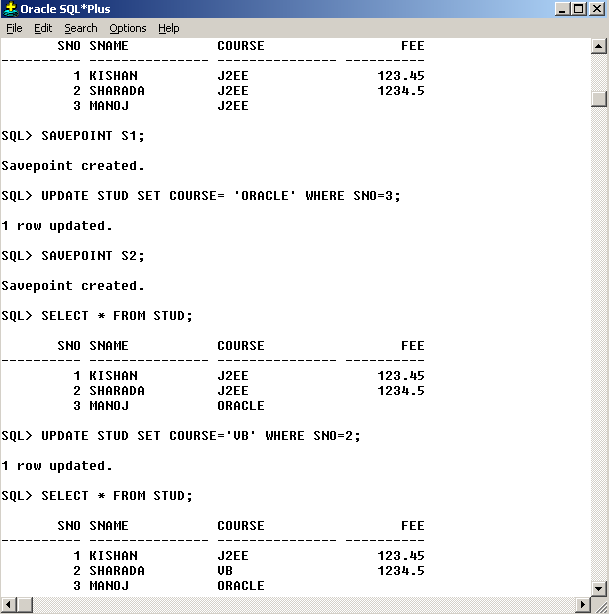
SAVEPOINT: This statement is used to mark a point in the transaction to which you can later ROLLBACK. (i.e. Undo the changes made to the database till that point)
Following screen shots explain the usage of SAVEPOINT and ROLLBACK commands
RENAME COMMAND: This Command is used to change the name of a table.
SQL > RENAME STUD TO STUDENT;
LOCK TABLE : The LOCK TABLE command is used to prevent concurrent processes from changing a table or from using it.
The two Locking modes are
1)IN SHARE MODE: In which concurrent processes are allowed to perform only read-only operations.
2)IN EXCLUSIVE MODE:Prevents concurrent processes from performing any operation the table.
Only the Owner of the table, DBA, or a user having ALTER, DELETE, INSERT, SELECT, UPDATE can lock a table. A table can have multiple SHARE LOCKS but only one EXCLUSIVE LOCK
Example: For obtaining EXCLUSIVE LOCK we write.
SQL>LOCK TABLE STUD in EXCLUSIVE MODE;
SQL>LOCK TABLE STUD in EXCLUSIVE MODE NOWAIT;
If we try to obtain a lock using the first statement then Oracle waits if the table is not available for locking. In second statement it returns immediately.
SQL>LOCK TABLE STUD in SHARE MODE; — to obtain shared mode lock
MORE DATABASE OBJECTS: A schema is a collection of components and database objects under the control of a given database user. Database Objects in Oracle are SEQUENCE, SYNONYM, and INDEX etc.
SEQUENCE: A sequence is an object in oracle, which is used to generate a series of numbers. It can generate unique sequential numbers for using in a primary key column of a table.
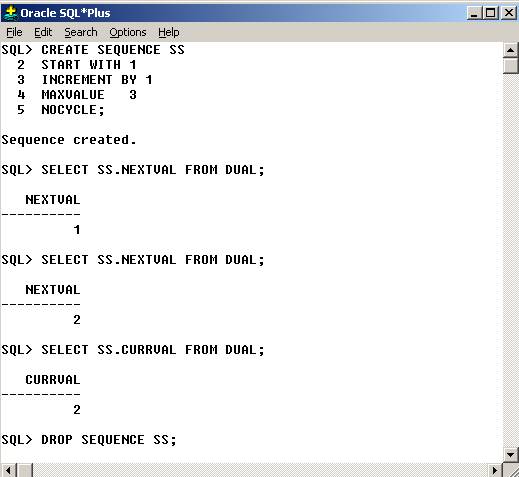
CURRVAL and NEXTVAL are called pseudo columns. CURRVAL returns the current value of a sequence. NEXTVAL increments the sequence and then returns the next value. A sequence can be modified using ALTER statement.
SQL>ALTER SEQUENCE SS
MAXVALUE 99999;
SQL>DROP SEQUENCE SS;
SYNONYM: A synonym is an alternative name given to the table, sequence etc in oracle. There are two types public Synonym and Private Synonym.
1) Public Synonym: A public synonym is accessible to all the users.
Example:
SQL>SELECT * FROM DICT;
DICT is a public Synonym for table DICTIONARY. To create a public synonym we need to login as user SYSTEM (i.e. DBA) and then type the following
SQL>CREATE SYNONYM EMPLOYEE FOR SCOTT.EMP;
In the above statement you have created synonym EMPLOYEE for EMP. Now you need to grant permissions to all the users over this synonym. The synonym for can be used to perform all DML operations (SELECT, UPDATE, INSERT and DELETE) over the table. We cannot ALTER the table using its SYNONYM.
2) Private Synonym: To create a private synonym we write.
SQL>CREATE SYNONYM EMPLOYEE FOR EMP;
SQL>DROP SYNONYM EMPLOYEE; ——– Will remove the Synonym.
INDEX: Indexes will make data access faster. This index tells where a certain row in the table is stored. It is more like an index in the book. When we create an index on a column it is stored separately in the database. A query on any table initially searches for an Index on that table.
SQL>CREATE INDEX EMP_IDX ON EMP(EMPNO);
SQL>DROP INDEX EMP_IDX;
Creating new user account : To create a new user account one need to logon to the database as a DBA as shown above. Then execute syntax similar to the one shown below.
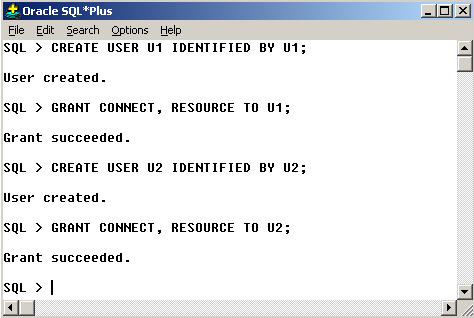
In the above example we have created 2 user accounts by names U1 and U2. Let us say U1 owns a table by name ORDERS which U2 want to use. This is possible only when U1 has given permission to U2. Privileges can be given using GRANT and taken back by using REVOKE command
Below given screen shots explain these commands.
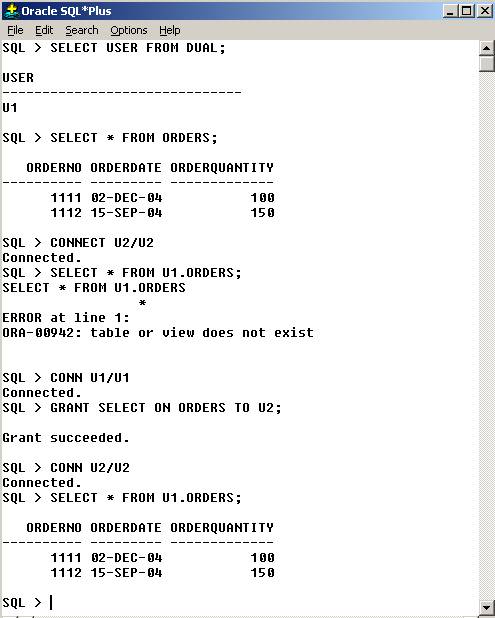
As U2 when we tried to access data from ORDERS of U1 we failed, as there were no sufficient privileges. Later we could access because U1 granted permission to do so.
To take back the privileges we write
SQL>REVOKE SELECT ON ORDERS FROM U2; —- For doing this You have to login as U1.
SQL>GRANT SELECT, UPDATE ON ORDERS TO U2;
SQL>REVOKE SELECT, UPDATE ON ORDERS FROM U2;
SQL>GRANT ALL ON ORDERS TO U2; — To give SELECT, UPDATE, INSERT and DELETE privileges in a single command
SQL>REVOKE ALL ON ORDERS FROM U2;
SQL>GRANT SELECT ON ORDERS TO U2 WITH GRANT OPTION;
Above command authorizes U2 to transfer the same privilege to others on behalf of U1.


