
Technical Training
SQL Server 2005 TrainingSQL Server 2005 - Server Groups
SQL Server 2005 - Server Groups
In this tutorial you will learn about Server Groups. As stated earlier, servers can be grouped together. Each group can be assigned a name. The name of the server group can also be changed by right clicking on the group name, pointing to edit and selecting Server Group properties. The name can be changed in the dialog box that opens.
1. Server Groups can be created by right clicking the server type in the Registered servers toolbar.
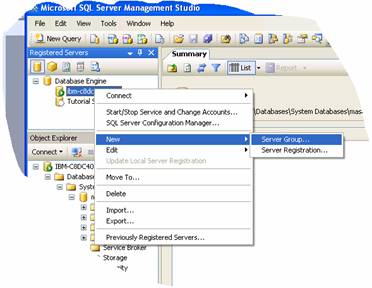
2. Right click on a server or a server group and point to New and Click Server group as illustrated above.
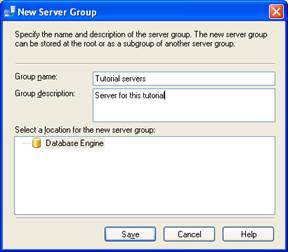
3. The New Server Group dialog box will appear. Enter the name of the group and a description. Select a location for the group. If no location is selected it is placed in the default location. Save.
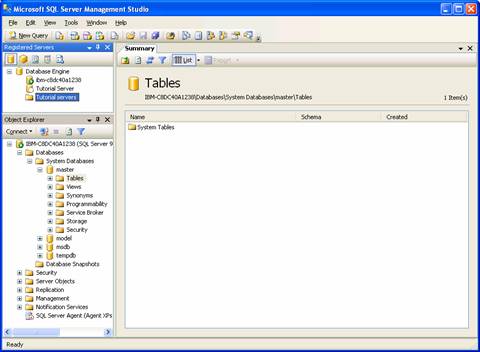
4. Note that a server group has appeared in the Registered servers window under Database Engine.
A registered server group can be moved to another location just as a server can be moved into another group. Right click on the server or server group and click Move To. The Move Server Registration dialog box opens. Expand the list of server groups and click the node in which you want your group to appear and click OK.
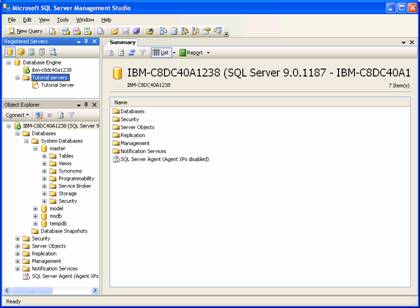
A server or a server group can be deleted by merely right clicking on the name of the server or group and clicking delete. The confirmation if given will result in the deletion of the server or the server group.
SQL Server 2005 Training
- SQL Server 2005 - Configuring Replication
- SQL Server 2005 Replication Enhancements
- SQL Server 2005 - Mirror Server
- SQL Server 2005 - Introduction to Data Availability
- SQL Server 2005 - Backing up a Database
- SQL Server 2005 - Using Database Snapshots
- SQL Server 2005 - Disaster Recovery
- SQL Server 2005 - Managing Certificates
- SQL Server 2005 - Managing Permissions
- Managing SQL Server 2005 Security
- SQL Server 2005 - Using the Database Tuning Advisor
- SQL Server 2005 - Tuning a Database
- Maintain indexes in a SQL Server 2005 database
- SQL Server 2005 - Defining Indexes
- SQL Server 2005 - Database Backup
- SQL Server 2005 - Populating the Database
- SQL Server 2005 Configuration Manager
- SQL Server 2005 - Using the Sqlcmd Utility
- Using the SQL Management Objects
- Using SQL Sever Management Studio - Part 2
- Using SQL Sever Management Studio - Part 1
- SQL Server 2005 - Using Event Notifications
- SQL Server 2005 - Using DDL Triggers
- SQL Server Monitoring Tools - Server Profiler
- SQL Server 2005 - Testing Troubleshooting
- SQL Server 2005 - Upgrading from earlier versions of SQL Server
- SQL Server 2005 Installation - Maintenance Plan Without Using Wizard
- SQL Server 2005 - Unattended Installations
- SQL Server 2005 Installation - Maintenance Plan Using Wizard
- Installing a Second Copy of SQL Server 2005
- Planning to Install SQL Server 2005
- SQL Server 2005 Installation
- SQL server 2005 Editions
- SQL Server 2005 Architecture Overview
- SQL Server 2005 - Management studio interface Summary Page
- SQL Server 2005 - Server Groups
- SQL Server 2005 - Registered Servers
- SQL Server 2005 Administrative Tools
- Developing Client applications in SQL Server 2005
- SQL Server Management Objects
- NET CLR in SQL Server 2005
- Native HTTP Support in SQL Server 2005
- XML Data Types in SQL Server 2005
- Using XML in SQL Server 2005
- Using Notification Services in SQL Server 2005
- SQL Server 2005 - Service Broker
- Data Manipulation Language (DML) in SQL Server 2005
- T-SQL Enhancements in SQL Server 2005
- Security Features in SQL Server 2005 for the Developer
- SQL Server Architecture and Components
- SQL Server 2005 Management Studio
- Overview of SQL Server 2005 for the Database Developer
- Getting started with SQL Server 2005


